| Author |
 Replies: 47 / Views: 10,586 Replies: 47 / Views: 10,586 |
|
Pillar of the Community
Canada
3167 Posts |
I was wondering what would you recommended to log and keep track of a coin collection on the computer, or if there is an easy way to do this with MS Excel?
|
|
|
|
Valued Member
United States
64 Posts |
To log, I'd use an open source alternative to Excel.
|
|
Pillar of the Community
Canada
4944 Posts |
I just use Excel.
Most people will include; Year, Mintmark, Grade, Colour, Purchase Price, Est. Value, Date Purchased, Seller, etc
|
|
Valued Member
United States
315 Posts |
I can't think of any other program that is easier to use than excel, but I'm probably a minority.
Off the top of my head, I'd put the type on the rows and the years in the columns.
If you don't have that many, I'd put each item in a separate row with details by category in columns.
For gold and silver, I'd have spot price somewhere and a column showing weight X spot.
Excel can also work as a straight up database. I would try to group them in some way and have multiple pages.
|
|
Pillar of the Community
 United States
4616 Posts |
I like excel because I can put mintage data in there and lookup functions, plus a pivot table that becomes my want list.
-----Burton 50+ year / Life / Emeritus ANA member (joined 12/1/1973) Life member: Numismatics International, CONECA Member: TNA, FtWCC, NETCC, EveryCountry (online) coin club Owned by three cats and a wife of 40+ years (joined 1983) Author: 3rd Edition of the Sample Slabs book, https://www.sampleslabs.info/ |
|
Pillar of the Community
United States
5825 Posts |
I like Excel because I can tailor it to contain any info I want.
In fact you can include links to images.
If you're good with databasing software Access (or something similar) would even be better.
But for me the learning curve is too steep and long.
I'll stick to Excel.
|
|
Pillar of the Community
United States
1436 Posts |
|
|
Pillar of the Community
United States
919 Posts |
Excel is a great way to do it. I track total spent for coins. I also use Excel to create sheets to take to shows. I list current auction prices for various grades and what coins I'm in need of. Easy to update as prices change and holes are filled.
|
|
Valued Member
United States
461 Posts |
I don't track value or cost. I only track sets I am completing. There are 2 apps on android I use. US coins and Coin collector. I only have to have a spreadsheet for the 7070. |
|
Bedrock of the Community
Australia
21789 Posts |
Each coin is fully written up on the cardboard / Mylar 2x2.
That way, if I wish to reorganize my collection, all of the attribution and purchase information moves with the coin.
|
|
Pillar of the Community
United States
1746 Posts |
I use MS Access, but I know I'm in the minority.
Once you get 1000's of records, it's the only way to go.
|
|
Pillar of the Community
 Canada
3167 Posts |
Okay, thanks for your help everyone! Here my attempt with Excel: 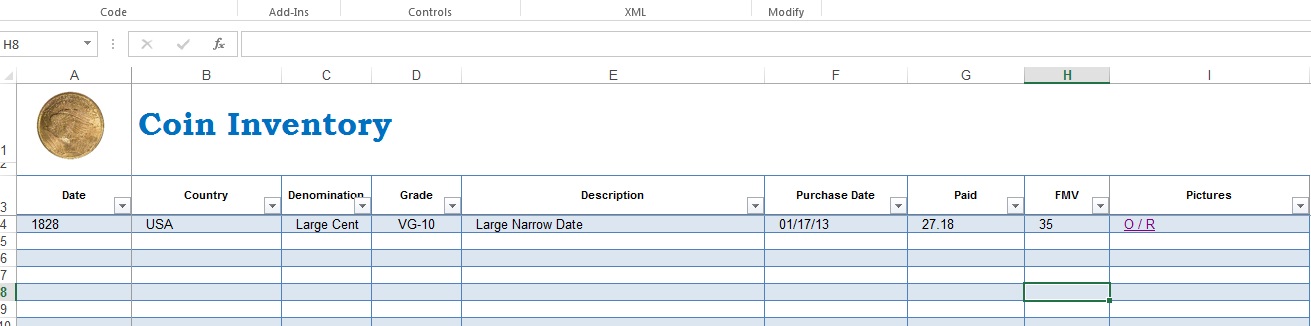 Should work perfectly, thanks everyone! @The_Duke Didn't even know what Access was  and its even installed on my computer! Looks kind of handy. Will have to try it out. Thanks! Noah |
|
Pillar of the Community
United States
2543 Posts |
I have a black surface and a label maker. I take pictures of all my coins when I buy them, on the black surface with labels as to what they are, specific details, when and how much they were bought for. I organize the .jpg's in folders and sub-folders on my computer and copies on a thumb which I keep at my office.
|
|
Pillar of the Community
Canada
3167 Posts |
I should add that the reason I am creating an inventory is in the case of something happening to the collection.
|
|
Pillar of the Community
United States
4085 Posts |
Open Office works well if you don't want to pony up the $$$ for Excel.
|
|
Pillar of the Community
United States
1002 Posts |
Excel works for me also..
|
| |
Replies: 47 / Views: 10,586 |









 Posted 10/18/2013 7:24 pm


