| Author |
 Replies: 7 / Views: 2,126 Replies: 7 / Views: 2,126 |
|
|
Pillar of the Community
Sweden
729 Posts |
Hi. I have a raw DMPL I'm playing around with, trying to get the dark/black surfaces we are all familiar with on DMPLs. I only have a compact camera, and use auto settings. Mainly because I'm not too famliar with how to use the settings, and it works satisfactory for most coins. But with the DMPL, I don't get the dark sufaces and white frosty eagle, but I get them inverted, since the lighting reflects on the surfaces. any idea how to get the "the right way" without using software and such? thanks epikur   |
|
|
|
Pillar of the Community
United States
9811 Posts |
I'd say that's a pretty good representation of PL photography, as it is. But you are going to have to go into the manual settings. First see you shot info on what you have already, then adjust for a bit longer time of exposure with the same F stop setting, this should brighten out the whites more by over exposing them.
But I think you've got a great shot already
"Buy the Book Before You Buy the Coin" - Aaron R. Feldman - "And read it" - Me 2013! ANA Life Member #3288 in good standing since 1981, ANS, Early American Coppers Member (EAC), Colonial Coin Collectors Club member (C4), Conder Token Collector Club member (CTCC), Civil War Token Society (CWTS) member, Liberty Seated Collectors Club (LSCC) & Numismatic Bibliomania Society member (NBS), USMex, Member in good standing, 2¢ variety collector. See my want page: http://goccf.com/t/140440 |
|
Pillar of the Community
 Sweden
729 Posts |
Thanks, westcoin, I'm quite pleased with the picture as well... I'm just surprised how everyone else (and I mean everyone)get the inverted image from mine. Everyone from pro photographers on Heritage to hobby sellers on ebay |
|
Pillar of the Community
United States
5825 Posts |
All coins with highly reflective surfaces cause imaging problems different from "ordinary" and circulated pieces. Controlling what you get most often requires modifying your lighting. See here: http://coinimaging.com/photography.html |
|
Moderator
 United States
23522 Posts |
Quote:
I'm just surprised how everyone else (and I mean everyone)get the inverted image from mine.
That's "the look." It doesn't show the reflectivity, but anyone who's seen a Morgan image can tell a coin with the look of yours has reflective surfaces to one extent or another. The only thing I've found so far that brings out the "black and white" appearance of a highly reflective coin is a circular fluorescent bulb, used as a ring light with the camera in the center. Like this: 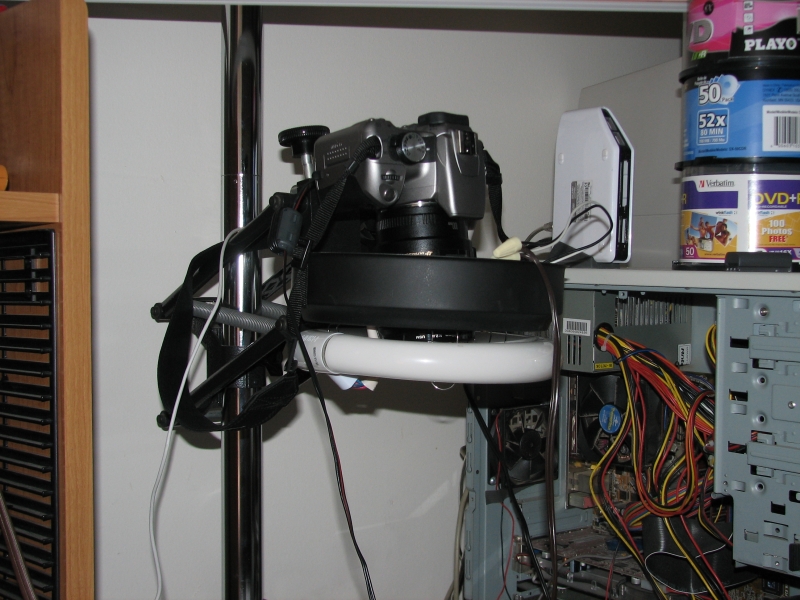 Works pretty good: 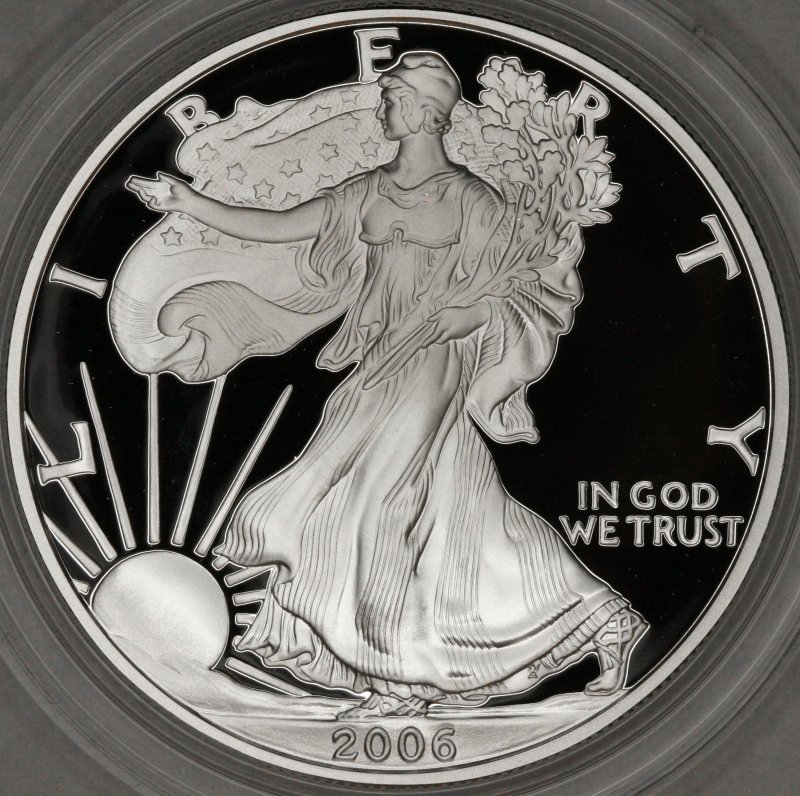 |
|
Pillar of the Community
United States
5825 Posts |
VERY well done, SDave.
I don't collect proofs, DMPL's, DCAM's, etc., so I haven't had to deal with the difficulties associated with imaging them.
|
|
Pillar of the Community
United States
3595 Posts |
|
|
Pillar of the Community
Canada
4944 Posts |
Quote:
The only thing I've found so far that brings out the "black and white" appearance of a highly reflective coin is a circular fluorescent bulb, used as a ring light with the camera in the center. I was able to get these images with two jansjo's.   |
| |
Replies: 7 / Views: 2,126 |
|










 Posted 03/09/2014 06:30 am


