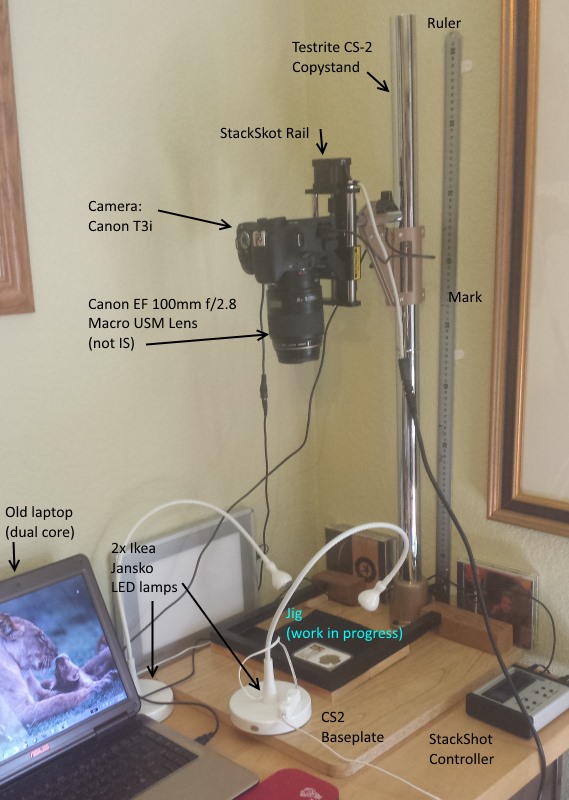
I don't (think about it) - the flow is pretty natural.
Well, OK, it did take me a couple of tries to get the software and cable setup just right (with Zerene I need the Canon control cable since the StackShot controller box fires the camera, with Helicon I don't use the cable as the fire command comes from the PC via the software). And some of the software needs to start up in a specific order. So I have a cheat sheet that tells me what to start up in what order.
- Camera on
- Wait for Canon EOS tool to launch
- select remote control
- launch Helicon Remote
- When it launches and settles down, select Live View
I find I need to do a couple of cycles of rough focus / height adjustment on the CS2 column to get whatever I'm shooting maximized in the frame (hence the marks on the ruler on the wall to give me the rough positioning).
I use the up/down on the StackShot to force it to the middle of the rail, click the autofocus on something of middle depth and then use the buttons on Helicon Remote to set the top/bottom position.
Helicon has an option that highlights what portion of the image is actually in focus as you adjust up or down. Being lazy I usually just press one button until all the blue highlight disappears and set that as A, then press the other button as the highlights move through the image and then disappear on the other side. Click that as B.
Between those two points, the software tells me the # of steps and allows me to pick an interval (# of steps) or choose the # of shots (it automatically does the inverse calculation).
Press Start Shooting and just walk away. Let it do it's thing.
When it's done, I either move the images to a REAL machine (if it's a big stack) or I just flip over to Helicon Focus and have it run the stacking. I really don't notice that the old laptop takes 'forever', although I do notice the difference between it (5 years old, dual core) and my new desktop. Even if it runs most of a dinner hour or most of the night, who cares? Just keeps the cat up.
So far I'm just using default settings.
I have the camera set to just shoot RAW and Helicon converts those and generates a large .jpg. I can then scale it using Paint.NET or whatever touchups I need to do (crop, etc.)
Oh, yes, What does the StackShot bring to the table?
I will also say that I tried for the better part of 4 hours to get a decent shot of the reverse of the coin before the StackShot arrived and it was a dismal failure. No amount of playing with focus could bring even half the surface up with any clarity (lack of focusable artifacts and a very unlevel field).
With the StackShot, the 1st 10 shot stack was 10x better than anything I had ever done.
-----Burton
50+ year / Life / Emeritus
ANA member (joined 12/1/1973)
Life member: Numismatics International, CONECA
Member: TNA, FtWCC, NETCC, EveryCountry (online) coin club
Owned by three cats and a wife of 40+ years (joined 1983)
Author: 3rd Edition of the Sample Slabs book,
https://www.sampleslabs.info/









 Posted 09/02/2014 12:16 am