| Author |
 Replies: 10 / Views: 2,149 Replies: 10 / Views: 2,149 |
|
|
New Member
United States
5 Posts |
New to coin photography - so any help is greatly appreciated. I am working with a canon T3i and 3 LED bendable lights. Lights positioned in a 3 point configuration. Coin is losing its detail and I find it to be grainy, blown out in some areas and too dark in others. The more I play with it the worse it gets. Feel like I'm losing my mind. I am having the same problem with most of the silver coins with any type of luster. Here are my settings: f/8 1/80 ISO - 200  Thanks in advance for any suggestions or help! Amanda :) |
|
|
|
Pillar of the Community
United States
5825 Posts |
Proof, proof-like and high grade MS coins have to be dealt with differently.
Ideally you should use axial lighting but most people don't have the setup to do that.
Next best thing is to use diffused lighting.
Surf it up.
|
|
Pillar of the Community
 United States
4047 Posts |
Amanda...how are you setting exposure? I suggest using the following:
f/8
ISO100
Av mode on camera to allow it to set exposure
Center-Weighted exposure metering
Set your EV compensation to -0.33 or -0.5, maybe even -0.66 or -1 EV. Try different settings to minimize over-exposure of any R, G or B
You are looking for a final image that has little or no over-exposed pixels in any color channel
Go into you picture style editor either in camera or in EOS utility and set it to either Neutral or Faithful and then adjust the sharpness to 3 and the contrast to -4. This will ensure that when the camera maps the RAW image file to jpg (I assume you're shooting jpg) it compresses the dynamic range as much as possible so you don't lose any of the blacks.
The resulting image may look a little "flat" and might need some contrast and levels optimization in DPP, but it will not be overexposed or underexposed so will be good raw material for a high quality final image.
Kanga's suggestion to use diffusion is also a good one, and is independent of my suggestions above.
Contact me for photographic equipment or visit my home page at: http://macrocoins.com |
|
Pillar of the Community
United States
3076 Posts |
just a feeble thought here,, when I try to take a shot of the coin and slab..I am really way out of perspective of getting a good shot "of the coin"...many lenses are for perfecting the whole coin or of macro pinpoint shots..In general I try to get a closer shot of the whole silver dollar in this case, as many of us do,, to get better detail of the coin alone...One can take a shot of the whole coin and slab...But real detail of the coin will not be as good ..It is good enough to post online like for ebay though.. The lenses focal distance alone is quite amazing, when one thinks of just taking a photo,,,,,getting the coin holder and then another the coin alone can be quite different distances from the lens focal planes... the good thing is there is more than one plane for a lens given its distance to the camera's sensor using adapters and what not..,, however these guys can point you into the best direction to chose what you want/or how you need to proceed to what your trying to do  The general Idea I am conveying is, many a lens is a normal lens with Macro ability....all in one lens,, "HOWEVER" using bellows or extension rings, the normal lens can take on new abilities..a lens that can only take distance shots can be made to take close up shots...AS noted silver can be a tuff shot to take.. Gene |
|
New Member
 United States
5 Posts |
Thank you all for the input. I have tried shooting Raw and Jpeg, manual and AV. I will try some of your suggestions and see where that gets me today. I have been surfing the web like a mad woman these past few days. Feeling like a complete idiot! I am portrait photographer so I am completely out of my element!
I am determined to get this!
Learning lots of great new stuff though!
I really really appreciate you guys taking the time to help me out!
I will let you know how it goes!
A
|
|
Moderator
United States
23522 Posts |
Welcome to Coin Community, Amanda. Pleasing to see a new member's first posts here in the Photography Forum.  I'm going to go out on a limb and suggest your images aren't as bad as you think right now, and will only need a little tweaking to get the last few percentage points of quality. One important question which hasn't been asked, though, is what lens you're using.... Go to two lights rather than three, and raise the ISO to 400 (even 800 will be OK with a T3i) so you have more latitude with exposures because the "sweet spot" exposure will be faster. I personally prefer Spot metering to Center-weighted so the corners have no effect on the metering, but Ray's better at this than me so you should probably listen to him. What you're getting in return for the "blowouts" is detail and contrast, and the moment you start diffusing the light those will suffer. There is a nice compromise with equipment of this quality, though, and the equivalent of maybe one layer of toilet tissue in diffusion will probably get you there. And you can always tweak a little in post. But, lens first. When displaying here, crop to just the coin and save the .jpg in lower Quality if you're going to use the CCF Uploader - that will allow you to post coin-only images of 800px or better (the "minimum" we like to shoot for). You could also host externally at Photobucket or similar. We don't like imgur because it's not filtered and we have young members here. |
|
New Member
United States
5 Posts |
Working all day at this Was able to get a consistent light but now my coloring is off  (banging head on wall)  Settings for this shot were as follows: for this shot were as follows: AV mode f/8 1/30 ISO 400 +.7 exposure 60mm macro lens I have included two images. The close up is the image I referenced above.The second is what what I am trying to achieve (or get close to). I am particularly befuddled on how the second image is so bright with out losing any of the detail?!? 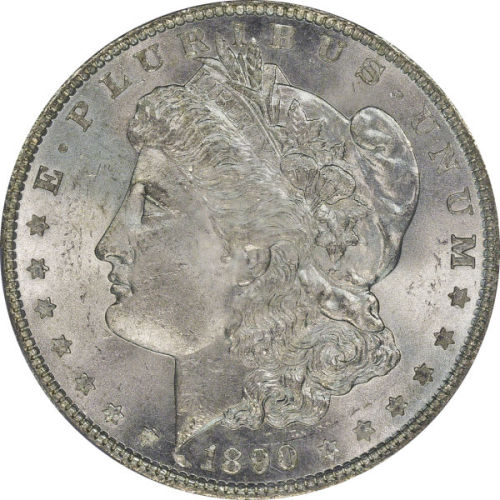 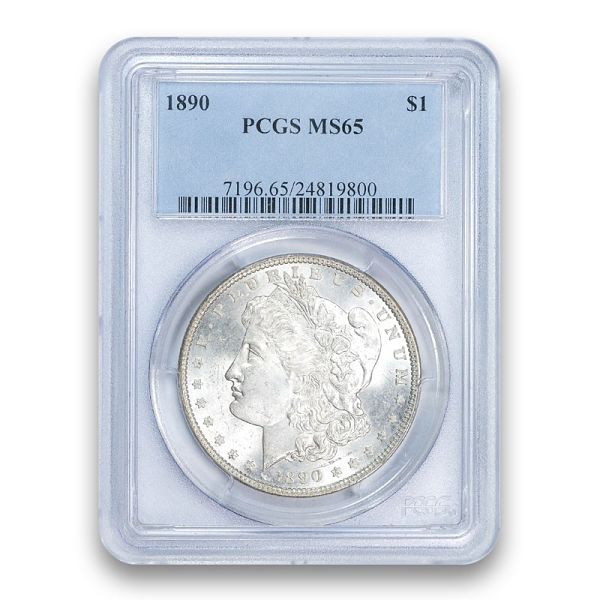 |
|
Pillar of the Community
United States
4132 Posts |
For color, you will want to adjust your white balance. It looks like you have a couple different color temperatures for the light sources illuminating your coin; probably the background lights in the room are a different color from the lights that are lighting it directly. Using lights that are all the same color will help (try turning off the room lights and closing the blinds).
For brightness, you can probably increase the exposure by at least a full stop. Either drop the shutter speed to something like 1/15 or open the aperture to f/5.6 or so while holding the other settings the same. You may have to go into full manual mode to get the exposure just right; shiny coins can foil auto-exposure settings. You could also increase the exposure in whatever program you use to process/edit your photos after you take them.
|
|
New Member
United States
5 Posts |
Thank you! I will try that first thing tomorrow!
|
|
Pillar of the Community
United States
4047 Posts |
I'm not sure that lower pic is a good reference. It is WAY overexposed. Your image is a bit overexposed but still has something to work with.
It looks like you need to move your lights around a bit to get best directional shadowing. I can see that you have a light coming from around 6:00, one from around 2:00, and maybe one from 10:00. It's almost never a good idea to have main lighting from anywhere between 4:00 and 8:00. I'd suggest simply turning off the light from 6:00 and see how the image turns out.
|
|
New Member
United States
5 Posts |
Thank you all so much for your help! The main issue with the coloring like you said was the different light sources (duh!) Fixed that and worked with my camera settings and this is what I have come up with. You have all been incredibly generous with your time and knowledge. Thank you so much! 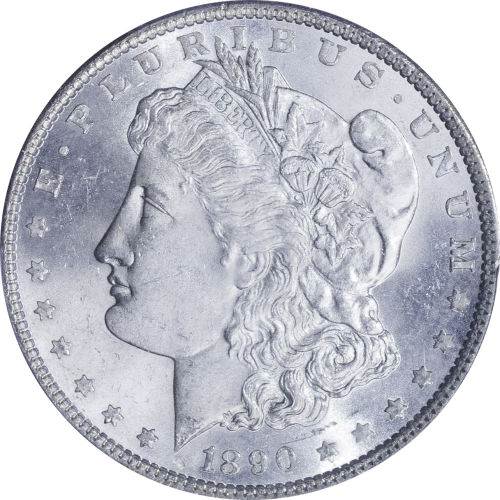 |
| |
Replies: 10 / Views: 2,149 |
|










 Posted 01/13/2015 12:23 am


