| Author |
 Replies: 22 / Views: 4,961 Replies: 22 / Views: 4,961 |
|
Valued Member
United States
430 Posts |
My wife is the family photog. I have purchased a lot of gear over the years for her to use.. I'll list most of it Nikon body-d200, D90, D7100 Nikon lenses 18-200zoom, 70-200 f2.8 monster, 14-35 wide zoom I think, 70-300 DX telephoto, old 50mm f1.8 fixed A 600? Nikon speedlight A number of point and shoot cameras including canon g5, and a canon a260 And a set of 3 72mm macro adapters to go on the end of the 18-200 1x,2x, and 4x which are stackable . I just bought a small $20 copy stand at Amazon which when it arrived I discovered it was only big enough to use with the point and shoot. And I bought a $9 desk light at target to shine external light on to coins. My attempts at using the d7100 with the 18-200 and the macro adapters hand held have been...less that desirable. The cheap copy stand and a260 were better but the lighting was poor and yellow/orange. There must be a way to get this gear to work with maybe a small purchase or two, right. If I have to II can buy a dedicated Nikon macro lens and write it off as a business expense but after looking through this forum I have the feeling there is a cheaper and better alternative. Is it a reversing ring, a lens extender, better lighting? I feel like have been blindly trying to do this and I need a little guidance |
|
|
|
Moderator
 United States
23522 Posts |
I'll throw some ideas at you, don't hesitate to ask for clarification. The best lens you have is that 50/1.8. That's the lens you want to be using those extenders with. I'll take a bad Prime over an excellent Zoom when creating a macro rig, ten times out of ten. Use the 1x only while learning. Stick the D7100 on a tripod pointed straight down. You can use the corner of a table, or weight one end of a 10" wide board and stick the other end off the table to hold the coin. Drop a pocket mirror on the spot where the coin sits, and compose a shot such that the lens is centered in the image, looking at itself. That makes you square and parallel to the coin. Aperture Priority, leave it at f/8. Use ISO if needed - you should be good to at least ISO800 - to keep your exposures above 1/100, but there's no need to be faster than 1/250. You probably have too much light if anything but blinding silver wants 1/400, and are getting highlights blown out. Use Exposure Compensation to fine tune. 2-second delay, of course. Don't be afraid to use more extension to reach 1:1 on the sensor, that 50 is a sharper lens than you think.  You'll find direct light better for luster and diffusion better for detail (trading each other off) but this rig ought to be good enough to use rather subtle diffusion - a couple tissue thicknesses or equivalent - to achieve a nice balance. As long as those extenders work with the 50, you should be in good shape with the equipment on-hand. Of course, you can throw more money in down the road but what you have will get the job done nicely. If the extenders don't work, and I'm unsure they will, spend a few bucks on a reversing ring for the 50 and all of the above still applies. |
|
Pillar of the Community
United States
4051 Posts |
Are you wanting to take pics of big coins or small coins, or both?
Contact me for photographic equipment or visit my home page at: http://macrocoins.com |
|
Valued Member
 United States
430 Posts |
First off THANK YOU. That was excellent. I do have a set of step up rings I forgot to mention so I can put the macro lenses on the 50 I think. Lighting is a challenge. Tonight instead of waiting for an appropriate response, I bought a ikea clamp on led light to help( when your new to a hobby the excitement level is high). How to use tissue paper without starting a fire? Build a small frame? The speedlight has a built in diffuser I could rip it out but that might get me in hot water, plus it's small. I think the local menards has sheets of opaque plexiglass that could work. Someone also mentioned a styrofoam cup with the bottom cut out in another post here. My coins alas are large and small, I got a few double eagles. Mostly halves, quarters and dimes. Have not started a penny collection though. mostly inherited, but I've been ripping up ebay for a month. |
|
Pillar of the Community
United States
4051 Posts |
The Jansjos run pretty cool. I put diffusion material directly on them, sometimes with tape. Never had a problem, but double check that yours run cool before taking any risks!
Since you are framing over a wide range of coin sizes, you might want to consider using your 50mm directly for larger coins, and then putting it in reverse on the 18-200 to vary the magnification for smaller coins. These "stacked" lens combos are picky and don't always work well so you need to try it out and see if it will work at the lower magnifications. It will certainly work for higher mags. The 14-35 may also work very well. Google "stacked lenses macro" in both regular and image searches and you will see what I'm talking about. The 14-35 will likely work from perhaps 25-35, which will give you good adjustability from 0.5:1 to 0.7:1 magnification for Quarters to Cents and Dimes. The 50mm on its own may work for the Dollars and Halves and Double Eagles.
Experiment around, try different combos, and post results here!
Contact me for photographic equipment or visit my home page at: http://macrocoins.com |
|
Moderator
United States
23522 Posts |
Use the 50 forwards if you wish for large coins, and reversed with a ring for magnification. Cheap extension tubes are another possibility, although those get expensive when you buy the ones that transmit lens data to the camera - the cheap ones don't do that. Alone, the 50 will probably do 50% magnification (you won't be able to focus is the lens is closer than that) - a 38mm coin would be 19mm on the sensor. Your sensor on the D7100 is 15.6mm, so at 50% it will hold less than a full 38mm coin. 42% magnification makes a Morgan fill the sensor. And your image size on a 24MP sensor is 6000x4000. That Morgan you just shot is 4x too large to see all at once on your monitor! And we haven't even started using Macro lenses yet. For the moment while you're learning the procedure, just use the 50 as you would normally. No added mag lens. Get comfortable with setup, white balance, minimum focusing distance and the shot parameters that work best with your specific equipment. Learn to shoot coins. Then we'll worry about manipulating magnification, because added magnification reduces the size of the "sweet spot" for settings. |
|
Valued Member
United States
430 Posts |
Great I'm on vacation now, so when I get back this weekend I will take some shots with the 50 and post the best.
The wide angle zoom is not what I said. It is a tokina 11-16 f2.8, not a Nikon 14-35.
|
|
Valued Member
United States
430 Posts |
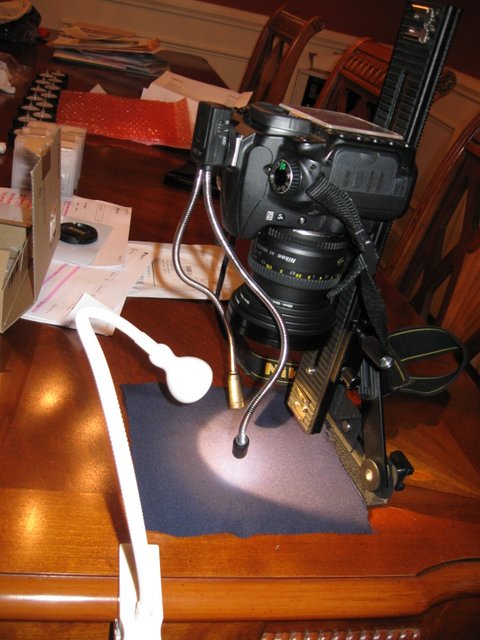
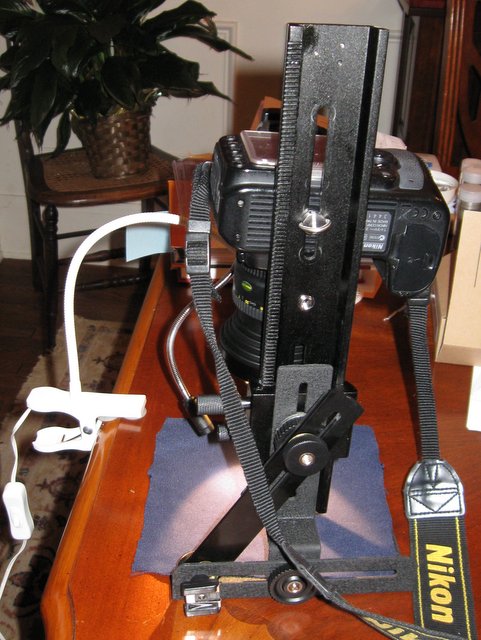
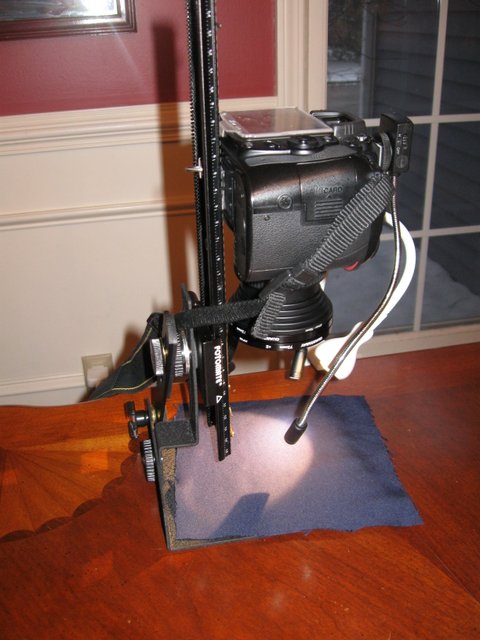
I just realized this topic is Don't know HOWLto use it. My bad. Anyway here is a photo with the D90 (the Mrs. wouldn't give up the D7100. I think things turned out ok. Tell me what you think. My rig is kinda cool, I'll take a photo and show you. 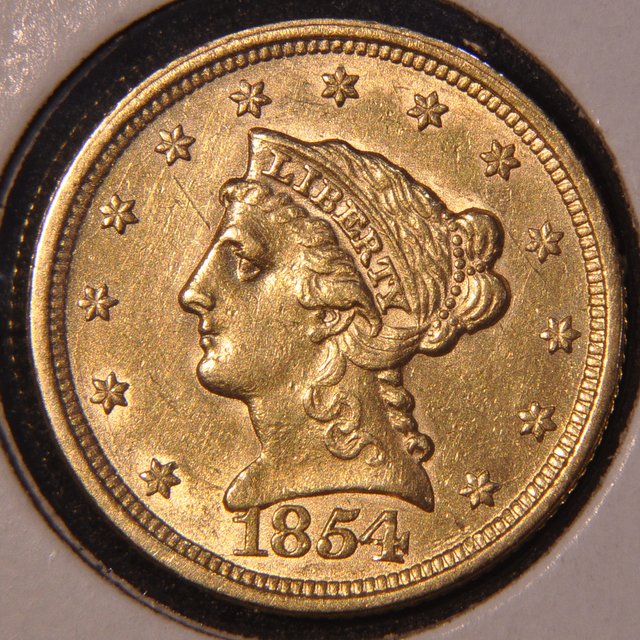 |
|
Moderator
United States
23522 Posts |
I took the liberty of fixing the title; didn't notice it at first. Man, you don't demonstrate a steep learning curve much, do you? OK. Depending on the color of the background, I don't think your White Balance is perfect. Explore a Custom setting. And, you can get larger images through the CCF Optimizer these days. I don't know what you started with as far as processing at home, but the ideal is about 800 pixels in diameter from a lens this good. That diameter and about 200kb in filesize is a nice compromise. That's all I got for you. You done learned too fast for me to teach. Now, grab the shiniest new Nickel and Quarter from your pocket, and point the lens at them.  All seriousness aside, now you know why we harp so loudly about bespoke lenses, even relatively cheap ones like you're using. All you did was point the thing at a coin, used general parameters to help the camera get it right, and it tossed off a tremendous image of the first coin. Think about how much flexibility this will leave you, since you can change virtually everything through a broad range of adjustments. All the same, gold is fairly easy. The pocket change will be a challenge. |
|
Valued Member
United States
430 Posts |
|
|
Valued Member
United States
430 Posts |
oh and step up rings from 52mm to 72mm. to attach a 4x and a 1x macro lens to the end of the 50mm lens.
|
|
Moderator
United States
23522 Posts |
Ha! I love it. I may not be reading this right since I'm on my phone, but it looks like the vertical arm has enough downward travel - and the camera enough upward - so it could become a load-bearing element. That would stiffen things, and frankly you're now working in a realm where little gains like that are important.
So how large are your originals? Are you autofocusing?
|
|
Valued Member
United States
430 Posts |
Thanks again SDave. the right lens with the right lighting and settings, voila! I'm not sure what you mean about a load bearing element. Without the angled hot shoe bracket the camera bobbed like a flagpole in the wind. the originals are between 5-7MB each. I cropped them and compressed them with Picassa. Manual focus, I used the fine adjustment on the focus rail to focus then locked it in. copy stand http://www.amazon.com/dp/B003OAD3C0...s=copy+standfocus rail http://www.ebay.com/itm/20083602402...RK:MEBIDX:ITthere is a cheaper focus rail that is shorter. that probably would have worked. So to fine tune the white balance do I bracket or use the color grid? I just picked Flourescent 4 and it looked ok. The background is navy blue (old clothes about to be donated). I'm shooting on the fine setting so the files are large now. When everything is set and I start to shoot my collection I'll pick a lower quality setting. Here is a silver coin 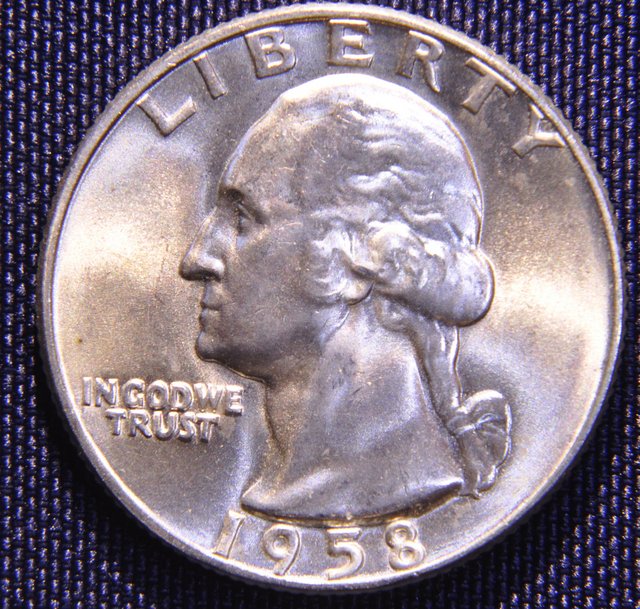 |
|
Moderator
United States
23522 Posts |
I'm thinking the focus rail can slide downward so the bottom actually touches the table and holds weight.
Custom white balance is a capability of all dSLR's. I don't know the specific steps for your camera, but it will involve setting white or gray paper (they make a bespoke 18% gray shaded card for the purpose) where the coin will be, with the lighting set as for the shot. You take a picture of the card and (via some setting) tell the camera that is "baseline." It is then able to correct color in-camera.
The tiny light position adjustments you make for each individual coin won't matter for this, as long as you're close to their final position to begin with.
My Canon is perfectly happy doing this with white printer paper. I don't know about your Nikon, but Ray (rmpsrpms) knows Nikons and will hopefully poke his nose in.
1) Always use the camera's maximum image size and quality. You're going to depend on postprocessing software to downsize the image later. In fact, if you want to go that far eventually, we'll teach you to use RAW files in your shooting. They're raw photographic data straight from the sensor, with no in-camera processing at all.
The reason for this is that cameras are very weak computers. It's preferable to do as much processing as possible on your much more capable desktop computer. Your goal is to do all processing at your computer, and directly upload a completed file.
2) Use only monochromatic shades for background. Preferably black or gray to minimize light reflected back into the lens. Reflected light is a problem in macro photography, moreso than other specialties. Work hard to minimize external light and surfaces that can reflect light back into the lens. Reflected light costs you contrast, and you are going to be adding a little contrast in most postprocessing operations anyway.
There isn't enough wrong with that Quarter image for me to offer any critique here. You're well ahead of the power curve in terms of quality - you seem to have the feel for how the coin needs to look which is a big help. That's teachable but difficult.
Find a well-worn and darker Lincoln - or something similar in your collection - and see what differences it requires for lighting and exposure.
|
|
Pillar of the Community
United States
4051 Posts |
Nice images! I have a few things to offer for improvement:
1) Use only one type of light. I like the little hotshoe guys but they are a lot more blue than the Jansjo, so they are messing up your white balance. You can see this clearly in the different color they reflect off the coin's luster bars. The Jansjos are showing yellowish, while the hotshoes are bluish.
2) Your lights are a little far out from the optical axis. You should bring them closer to the lens.
>>TIP...don't be afraid to put lights BETWEEN coin and lens. Open the lens to your shooting aperture, and move them until you see a little darkening at the rim, then back away til the darkening is gone. Make sure they don't shine any light up toward the lens directly (ie point lights straight down). Your hotshoe lights will have the advantage here.
3) Your Nikon has a white balance "WB" button. Press it and rotate the thumbwheel til you see pre (for preset). Hold down the WB button and when the display flashes shoot a picture of your gray card or whatever you want to use to call white.
>>TIP...shoot your gray card or index card or whatever OUT OF FOCUS. You'll get a more consistent WB setting.
Contact me for photographic equipment or visit my home page at: http://macrocoins.comEdited by rmpsrpms
03/24/2015 9:47 pm
|
|
Valued Member
United States
430 Posts |
so I tried the WB reading a out of focus white card, but had trouble. So I just took a series of photos with different K numbers with silver coins and pennies. I went with what I thought was the best 3450K. Here is an example 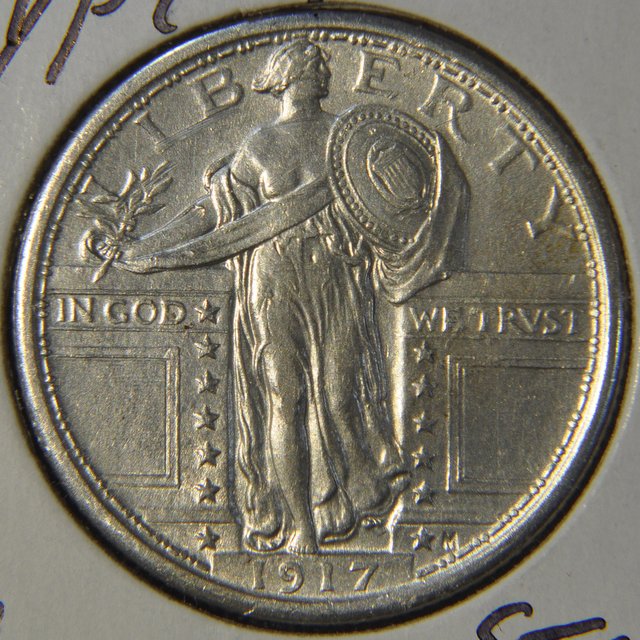 |
| |
Replies: 22 / Views: 4,961 |







 Posted 03/17/2015 9:02 pm