| Author |
 Replies: 9 / Views: 2,562 Replies: 9 / Views: 2,562 |
|
|
Bedrock of the Community
 United States
12917 Posts |
After inserting pictures previously uploaded*, all I can do is click "Please click here to close this window". It would be nice to have the option to upload another as well as close.
* Select "Upload Image", then "My Previously Uploaded Files" button, then select any file and then upload.
|
|
|
|
Forum Dad
 United States
24231 Posts |
Good idea, on my list to look at for tomorrow.  |
|
Bedrock of the Community
 United States
12917 Posts |
A minor inconvenience to be sure, but when you're trying to keep up with GR58 and his splendid photos, this would make life much easier. Thanks, Forum Dad!  |
|
Forum Dad
United States
24231 Posts |
|
|
Bedrock of the Community
United States
12917 Posts |
This site is the gift that just keeps on giving. Thanks, Forum Dad. |
|
Moderator
United States
23522 Posts |
By the time Bobby is done, the CCF website will feed its' visitors and do their laundry.
|
|
Moderator
United States
14463 Posts |
I can feed my self, but if CCF could do my laundry that would be awesome.   |
|
Bedrock of the Community
United States
12917 Posts |
You haven't downloaded the CCF Laundry app yet? Oh wait, it's only for iOS at this time.
|
|
Moderator
United States
23522 Posts |
Quote:
Oh wait, it's only for iOS at this time. Story of my life.  |
|
Bedrock of the Community
United States
12917 Posts |
So I was messing around with uploading some pics on a post tonight and used a combination of new and previously uploaded. I'm not sure if it has anything to do with the changes you made but I saw this, which seemed odd: 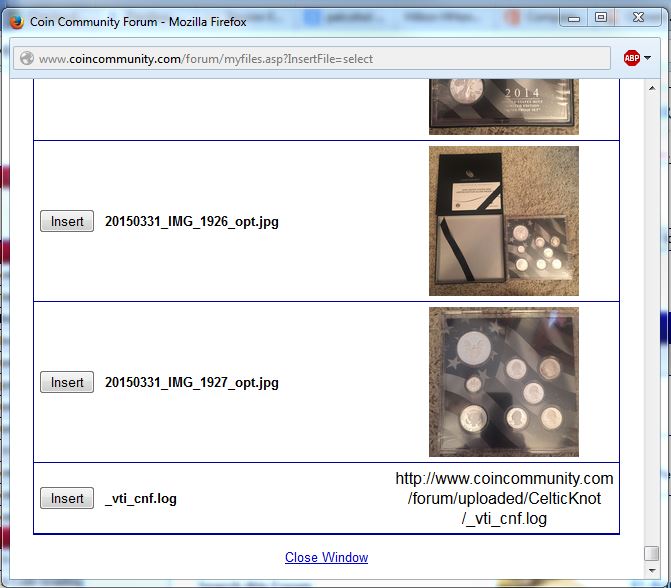 I plan to upload/insert a few more combinations of new/old photos over the next couple of days so I will try to keep better record of what I did, just wanted to point this out. Thanks again for making that change! It worked great. |
| |
Replies: 9 / Views: 2,562 |
|










 Posted 03/26/2015 02:56 am


