| Author |
 Replies: 171 / Views: 19,138 Replies: 171 / Views: 19,138 |
|
|
|
Pillar of the Community
 United States
1476 Posts |
Ok, Here are the First 2 shots I have taken with the setup. I am playing with all the settings to see what happens. I did nothing special and kind of took these quickly just to play. What do you think? ISO 100, 1/160 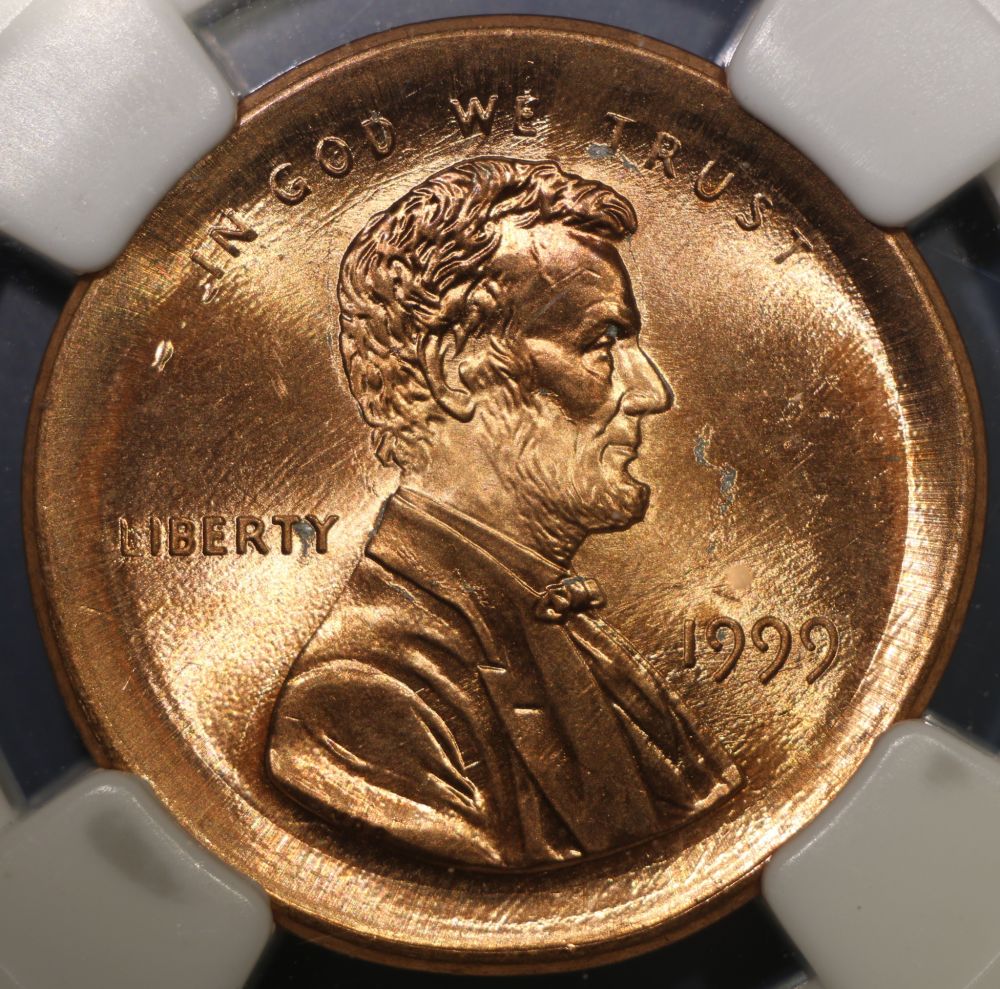 ISO 100, 1/200 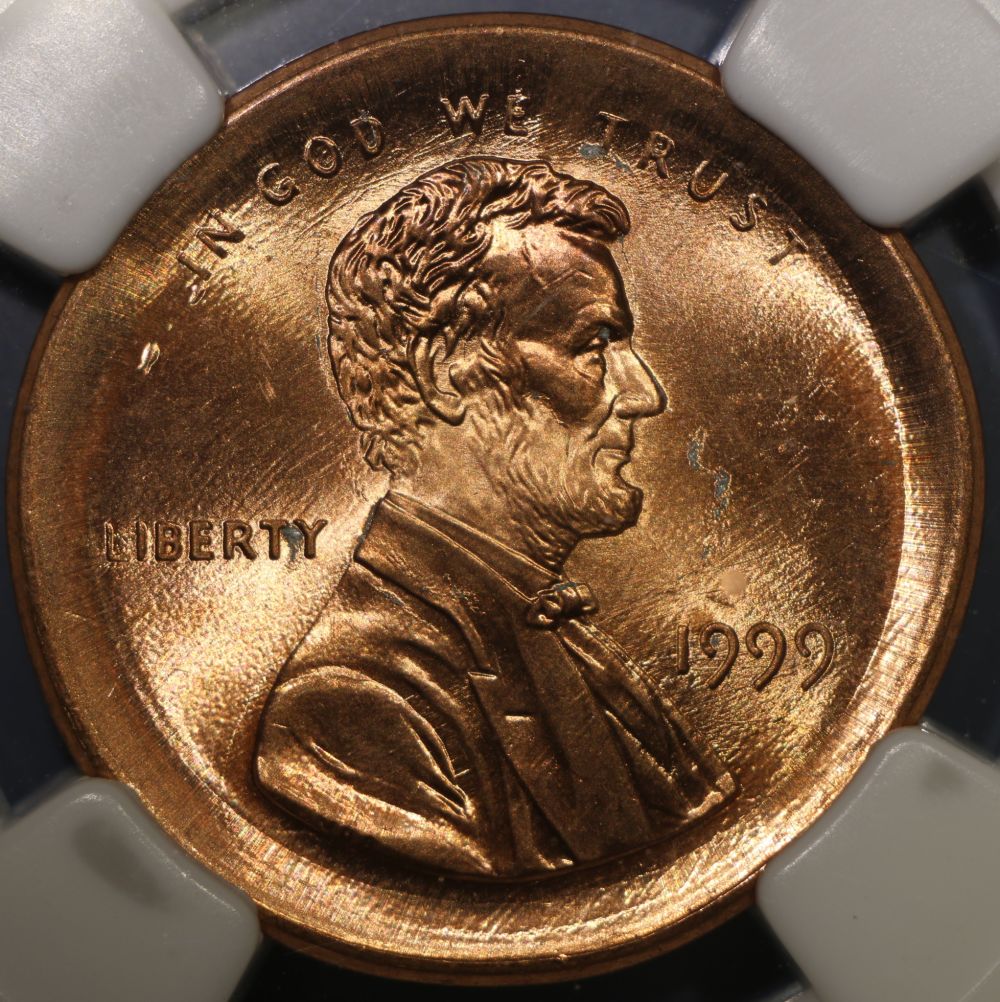 All opinions Welcome and Needed. Thank You.  |
|
Pillar of the Community
 United States
5828 Posts |
|
|
Pillar of the Community
Canada
9661 Posts |
OK you know I'm new at this but I like the first one.
|
|
Pillar of the Community
 United States
4048 Posts |
Really nice Dar. The surfaces are very natural looking. I think maybe the new camera has some of the qualities I've been talking about over on the sharpening thread. Lots of fine detail showing through. Was this with the Vivitar 75mm?
Contact me for photographic equipment or visit my home page at: http://macrocoins.com |
|
Pillar of the Community
Canada
2784 Posts |
dar totally excellent right out of the gate and you are leaps ahead of me. your photos are excellent like them both
|
|
Pillar of the Community
United States
1476 Posts |
Quote:
Was this with the Vivitar 75mm? Yes, I have only used the Vivitar so far. I didn't even image the REV of the coin yet. That will be today so I can post it in the error's section.  It was set @ f22 for these shots. I don't know how to read the bellow's number yet but it is set at approx. the 83mm mark. I have so much to learn.  Are these high enough quality to be used in gradeing purposes? Quote:
OK you know I'm new at this but I like the first one. Thanks Mcshilling.  I am trying to figure out which exposure will be a balance of good contrast and still show luster. These were taken with 2 janceos about 11:30 and 1:30 without diffusion and as close to the lens as I could get them. I checked the camera alignment as described in the forums using the 4" mirror I got at Joanne fabric's and it seems to be working. The Live view shooting is great because I don't have to move anything and can change the settings from the keyboard. Lovin it! Edited by Dar
05/06/2015 12:01 pm
|
|
Moderator
United States
23522 Posts |
Quote:
Are these high enough quality to be used in gradeing purposes?
Heh. I think you already know the answer. You're getting why we preach this stuff now, aren't you? f/22 is why you're getting the whole sides of the broadstrike in focus. Think about this, Dar - that aperture gives up a whole bunch of sharpness.... |
|
Pillar of the Community
United States
1476 Posts |
Quote:
Heh. I think you already know the answer.
Well, I think they are but wanted to ask. Quote:
You're getting why we preach this stuff now, aren't you? Yes Sir Quote:
f/22 is why you're getting the whole sides of the broadstrike in focus. Think about this, Dar - that aperture gives up a whole bunch of sharpness.... It looks pretty sharp to me but I don't have a trained eye yet. I DO think it could be Much better though. So in order to get better sharp ness, say on close ups of details, I will want to lower the aperture settings? Correct? Depending on the size of the coin? I really am trying to get this stuff. I would LOVE to be able to just 'get it'. It is NOT an easy over night thing I realize, and to tell you the truth I'm kind of glad. Although any help in getting ahead of the 'curve' would be greatly appreciated.  EDIT: I think I wrote something wrong. I had the ap set to f8, Not 22.  Edited by Dar
05/06/2015 3:16 pm
|
|
Pillar of the Community
United States
1476 Posts |
Just thought of this. I noticed that the electronic level is saying that I am not quite level. Is this a concern?
I have also noticed that the sharpness decreases when I use the image optimizer on the site to get the images to a size to be able to post.
Anyway better to do this?
Edited by Dar
05/06/2015 3:13 pm
|
|
Moderator
United States
23522 Posts |
You can't even see the reduction in sharpness from diffusion outside a 100% crop, unless it's really brutal. Apparently your Vivitar doesn't consider f/22 that brutal. Your sweet spot for maximum sharpness with this setup is probably f/8, maybe f/5.6 due to the dense pixel pitch. That latter might not give enough depth of field, with the understanding that we're accustomed to working with depths of field which cannot focus on the whole depth of your example coin. The takeaway here for you is, for image-posting purposes it really doesn't much matter, does it? I'm gonna re-emphasize here just what kind of technological overkill we're bringing to bear with these rigs. Part of your training includes training your eye to see this stuff, and that comes at its' own pace. As regards level, all you want is coin and lens plane parallel. With a rig like this, the image itself will tell you if it's parallel enough especially when you're working full-size on your monitor. Refer to my overkill comment, although when you're working on the edge of sufficient depth of field this becomes critically important. Look for equal sharpness all the way around the periphery. As regards sharpness, always do as much postprocessing as possible in dedicated software on your local computer. It's by far the most sophisticated software and (especially with your box!) the strongest processing capability. Our recent upgrades to the CCF Uploader mean you can probably do everything locally and upload without any modifications whatsoever, and you're certainly qualified for a CCF Gallery - our member perk online storage - now. Aside being able to create and access your own albums, though, a Gallery offers no size advantage over the Uploader any more. Your image is 1000px and 239kb. I can achieve that locally with the Gimp with ease. |
|
Pillar of the Community
United States
1476 Posts |
ok, a CCF Gallery? How would I go about accessing this? (on a completely different note: I just noticed that there are 'boxes' around the smilies in the post function. Have they always been there)?  |
|
Moderator
United States
23522 Posts |
I'll let Bobby know you're interested in a Gallery. Smilies here have to be surrounded by brackets when typing. Kinda been that way all along....  |
|
Pillar of the Community
United States
1476 Posts |
Quote:
Smilies here have to be surrounded by brackets when typing. Kinda been that way all along.... No, I mean in the box to the right of where you type your posts. Unless I couldn't see them prior to calibrating my monitor? |
|
Pillar of the Community
United States
4048 Posts |
f8 is good for the Vivitar. Since you're downsizing something like 5x you won't be able to tell the difference between 5.6, 8, 11, or maybe even f16. f22 would start to be a problem even with downsizing. For closeups (2:1 magnification), the Vivitar does best at f5.6 but f8 is probably still OK and will keep you from having to stack.
Getting luster, color, and eliminating both over-exposed hotspots and lost shadows is a balancing act of lighting, camera settings and post-processing. We each develop our best practices that give a reasonable workflow and good results. Figuring that workflow out is what takes the most time in the learning curve. Some folks use RAW processing to get their best results, others stick to jpg. Often folks have "secrets" they don't want to disclose. Many are doing this for a living and won't reveal anything at all about what they do! Some folks, even the pros, find as simple a setup as possible that gives an overall acceptable result without much effort (eg refer to Heritage thread). Some workflows work for one photog but not for another because of equipment or software limitations. And finally, what looks best to each person is a very individual thing. It's a real mishmash! Luckily you're already well down the path of publishable photos, and folks who contribute here will help you get better.
Contact me for photographic equipment or visit my home page at: http://macrocoins.com |
|
Moderator
United States
23522 Posts |
Quote:
No, I mean in the box to the right of where you type your posts. Unless I couldn't see them prior to calibrating my monitor?
The box to the left, I'm guessing because there's nothing to the right in my posting box. They show the code which creates them when you mouseover, but no boxes of any sort on my monitor. Are you running Chrome? That browser - much as I love it - does some really weird things sometimes and you have to clear the cache. Beyond that, this might be a Support issue. Can you capture a screenshot? |
| |
Replies: 171 / Views: 19,138 |







 First Page
 Previous Page


 Posted 05/05/2015 7:07 pm





