| Author |
 Replies: 9 / Views: 2,528 Replies: 9 / Views: 2,528 |
|
|
Valued Member
United States
193 Posts |
I'm a new collector having inherited some coins from my grandfather. Many of those have been in the cardboard coin holders for years. Some nice 38 and 39 Jefferson nickels have been wrapped in old cellophane that I'm sure many of you would scream over. And, lots are just loose in baggies. My question is, if I want to take pics of the ones in holders, do I remove them from the holder? I know I should get new holders for them all, but, money is an issue, so, if anyone has advice about how to store them safely until I have money for better options, I'd appreciate it, too!  |
|
|
|
Moderator
 United States
23522 Posts |
It's always recommended to pull coins from the holder to shoot most accurately. If you're in a spot where you need to reuse the holders, concentrate on removing the staples as cleanly as possible - all of them before going in for the coin. I usually use a letter opener or similar, pushing both sides of the crimped staple back out to as vertical as possible, and then pulling from the other side outward. As long as cardboard isn't flaking, and has a bit of flex without cracking (same goes for the mylar covering), you can safely reuse them. Try to use the same holes when re-stapling.
Those cardboard flips are on the order of $2 per 100.
|
|
Valued Member
 United States
193 Posts |
OK, thank you SuperDave. Yeah, some of the staples are actually rusted, that's how long they've been on there lol.
I'm going to have to do some more research and experimenting with coin photography. It sure seems like its tough to take good quality photos!
|
|
Moderator
United States
56855 Posts |
Take them out of the 2x2 before pics. The 2x2 are from 2-4 cents each. Flatten down the staples when you do it. When you open the old holders be careful not to damage the coin and handle the coin with care.Label the 2x2 accordingly. John1  |
|
Moderator
United States
23522 Posts |
Quote:
I'm going to have to do some more research and experimenting with coin photography. It sure seems like its tough to take good quality photos! The tough part about coin photography is trying to force the equipment you have into doing it well. Some cameras are far better than others at this, and for many the "sweet spot" where you get good results is rather narrow in terms of setup and settings. Don't hesitate to post images here for critique. It's what we do in this forum. Let us know what equipment you're using including lighting, and put up a couple shots so we can see how to help you improve. Most importantly, we can get a feel for what to correct in what order. Hitting this stuff haphazardly will frustrate you and lengthen your learning process. It's a very procedural, step-by-step process and once you hit on those steps you'll be amazed at just how easy it is because the coin-to-coin differences are minor by comparison. |
|
Pillar of the Community
United States
1314 Posts |
|
|
Valued Member
United States
193 Posts |
Fantastic, thank you all again. Dave, I'm using a Canon Sure Shot point and shoot. It's a better quality point and shoot, but, I'm still learning about it. Frankly, I've had some other cameras that were cheaper that I think have had better image quality. Here's one of the better coin pics I've taken with it. I did the editing in Paint Shop Pro 7.  |
|
Moderator
United States
23522 Posts |
That's not exactly a terrible result.  P&S cameras are sensitive to outside light entering the lens' field of view and killing contrast, and I think I see some of that here. It's not hard to see that the coin still has luster, and more contrast is not difficult in postprocessing (I exaggerated the effect here to make the point): 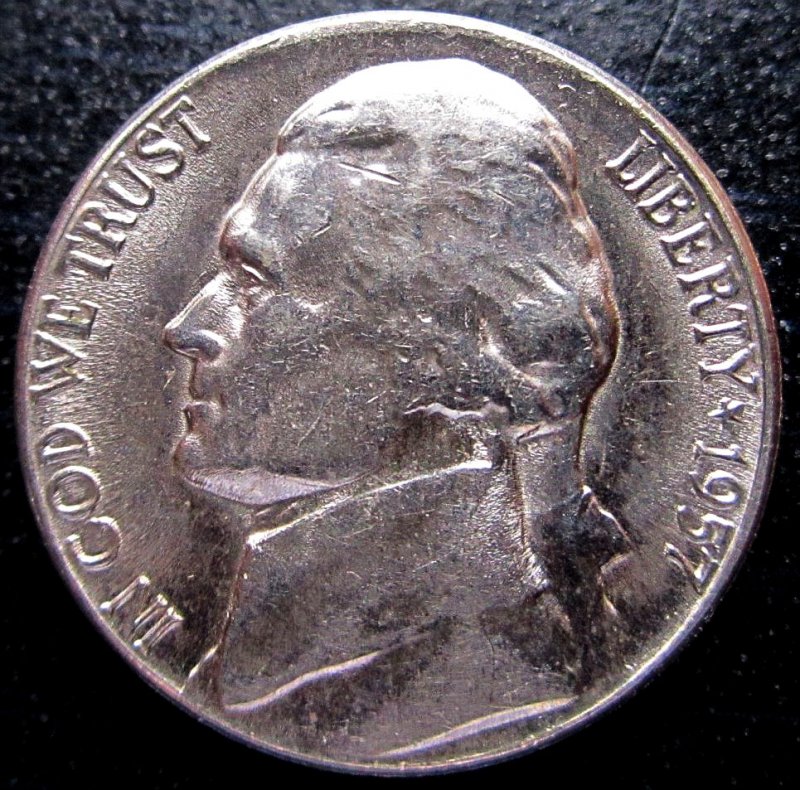 Point being, I think that Canon has more to give you. |
|
Valued Member
United States
193 Posts |
Wow, that's very nice. And, yes, I know what you mean about the ambient light. It's hard to get a balance between natural light and having the flash make the image seem overly bright.
Plus, I worry about adjusting the photo so much that it actually makes the coin appear better than it actually is. You know what I mean?
|
|
Moderator
United States
23522 Posts |
The flash should be a forgotten thing of your past for shooting coins. Turn it off completely and provide all your own light. Quote:
Plus, I worry about adjusting the photo so much that it actually makes the coin appear better than it actually is. You know what I mean?
This is a very valid concern we all share. You just have to be careful how you slice up the shot; use a razor rather than a sword. Contrast isn't a worrisome thing, because it doesn't alter the coin itself, just the effect lighting has on it. Sharpening and color alterations are more important, as they can change the look. Another consideration is, your monitor is not mine. Everybody uses different monitors with differing color calibrations. You can't necessarily expect someone to see exactly the same thing you see. That's why you'll usually see me shoot on black or white instead of grey; it gives me a reference I can recommend to a viewer if they disagree with the color. Compare my background to what's known to be either black or white on your screen, and if they look the same the problem is on your end and not mine. If they're different, the problem is on my end. |
| |
Replies: 9 / Views: 2,528 |
|








 Posted 04/25/2015 10:41 pm