Coin Community Family of Web Sites Join Thousands of Coin, Bullion, & Money Collectors
Royal Canadian Mint products, Canadian, Polish, American, and world coins and banknotes. Join Thousands of Coin, Bullion, & Money Collectors 300,000 items to help build your collection! Shop for APMEX Bullion on eBay!Vancouvers #1 Coin and Paper Money Dealer Coin, Banknote and Medal Collectors's Online Mall Specializing in Modern Numismatics


Username:
Password:
Save Password
Forgot your Password?


This page may contain links that result in small commissions to keep this free site up and running.

Welcome Guest! Registering and/or logging in will remove the anchor (bottom) ads. It's Free!

Nikon Problems Ray Can You Help

To participate in the forum you must log in or register.
Author Previous TopicReplies: 5 / Views: 1,850Next Topic  
Pillar of the Community

Canada
2784 Posts
 Posted 09/11/2015  8:25 pm Show Profile   Bookmark this topic Add rocky to your friends list Get a Link to this Message Number of Subscribers
ray I have started to do some more shooting with my Nikon. I noticed that my photos are way over exposed. no matter what I do the brightness never changes. I did some searching on google and dp reviews. they identified to a person there. that the issue might be here's a quote from them : Looks like the aperture blades are not closing as your f11 shots look like f4. ray what they don't explain is there a fix or away that I can check this. it does not matter the lens. your help or any ones help greatly appreciated
New Member
jtlee321's Avatar
United States
43 Posts
 Posted 09/11/2015  11:59 pm  Show Profile   Bookmark this reply Add jtlee321 to your friends list Get a Link to this Reply
Rocky, A quick way to check to see if your aperture controller on the camera is working is to press the small black button down at the intersection of where the lens attaches to the body. As your holding it with the lens pointed towards your subject it's towards the bottom and on the right side. It's default setting is aperture preview unless you have changed it. From your statement that it is with all lenses, my guess is its the communication between the camera and lens. It could be as simple as cleaning the contacts.
Pillar of the Community
Learn More...
United States
4037 Posts
 Posted 09/12/2015  01:14 am  Show Profile   Bookmark this reply Add rmpsrpms to your friends list Get a Link to this Reply
Rocky...remind me what lenses you are using? I thought you were doing all-manual but maybe I am misremembering. If you are using a standard lens with aperture control linked to the camera (like a Nikon Micro-Nikkor) then Justin's suggestion is very good, ie press your DOF preview button and see if the aperture moves. If it doesn't for any standard lens you mount, your camera body may have an issue...Ray
Contact me for photographic equipment or visit my home page at:
http://macrocoins.com
Pillar of the Community
Canada
2784 Posts
 Posted 09/12/2015  11:06 am  Show Profile   Bookmark this reply Add rocky to your friends list Get a Link to this Reply
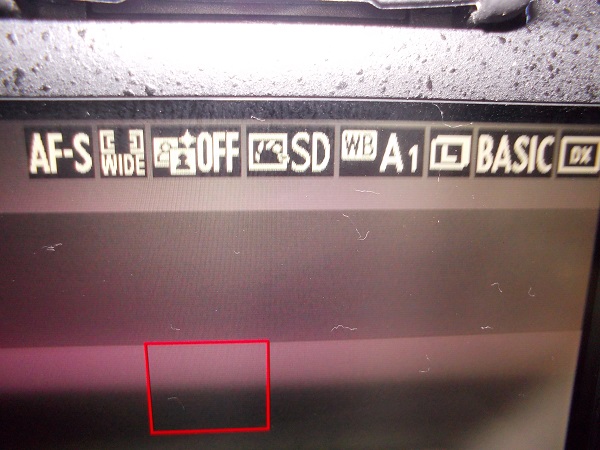
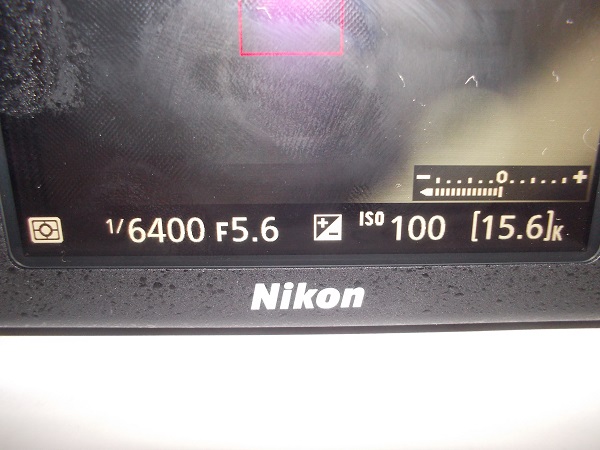
thank you all so much. here is some thing I have found out. control my Nikon. that program will not make adjustment to a Nikon d7100. this is due to Nikon control over its camera. so what you see for reading on the computer screen don't mean a thing. Nikon used a different name for it. but the trues is it is there control ok so I put my standard kit lens on 18 to 55 mm ray here is the setting right know in manual looking at the rear screen shutter speed is 1/6400 F:5.6 I have set the ISO to 100 at the top first symbol is AF_S see I think I have set some thing wrong can you help me. I figure the easy way take a photo hope this helps ray . I had been working in A mode what do you sugest any help greatly appreciated

Nikon-Problems-Ray-Can-You-Help

Nikon-Problems-Ray-Can-You-Help
Pillar of the Community
Learn More...
United States
4037 Posts
 Posted 09/13/2015  10:28 am  Show Profile   Bookmark this reply Add rmpsrpms to your friends list Get a Link to this Reply
rocky...if CMN is not set up for the D7100, then it might be at fault for your exposure problems. Have you tried shooting without it? 1/6400 on A mode in macro is clearly a problem. Seems like the program can't judge exposure and is pushing the shutter to its fastest setting. Try a manual shutter release, non-tethered, to see if that works. If so, you may need to invest in Camera Control Pro 2, but make sure it has D7100 control before you buy!
Contact me for photographic equipment or visit my home page at:
http://macrocoins.com
Pillar of the Community
Canada
2784 Posts
 Posted 09/13/2015  8:33 pm  Show Profile   Bookmark this reply Add rocky to your friends list Get a Link to this Reply
thank you ray spent most of the day trying to figure out what I touched. I did some research on control my Nikon. I found out the reading on the computer screen don't mean a thing. that some thing they don't explain. some times cheap is not good anyway took the manual reset the camera. its taking images no problem. I will have to look into getting this program. thank you ray have a great one

Nikon-Problems-Ray-Can-You-Help
  Previous TopicReplies: 5 / Views: 1,850Next Topic  

To participate in the forum you must log in or register.


Disclaimer: While a tremendous amount of effort goes into ensuring the accuracy of the information contained in this site, Coin Community assumes no liability for errors. Copyright 2005 - 2026 Coin Community Family- all rights reserved worldwide. Use of any images or content on this website without prior written permission of Coin Community or the original lender is strictly prohibited.
Contact Us  |  Advertise Here  |  Privacy Policy / Terms of Use

Coin Community Forum © 2005 - 2026 Coin Community Forums
It took 0.22 seconds to rattle this change. Forums