|
This page may contain links that result in small commissions to keep this free site up and running.

Welcome Guest! Registering and/or logging in will remove the anchor (bottom) ads and the security checks. It's Free!
To participate in the forum you must log in or register. | Author |
 Replies: 10 / Views: 1,711 Replies: 10 / Views: 1,711 |
|
|
Valued Member
United States
441 Posts |
See pic below. I'm working on Jeff Nickels, alot of which are BU. For the life of me, I cannot seem to eliminate hot spots, no matter how much I diffuse and distance/turn, etc. The Jansjo's will not give me what I want. For this pic, I'm using a flourescent desk lamp about 12" above the coin. Depth of field seems OK, but the hot spots bother me. Is there a way in post using DPP or Corel Paintshop to tone down the hot spots without losing too much integrity in the pics? What else could I do to improve on this? I mainly get the hot spots on the obverse, reverse gives me no problems with this coin type. Please don't blow me off as I really need the advice. Thanks in advance. 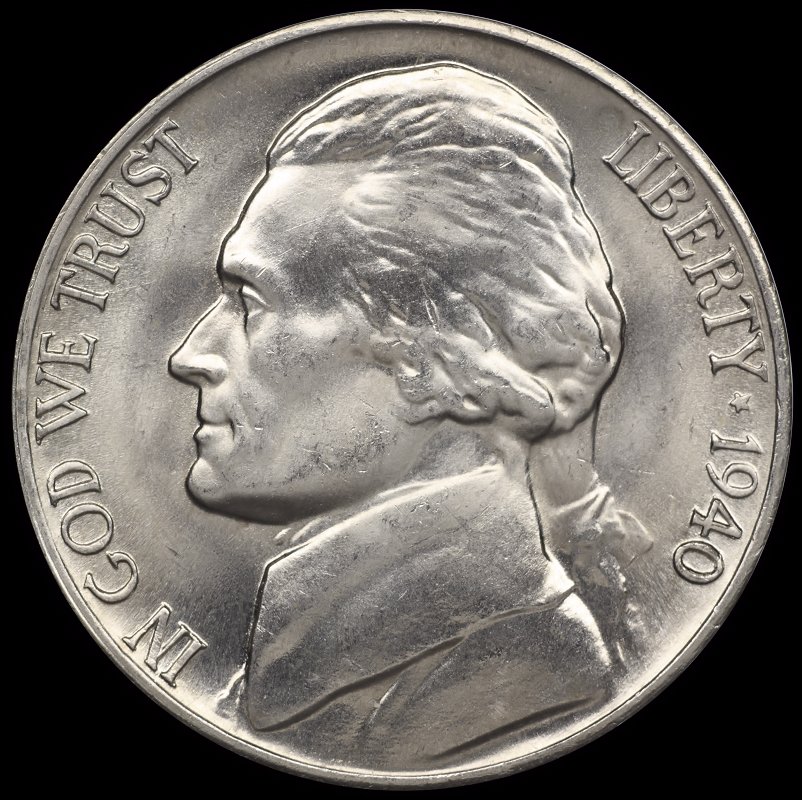 |
|
|
|
Pillar of the Community
2087 Posts |
when photographing a coin I try to imagine how the lights would look from the coins perspective. I aim for very even lighting so from the coins perspective the lighting should look unfocused, as if it were coming from all directions( like a bright fog). Most often I find I have to bring the diffusion much closer to the coin often not more than a couple of inches away from the coin. Personally I find janscos frustrating.
Another approach you might want to take is to underexpose the picture and then adjust the brightness in post processing. If you are working in Raw you should get very acceptable results. I don't recall what camera you have.... if it were a mirror less camera I would suggest you turn Zebra on( set to 70%) you would then see the zebra stripes where the hot spots were becoming overblown
Edited by austrokiwi
03/12/2016 4:19 pm
|
|
Pillar of the Community
 United States
4051 Posts |
Quote:
Another approach you might want to take is to underexpose the picture and then adjust the brightness in post processing This is the approach that works for me. You don't really need to go RAW to make it work, just get the camera settings right and the camera jpg processor will effectively compress the full dynamic range of RAW into the much smaller dynamic range of jpg. Follow up with some post-processing to clean things up and you're golden. I can walk you through it if you want (I'm sure AK could do the same). Contact me for photographic equipment or visit my home page at: http://macrocoins.com |
|
Valued Member
 United States
441 Posts |
Ray and Aus,
I'm running a $400 thread setup with a Canon EOS 1000D, Pentax autobellows, and Beslar 75mm 3.5-22 enlarging lens. I've tried various light setups with the 2 jansjos, 3 4100k cool white, sunlight, office flourescent, desk lamp....the list goes on.
I've actually been playing around more today with the jansjos and have been having pretty good luck. As both of you said, under exposing then tweaking in post seems to work well. The 4100k cool whites work well also depending on the coin and its attributes.
The biggest hurdle I run into is getting the lights positioned right and getting the white balance right along with getting the exposure correct relative to aperture and DOF. Basic stuff, but all extremely important to get a decent shot.
My next step is to find some sort of boom stand to mount the bellows on vs the homemade rig I'm using now and getting a microscope objective setup on the bellows. I'm open to advice on this path as well.
|
|
Pillar of the Community
United States
4051 Posts |
Have you tried the "diffuser at the lens" as documented in a couple of threads on CCF? Or maybe I should ask "how are you diffusing the Jansjos"? And what are your Style settings on the camera? The settings are something like "Standard" or "Neutral". Then within the settings are the sub-settings that set sharpness, contrast, saturation, and hue. Let us know what you're using...Ray
ps...are you doing anything with exposure compensation? And finally, are you being careful to place the white box over the brightest area of the coin?
Contact me for photographic equipment or visit my home page at: http://macrocoins.comEdited by rmpsrpms
03/12/2016 8:57 pm
|
|
Valued Member
United States
441 Posts |
Ray, Quote:
Have you tried the "diffuser at the lens" as documented in a couple of threads on CCF? Or maybe I should ask "how are you diffusing the Jansjos"? Yes, I'm diffusing at the lens. I'm using a cotton makeup remover pad that's taped on. Then over that, I'm using a coffee filter held on and away from the front to diffuse even more. Thus far, it's working fairly well. If I want to diffuse further, I'll add another of one or the other. Quote:
And what are your Style settings on the camera? The settings are something like "Standard" or "Neutral". Then within the settings are the sub-settings that set sharpness, contrast, saturation, and hue. Let us know what you're using...Ray The style setting is set to "Standard". I don't make any changes to the sub-settings, at least I haven't tried to assuming that it'll screw things up in the raw image. I tweak these settings in the post processing. Quote:
ps...are you doing anything with exposure compensation? When I focus on the coin with the bellows setup, I have the aperture wide open so I can see. Once focused, I dial it to Fll. Even at this setting it's bright, so I dial down the EC to -2 and it seems to get the exposure where I want it. Quote:
And finally, are you being careful to place the white box over the brightest area of the coin? I don't know what you're talking about here and where this "box" is in the process..... Thanks. Andy |
|
Pillar of the Community
United States
4051 Posts |
Quote:
The style setting is set to "Standard". I don't make any changes to the sub-settings, at least I haven't tried to assuming that it'll screw things up in the raw image. I tweak these settings in the post processing. The overall Style, and especially the sub-settings, define how the RAW image maps to the final jpg. Remember that you cannot get back lost highlights or shadows. Your goal is to ensure the image coming from the camera occupies LESS than the 8-bit dynamic range of the jpg format. This means that highlights cannot have any RGB values at 255 on the high end, and 0 on the low end. My preference is to allow a few pixels to hit 255 on the Red channel, but none on the Green. You usually don't need to worry about Blue. On the other end, I will allow pixels not on the coin to go to 0 in Blue, but anything on the coin stays at 4 or higher, usually 8-16. This ensures all shadows on the coin are adjustable in post processing. I recommend changing the contrast setting on the Standard style to -4. This gives you the additional compression needed to ensure no crushed blacks, in general. Quote:
When I focus on the coin with the bellows setup, I have the aperture wide open so I can see. Once focused, I dial it to Fll. Even at this setting it's bright, so I dial down the EC to -2 and it seems to get the exposure where I want it. It sounds like you are using the viewfinder? If so, then it's time you load up the EOS utility and start shooting in Live View. Quote:
I don't know what you're talking about here and where this "box" is in the process..... Once you get going with tethered Live View then the white box will become your friend. Contact me for photographic equipment or visit my home page at: http://macrocoins.com |
|
Valued Member
United States
441 Posts |
Ray,
Pretty much everything you said in your last post went over my head. You have to remember that I'm coming from the P&S world of cameras and a virgin to DSLR world. It's obvious that the capability of my camera and the Canon software are WAY above my current knowledge and skill set.
I don't really understand what you're talking about with RGB levels, number of pixels per color, crushed blacks, or even how to read/adjust a histogram. More learning needed....
I don't use the monitor to focus. And yes, I use the viewfinder to do my focusing, but I'm also tethered to the PC and use the EOS Utility to snap the pic and make the adjustments needed such as WB, ISO, etc that are listed on the screen. Just basic stuff.
My analog monitor has a max resolution of 1600x1200 with the card I have. My setup is not exactly next to the monitor and it's difficult to adjust the bellows and watch the screen. I need a boom stand or something to hold my setup that's more portable than what I have now.
I know what white box you're talking about now...live view, correct? However, I still don't know how to use it correctly. I would assume it's used for critical focusing since it zooms in on a particular area. Regardless, I'm not even sure what to focus on using that tool. I just focus via the viewfinder until the overall look appears focused and is appealing. I guess even more learning awaits.....
EDIT: Just read through the EOS Utility manual. About 90% of the functions lsited will not work with my current setup and camera, EOS Rebel 1000D. Might be different if an actual lens was attached to the body...don't know as I don't have one.
Edited by andywoj00
03/13/2016 12:05 pm
|
|
Pillar of the Community
United States
4051 Posts |
No worries, this is why I offered to walk you through it!
I'm amazed you are getting the result you showed above using just the viewfinder. I know it is of course possible, but how many shots did it take to get there? In Live View on the monitor, you see what you are going to get, so you just need to shoot once. Of course it takes a bit of learning to know what you see is actually what you want, but that's part of the learning.
It's very important, as a key element of the <$400 setup, to tether your camera to your computer and use the tethering program to frame, focus, and shoot using Live View.
Contact me for photographic equipment or visit my home page at: http://macrocoins.com |
|
Valued Member
United States
441 Posts |
Quote:
I'm amazed you are getting the result you showed above using just the viewfinder. I know it is of course possible, but how many shots did it take to get there? In Live View on the monitor, you see what you are going to get, so you just need to shoot once. Of course it takes a bit of learning to know what you see is actually what you want, but that's part of the learning. It's very important, as a key element of the <$400 setup, to tether your camera to your computer and use the tethering program to frame, focus, and shoot using Live View. Ray, Well, the hardest part for me is getting the white balance and exposure correct. Takes a few shots initially that display in the DPP program to get that right. Once I dial in WB and EC, after that, it's just a matter of taking the pics and post processing. I have no difficulty in focusing with the viewfinder. Getting it to be in frame properly and oriented takes a bit of effort, though. I may have to start using the Liveview to make sure it's in frame properly before hitting the button. As I previously stated, I really can't efficiently focus with Liveview using my current setup. It's just as easy for me to turn in the chair, stand up, look through the viewfinder to focus, set the aperature, sit back down and take the pic. Yes, I have to do that with each coin/side, but I'm used to it now. What kind of stand would you recommend for a bellows setup that's reasonably priced that I could setup on my computer desk next to the monitor? My current footprint is 20 cubic inches including Jansjos. Not working right now, so funds are a bit tight. Appreciate your insight thus far. Thanks. Andrew |
|
Pillar of the Community
United States
4051 Posts |
What are you using now to hold the bellows? Are you focusing using the bellows focus rail?
It's tough for me to comment on how best to modify your setup since I don't really understand the issue. I can say that a small tripod that fits on the desktop has worked for me and for others, so that's what I'd shoot for.
Contact me for photographic equipment or visit my home page at: http://macrocoins.com |
| |
Replies: 10 / Views: 1,711 |
|
To participate in the forum you must log in or register.
Disclaimer: While a tremendous amount of effort goes into ensuring the accuracy of the information contained in this site, Coin Community assumes no liability for errors. Copyright 2005 - 2026 Coin Community Family- all rights reserved worldwide. Use of any images or content on this website without prior written permission of Coin Community or the original lender is strictly prohibited.
Contact Us | Advertise Here | Privacy Policy / Terms of Use
|
| Coin Community Forum |
© 2005 - 2026 Coin Community Forums |
| It took 0.36 seconds to rattle this change. |
 |
|
| |
| |







 Posted 03/12/2016 4:44 pm


