


Coin Community Family of Web Sites
Royal Estate Auctions - $1 Coin AuctionsShop CCF Members on eBay! Specializing in Modern Numismatics Vancouvers #1 Coin and Paper Money Dealer Coin, Banknote and Medal Collectors's Online Mall Royal Canadian Mint products, Canadian, Polish, American, and world coins and banknotes. 300,000 items to help build your collection!


Username:
Password:
Save Password
Forgot your Password?


This page may contain links that result in small commissions to keep this free site up and running.

Welcome Guest! Registering and/or logging in will remove the anchor (bottom) ads and the security checks. It's Free!

Stacking Issue: What Am I Doing Wrong?

To participate in the forum you must log in or register.
Author Previous TopicReplies: 3 / Views: 1,397Next Topic  
Pillar of the Community
austrokiwi's Avatar
2087 Posts
 Posted 05/28/2016  12:32 am Show Profile   Bookmark this topic Add austrokiwi to your friends list Get a Link to this Message Number of Subscribers
I was in a hurry to create some large pictures of some coins. I set the stack increment wrongly. It was at 0.045mm when I could have got away with 0.490mm comfortable. Magnification was about 1.6X sensor full frame. I get these interesting(not) artifacts at the 100% zoom level. I have never seen this before; I did have very frustrating issues with Helicon focus. The night before I had upgraded, and when I turned the computer on last night the program had reverted to demo mode. It took some frustrated emails to Helicon before I got a link to down load Helicon again. Then I did the problem stack(47 photos):


Stacking-Issue:-What-Am-I-Doing-Wrong?

Settings for the stack
depth map, 100% resolution, radius 8, smoothing 4
Pillar of the Community
austrokiwi's Avatar
2087 Posts
 Posted 05/28/2016  12:48 am  Show Profile   Bookmark this reply Add austrokiwi to your friends list Get a Link to this Reply
ARGGGGGHHHHHH!! IBIS ( in body image stabilization) was on!!

Edit: Ok it was more than one issue( shows how flustered I was over the Soft ware issue...my brain had switched off!) I was using axial lighting so that was the majority of the problem. The beam-splitter was blurring the fine detail then add in IBIS and you can see the result. I repeated the stack going a step further than just removing the axial lighting smoothing to 1 and radius to 1 plus silent shutter (fully electronic shutter) to Use the fully electronic shutter I had to adjust the lighting and exposure so the shutter speed was not a a factor of 50hz( power frequency here) this ensures no light and dark banding in the image:

Here is a crop showing much better results( lens was Staeble-Magnon 105/5.6 @ 5.6:


Stacking-Issue:-What-Am-I-Doing-Wrong?

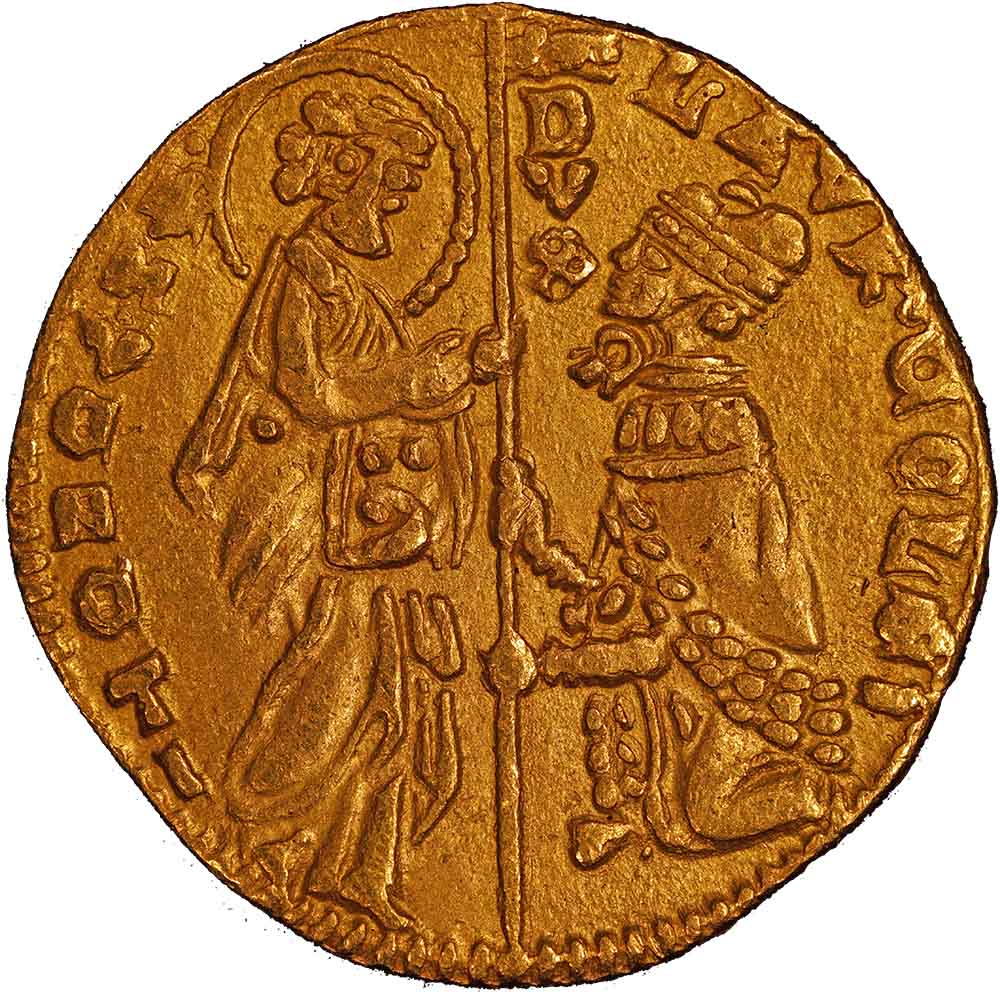
I am feeling like an idiot as now I have to repeat last nights work. Here is the coin I used to sort the issue out


Stacking-Issue:-What-Am-I-Doing-Wrong?
Edited by austrokiwi
05/28/2016 01:39 am
Pillar of the Community
Learn More...
United States
4053 Posts
 Posted 05/28/2016  01:47 am  Show Profile   Bookmark this reply Add rmpsrpms to your friends list Get a Link to this Reply
Some folks would pay extra for that swirly-bokeh look!

Final result is really beautiful. Great coin and image. A few bits of stray stuff in the white field especially lower left.
Contact me for photographic equipment or visit my home page at:
http://macrocoins.com
Pillar of the Community
austrokiwi's Avatar
2087 Posts
 Posted 05/28/2016  02:19 am  Show Profile   Bookmark this reply Add austrokiwi to your friends list Get a Link to this Reply

Quote:
Final result is really beautiful. Great coin and image. A few bits of stray stuff in the white field especially lower left.


Thanks I use a black background for all my shots and evey so often when editing I miss dust flecks which sometimes aren't removed with the rest of the background. I am much more careful with the final images.the one here was just to show the coin
  Previous TopicReplies: 3 / Views: 1,397Next Topic  

To participate in the forum you must log in or register.


Disclaimer: While a tremendous amount of effort goes into ensuring the accuracy of the information contained in this site, Coin Community assumes no liability for errors. Copyright 2005 - 2026 Coin Community Family- all rights reserved worldwide. Use of any images or content on this website without prior written permission of Coin Community or the original lender is strictly prohibited.
Contact Us  |  Advertise Here  |  Privacy Policy / Terms of Use

Coin Community Forum © 2005 - 2026 Coin Community Forums
It took 0.21 seconds to rattle this change. Forums