| Author |
 Replies: 13 / Views: 1,961 Replies: 13 / Views: 1,961 |
|
|
Valued Member
United States
441 Posts |
As the subject says, I'm running into this problem. I'm using a Rodagon 80mm at f8, ISO 100, Tungsten WB with Jansjo lighting, Pentax auto bellows, on a Canon EOS 1000d to pic LWC's. The RAW pics are near a identical match for coin in hand. However, when I convert to JPG, I seem to lose some detail and the color changes to a more yellowish tint. I have the camera and Canon DPP set to use AdobeRGB ICC and my post software is setup with the same. What am I doing wrong? Since RAW images cannot be uploaded here, here's a link to look at the RAW. I usually shoot a bit dark then tweak in post: https://drive.google.com/file/d/0Bx...?usp=sharingConverted JPG file 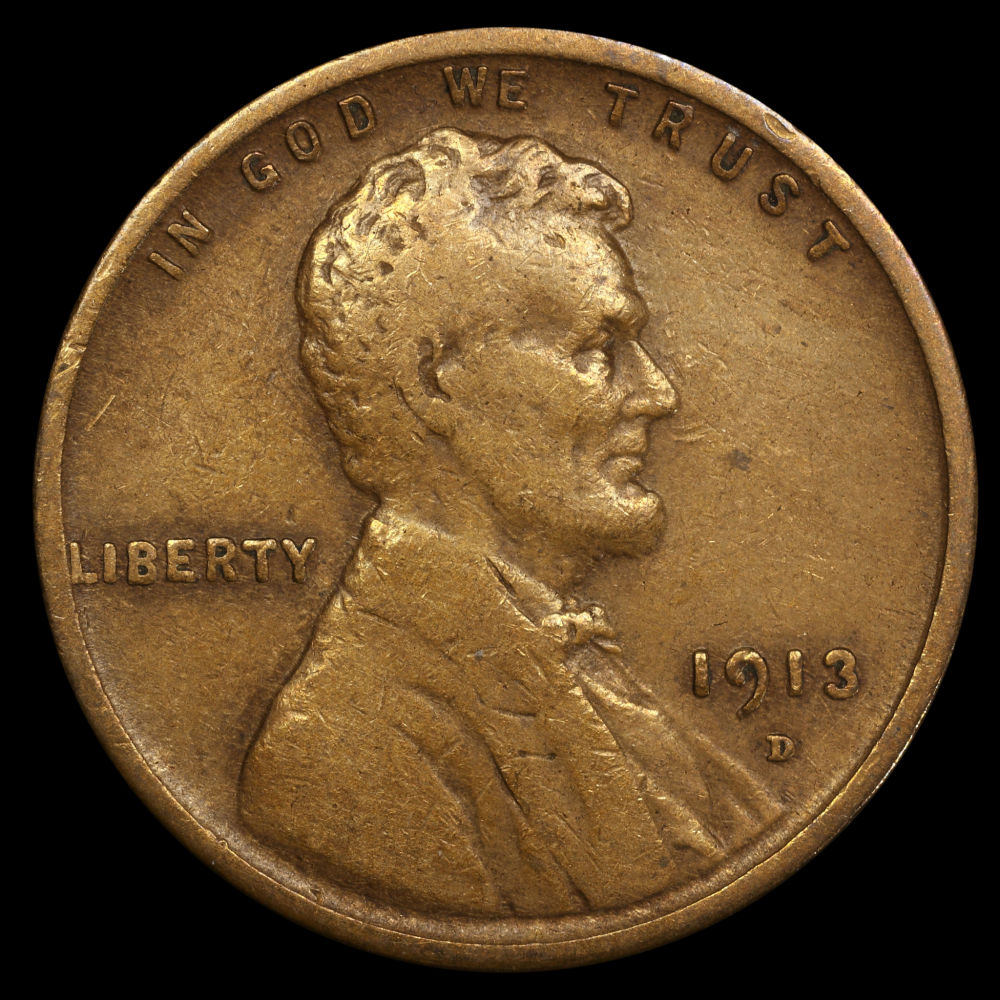 |
|
|
|
Pillar of the Community
2087 Posts |
ON my monitor I can't see any difference between the Raw and Jpeg
|
|
Valued Member
 United States
441 Posts |
Austrokiwi.....to my eye, the .jpg has a brassy tint whereas the RAW is more patina copper color. Maybe I'm being to critical.....
|
|
Pillar of the Community
Canada
4227 Posts |
I have a fairly large retina display and, although the two images look virtually the same, there is a bit of a glossiness to the jpg, but that's about all I notice and that's looking REALLY closely.
|
|
New Member
Greece
45 Posts |
It's a whole story! The color space you use (adobe), has different range of colors compared to sRGB. Internet, for the time, is made to accept only sRGB. So when you work on Adobe, the internet cannot show all range of colors of your photo which is Adobe. This is the reason most photographers use sRGB instead of Adobe. Read this article and other similar... http://www.color-management-guide.c...rophoto.html |
|
Pillar of the Community
 United States
4051 Posts |
I took your RAW image and did a jpg conversion, without changing any of the source parameters. Only change I made was to crop to 2500x2500 and then downsize to 1000x1000 to match the jpg parameters. There is a definite red shift in your jpg image vs the original CR2. The histogram is definitely shifted vs the original. How did you edit the file prior to doing jpg conversion. Here's the cropped and downsized raw file, presented as a jpg:  |
|
Valued Member
United States
441 Posts |
Ray,
I don't recall if I did or not. My usual process is to take the pic in RAW, circle crop in DPP, then if needed, adjust the brightness, contrast, saturation, and sharpness. RARELY do I touch the hue settings. Then I convert/save to JPG.
If you like, I'll retake the pic and post a new link with no processing at all. Then you can apply your expertise and LMK where I'm going off the rail.
|
|
Valued Member
United States
441 Posts |
I took some new pics of this coin in RAW, one with a Componon-S 80 and the other with a Rodagon 80. Here are the links to view: https://drive.google.com/file/d/0Bx...?usp=sharinghttps://drive.google.com/file/d/0Bx...?usp=sharingI then went into the histogram to compare. On screen, they're virtually identical, but you can see a hint more red in the Rodagon pic. The histogram shows an increase in RGB with the Rodagon as well. Also, pics are nearly identical to in hand. I did revert my workspace color and camera color to sRGB, so all match. That did make a bit of difference. Additionally, I can't seem to get some of these LWC's to show the rich/dark brown patinas. Suggestions on how to make the pics show the richer browns vs. looking too tan or blonde (not that tan/blonde isn't a good thing  )? Edited by andywoj00
06/06/2016 12:43 pm
|
|
Pillar of the Community
United States
4051 Posts |
Andy,
I'll take a look at the new pics later tonight, but I don't think I can tell you what is going wrong with your process unless I know exactly what you're doing. I suggest you stick with the original pic that I converted, and go through your workflow again writing down everything you do, then publish the final image and al processing steps. I could then follow through the same steps and see what causes the problem.
Ray
Contact me for photographic equipment or visit my home page at: http://macrocoins.com |
|
New Member
Greece
45 Posts |
Andy, since you reverted everything in sRGB (DPP also) now fix your WB and I think you are done.
|
|
Pillar of the Community
United States
4051 Posts |
I did a little editing during lunch and I think what's going on is your edited image has quite a bit more saturation than the original raw image, so it ends up just looking more vibrant than the original. Here's my edited image, where all I changed was levels plus a little sharpness. Looks more like your published jpg.  Contact me for photographic equipment or visit my home page at: http://macrocoins.com |
|
Valued Member
United States
441 Posts |
Nickos- I don't think there's anything I can do with the WB. Closest setting in the canon's cam is the Tungsten setting for the Jansjo lights. Unless there's something in the post software (PSP X8) that I can do. Ray - Appreciate all your tweaking on the RAW. Still looks a bit brassy/yellow to me, but better than my original post pic. More brownish and it would be dead on. May be my monitor calibration or something. I'll work through it or just accept the final result. Not getting paid for pics, for my use only. Maybe I'm just a little too critical  |
|
Pillar of the Community
United States
4051 Posts |
Andy...I was not trying to make it look better, just to match what I saw in your original jpg conversion. I think it's just a matter of having more saturation rather than a hue issue. More saturation brings out the hue more strongly. I agree with Nickos though...your WB is off. If Tungsten is not giving you good results, you will need to do a custom WB. You can do it after the fact in RAW, but it's still better to do it before you take the pic.
Contact me for photographic equipment or visit my home page at: http://macrocoins.com |
|
Valued Member
United States
441 Posts |
I'll give the custom WB a shot using some WB calibration cards I have. Thanks to all for the advice.
|
| |
Replies: 13 / Views: 1,961 |
|





 Posted 06/04/2016 2:34 pm





