| Author |
 Replies: 15 / Views: 2,082 Replies: 15 / Views: 2,082 |
|
|
Pillar of the Community
United States
949 Posts |
I'm not sure I understand what's happening.
I have finally received all the components for my macro coin photo setup. I bought a Canon XSi Rebel 450D camera body for use with bellows (Nikon PB-6 and Olympus OM) linked to the camera via the appropriate Confirm adapters. Both bellows systems will support imaging through enlarger lenses and microscope objectives. However, the use of the bellows takes me out of the range of the operating manual for the camera body.
My present problem is this:
Common configuration - lights at 10 and 2; camera on either bellows, equipped with the 105 Micro-Nikkor stopped down to f11 .
When I set the camera for M (manual) operation, this config requires camera settings of 1/15 sec at ISO 400. When I change aperture, the picture gets darker or brighter, and I am in control of how much it changes.
With the same setup when I set the camera to Av (Aperture preferred) mode the exposure does not seem to change even when I decrease the lighting, or change the aperture, or move in on the subject, or change the ISO settings. Moreover, the shutter speed seems faster than in M mode and does not sound like it changes with these variations in lighting. All exposures turned out about the same.
Is this how it is supposed to work? How do I regain exposure control in Av mode with this camera body?
|
|
|
|
Pillar of the Community
Canada
2784 Posts |
i use AV mode set the iso to 100. set the F stop on your lens to F8. let the camera do the rest. what type of metal are you photographing. if you dont mind my asking.
|
|
New Member
United States
1 Posts |
Are you using EOS Utility for tethering? Is "Exp. simulation" enabled on your camera? (I assume that's available on your camera; my camera is a 60D.)
On my camera, when I use M mode with exposure simulation on, the image on the monitor gets darker and brighter as I change light, shutter speed, or ISO (aperture is fixed). If I adjust the exposure so the image looks good on the monitor, the captured image is overexposed by several stops, so I have to adjust it. A proper exposure results when the image on the monitor is quite dim (impossible to focus with). I contacted Canon about this and they said this is normal, if you can believe that.
What do you mean by "the exposure does not change" when you were using Av mode? Is the image on the monitor not changing or is the captured image not changing? Isn't the shutter speed changing?
I haven't used Av mode in a long time but I can investigate that if it will help you.
|
|
Valued Member
United States
67 Posts |
It sounds like the camera is working as expected. In Manual mode, you need to set the aperture, shutter speed and ISO, and any of those changes will directly affect the net exposure. In AV mode (an automatic more), the camera is metering the frame, expecting an average of 18% gray, and adjusting shutter speed to get you the same exposure, regardless of how you set the aperture. That's how you'd expect an automatic exposure to happen.
Which mode you use is up to you. I prefer Manual because I find that once you set it for the shooting session, it is much closer to "correct" than having the camera compensate and adjust exposure based on the type of metal in the coin.
|
|
Pillar of the Community
United States
9395 Posts |
Quote:
If I adjust the exposure so the image looks good on the monitor, the captured image is overexposed by several stops, so I have to adjust it. A proper exposure results when the image on the monitor is quite dim (impossible to focus with). I contacted Canon about this and they said this is normal, if you can believe that.
That happened to me, too, when using M mode. You might try Tv mode, and see what happens. You adjust the shutter speed as with M, and the camera tries to adjust the aperture, but it can't. It ends up being effectively the same as M, except the monitor image and exposure are pretty close (at least on my T6s). |
|
Pillar of the Community
 United States
4621 Posts |
You can't get automatic aperture control with this kind of setup - the electronics aren't compatible, even if (unlikely) they are being transferred through the bellows.
It's over-exposed because the camera thinks the lens is wide open for the measurements and will then be partly closed down (less light) for the actual shoot, but this is not occurring.
-----Burton 50+ year / Life / Emeritus ANA member (joined 12/1/1973) Life member: Numismatics International, CONECA Member: TNA, FtWCC, NETCC, EveryCountry (online) coin club Owned by three cats and a wife of 40+ years (joined 1983) Author: 3rd Edition of the Sample Slabs book, https://www.sampleslabs.info/ |
|
Pillar of the Community
 United States
4051 Posts |
There is a bug in the Canon firmware that they refuse to fix. The bug makes M mode exposure simulation worthless.
Av mode ignores the Aperture and adjusts Time and ISO to meet target exposure levels. The target is NOT ALWAYS 18% gray, but depends on the metering mode, and also depends on if you're in Live View. I always use Av mode (which simulates exposure correctly), and Live View (so I can see the image on screen). The Live View metering mode uses the zoom/magnifier/white box. Always move the white box to encompass the brightest highlights in the image to avoid over-exposure.
Contact me for photographic equipment or visit my home page at: http://macrocoins.com |
|
Valued Member
United States
441 Posts |
Quote:
The Live View metering mode uses the zoom/magnifier/white box. Always move the white box to encompass the brightest highlights in the image to avoid over-exposure.  Ray has had to beat me up several times regarding the white box and how to use it  . The step above will definitely make a huge difference in getting the exposure right. I usually underexpose a bit so I can tweak later. |
|
Pillar of the Community
 United States
949 Posts |
Thanks for all the suggestions, guys. Quote:
Av mode ignores the Aperture and adjusts Time and ISO to meet target exposure levels. The target is NOT ALWAYS 18% gray, but depends on the metering mode, and also depends on if you're in Live View. How do I set the "target exposure level" in Live View? Should I be "normalizing" the camera with readings from an 18% gray card? If so, how do I do that through the macro setup? Given the errors in M mode, how can I override the Auto exposure for creative control? Rocky asked about metal - the coin that is giving me fits is billon (a blend of silver and copper/bronze) with some surface irregularities. The lights are diffused floods with a 5000-5100K color temperature, which means everything comes out a tad warm since this is shy of true daylight by a full 500+ degrees. But before I attend to that, I need to stabilize the auto-exposure features. In Av mode I am getting the same level of exposure when I use both lights or only one from either side. |
|
Pillar of the Community
Canada
2784 Posts |
lrbguy good way to do this is to power up your camera. turn on liveview get ready to take a picture. take images of your screen. post them here. then the group will guide through the setting. I have done this in the past and it works great. because they will tell you what to set and how. hope this helps.
|
|
Pillar of the Community
United States
949 Posts |
Following Rocky's suggestion, here is what I observed shooting in Av mode. The pics below are composites of a screenshot of the view as it was being composed in Live View showing the settings info, and an insert of the final image as exposed. (All "screenshots" were taken externally with another camera.) The larger view is what the cam saw, and the inset is what it gave. No settings on the camera were changed between shots. The lights are at positions 10 and 2 at the level of the lens. Both lights on: 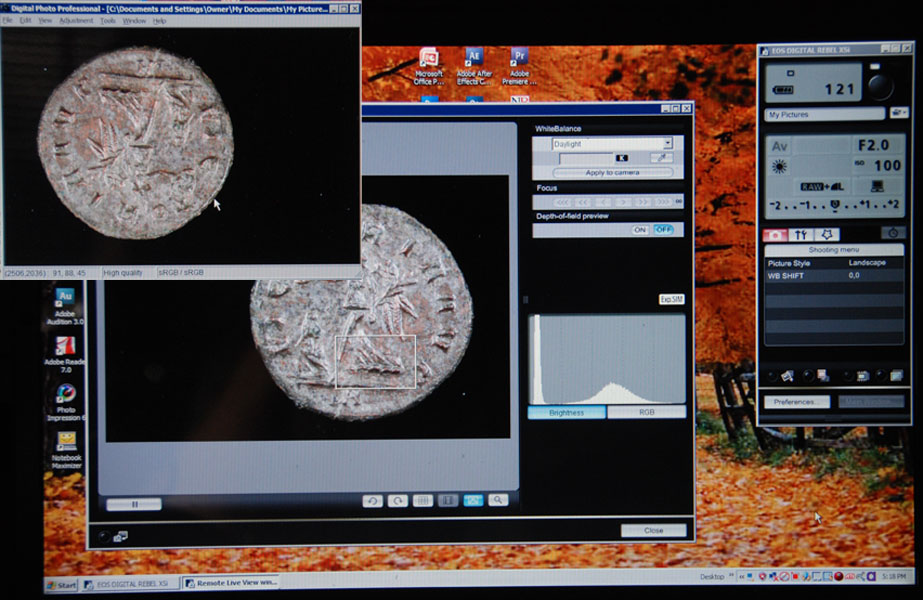 Left light only: 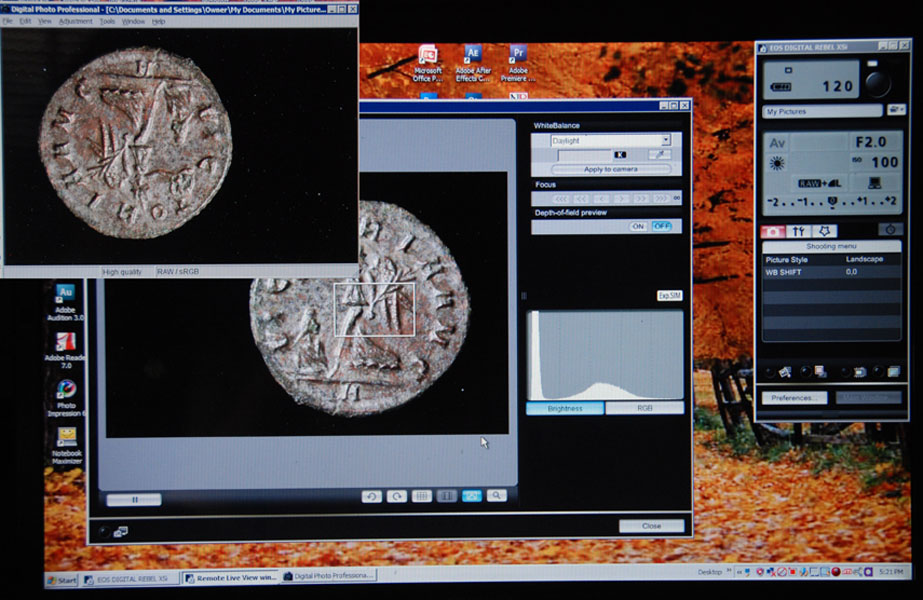 Right light only: 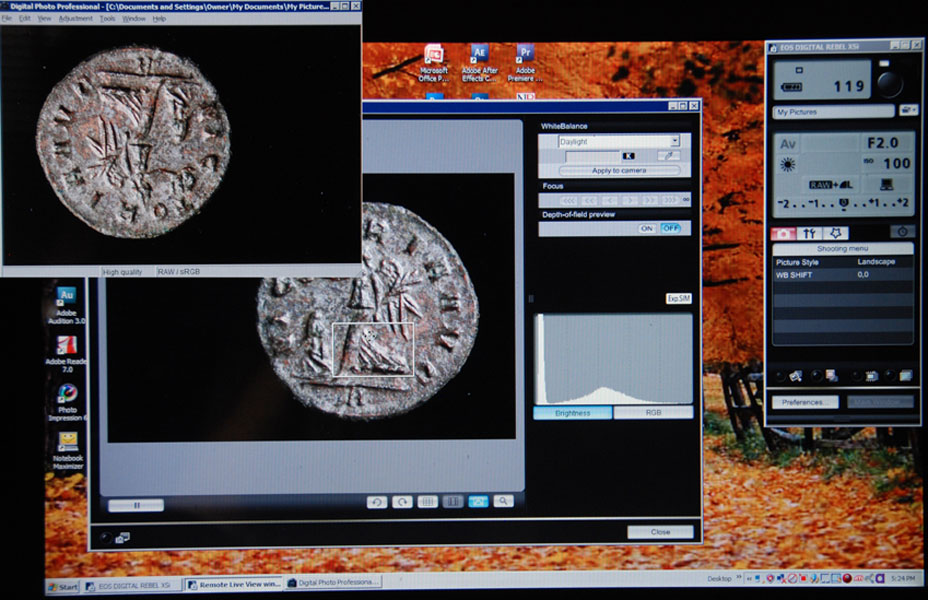 As you can see, reduction in the overall light level did not appreciably reduce the overall level of exposure. The direction of the light origin does change, but the intensity remains fixed. While it is handy being able to see what the camera is likely to shoot beforehand, in this mode it is difficult to take shots where the light is intentionally attenuated. In this case, the highlights are too bright and exaggerate the surface condition with specular highlights that need to be toned down, but resist reduction in post. Edited by lrbguy
06/25/2016 09:42 am
|
|
Pillar of the Community
United States
4051 Posts |
Yep, that's how Av works. No matter what light you hit it with, it will adjust exposure time to compensate. A great time saver!
See the slider in the middle of the control box, goes from -2 to +2? That's your creative exposure control, allowing you to manually adjust the target Av exposure level. Use it to eliminate blowouts, assuming you have the white box over the brightest highlight areas.
|
|
Pillar of the Community
United States
949 Posts |
That's a help Ray. Thanks. What is the scale on that box? To the left: Reduction of aperture by two stops, or reduction of illumination by two stops? Since the aperture does not actually change, I assume it is the latter via shutter speed? ISO? Some combination thereof? At some point there should be more noise I suspect.
|
|
Pillar of the Community
United States
4051 Posts |
It is exposure reduction by stops. If you have ISO fixed, then it is just by shutter speed. If ISO is allowed to vary, then the camera will figure out its best guess for the optimum shutter speed and ISO combination. With ISO 100, you have a lot of flexibility before noise is a problem.
|
|
Pillar of the Community
United States
949 Posts |
Okay, thanks again, Ray. As much as I dislike auto features I'm starting to feel better about Av mode. I am sure it will be a particular blessing in high mag situations using microscope objectives whether focus stacking or not.
But suppose I want to do a film noir kind of thing and force the camera to accept imbalances with deep shadow or low key light and keep the tones subdued. Obviously for that kind of thing I will have to go with full manual mode. So what is the glitch I will be facing? I.e. the bug that is going to make my exposure settings inaccurate/unreliable/unpredictable (which is it)?
Is the degree of error consistent, or does it vary with the image size?
|
|
Pillar of the Community
United States
4051 Posts |
I don't know. I have avoided Manual mode due to the bug, so don't know its exposure simulation limitations.
|
| |
Replies: 15 / Views: 2,082 |
|










 Posted 06/23/2016 8:31 pm


