| Author |
 Replies: 76 / Views: 55,917 Replies: 76 / Views: 55,917 |
|
|
|
Pillar of the Community
Canada
586 Posts |
Defiantly need an app for that. I've been thinking of one, where you take a picture of your coin or note with your phone, upload to your app with a brief description and the app automatically links a detailed history behind the coin with a rang of values. Other app users can add comments as well.
Thoughts and does anyone know how to develop such a thing, lol
|
|
Pillar of the Community
Canada
9941 Posts |
Quote:
I have always used Excel. I have different tabs for each type of coin or set I have been using this also and trust me I'm NOT a tecky person. I have over 10,000 listed and you can send it to the lap top or cell phone. With it on the cell I can go into a shop and see what I have and grade. You just can't work with it on the cell. (well I can't) |
|
Pillar of the Community
United States
1305 Posts |
Quote:
If I were going to add photos to my spreadsheets, I would link locally to my own photos on my machine. The only thing I would want to hyperlink externally would be pricing information. That is what I did. Linked my photos on my computer. They all will not work now. |
|
CCF Advertiser
United States
1533 Posts |
I did that too, but then went to CoinManage which stores them on your machine in their own database, so if you reorganize your files, no links are broken.
|
|
Pillar of the Community
United States
1305 Posts |
Quote:
Downloaded the demo of CoinManage, and it would not install on my Mac. Windows only. I have a Mac, and the only software for Mac that I have found is US Coin Collector for OS/X. Price is $24.95. Anyone have knowledge about this product? |
|
Pillar of the Community
United States
1261 Posts |
Quote:
I have a Mac, and the only software for Mac that I have found is US Coin Collector for OS/X. Price is $24.95. Anyone have knowledge about this product? If that's the software from SaintsSoft then I highly recommend it. I have their app downloaded on my iPad and phone and it works great. It's like carrying my collection around all the time. I've had it for at least 4 years and they are always keeping it updated and improving the functionality. |
|
Moderator
 United States
196572 Posts |
Quote:
That is what I did. Linked my photos on my computer. They all will not work now. That is rather odd. I have never had that problem (I do it in work related spreadsheets a lot). |
|
Pillar of the Community
United States
1305 Posts |
Quote:
That is rather odd. I have never had that problem (I do it in work related spreadsheets a lot). Here is a screen shot of what happens when I try to open the hyperlink photo. All the hyperlinks were functional at one time (2 or 3 months ago). 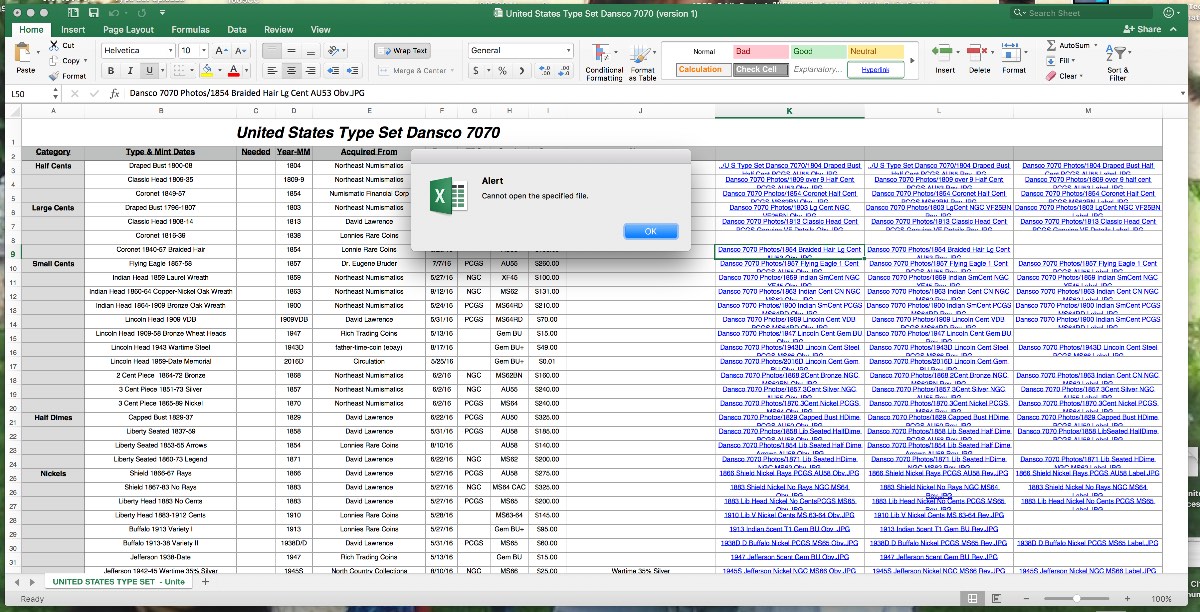 |
|
Moderator
United States
54298 Posts |
Quote:
That is what I did. Linked my photos on my computer. They all will not work now. 1) What exactly did you do (describe steps). 2) What do you mean by "not work now"? |
|
Pillar of the Community
United States
1305 Posts |
Quote:
If that's the software from SaintsSoft then I highly recommend it. I have their app downloaded on my iPad and phone and it works great. It's like carrying my collection around all the time. I've had it for at least 4 years and they are always keeping it updated and improving the functionality. It is from SaintsSoft. And you have convinced me. I have spent some time on their website, and was impressed. Going to buy the software. Will install it on my Mac desktop computer. Thanks. |
|
Pillar of the Community
United States
1376 Posts |
Quote:
Here is a screen shot of what happens when I try to open the hyperlink photo. All the hyperlinks were functional at one time (2 or 3 months ago). Ham, I have only ever seen an excel hyperlink get broken if the filename or path has been moved or changed. Did you rename the directory that the pictures are located in or do something else to change the names or locations of the files? |
|
Pillar of the Community
United States
1305 Posts |
Quote:
They all will not work now. I should of said, none of the hyperlinks work now. About 2 or 3 months ago (last time I checked) they all worked. At the present, none of the photo links work. |
|
Pillar of the Community
United States
1305 Posts |
Quote:
Ham,
I have only ever seen an excel hyperlink get broken if the filename or path has been moved or changed. Did you rename the directory that the pictures are located in or do something else to change the names or locations of the files? It is possible, but I doubt it. Thanks to all for the help and suggestions about this, but I have taken the position to not try to correct the problem. It takes too much time and effort. I am going to use another type of software to include photos. |
|
Moderator
United States
54298 Posts |
Your spreadsheet's reference is to a file in "Dansco 7070 Photos".
Are the photos linked to still in "Dansco 7070 Photos"?
If yes....
Is your spreadsheet in the exact same folder, "Dansco 7070 Photos", or in the next level up (the folder or drive that contains "Dansco 7070 Photos"?
If your spreadsheet is not in the next level up folder (or drive if "Dansco 7070 Photos" is in the root directory), then the links will not work. If this is the case, just move the spreadsheet back to the folder just above "Dansco 7070 Photos".
EDIT....
I notice some of the links are directly to a file name (that is, no folder name precedes the filename). These are the ones on the bottom part of your spreadsheet screenshot. Are those particular photos in the exact same folder as the spreadsheet? If so, this would mean you have some photos in the same folder as the spreadsheet, and some photos in a different folder.
Edited by nss-52
10/30/2017 12:27 pm
|
|
Moderator
United States
196572 Posts |
I am not sure how Macs behave, but check to see that the links are not relative to the Excel file is located. Can you post a sample of your links from the spreadsheet?
|
| |
Replies: 76 / Views: 55,917 |








 First Page
 Previous Page


 Posted 10/26/2017 1:24 pm


