



Coin Community Family of Web Sites Join Thousands of Coin, Bullion, & Money Collectors
Vancouvers #1 Coin and Paper Money Dealer Royal Estate Auctions - $1 Coin AuctionsSpecializing in Modern Numismatics Coin, Banknote and Medal Collectors's Online Mall 300,000 items to help build your collection! Royal Canadian Mint products, Canadian, Polish, American, and world coins and banknotes. Join Thousands of Coin, Bullion, & Money Collectors


Username:
Password:
Save Password
Forgot your Password?


This page may contain links that result in small commissions to keep this free site up and running.

Welcome Guest! Registering and/or logging in will remove the anchor (bottom) ads. It's Free!

Dpp Is Not Showing Raw Images

To participate in the forum you must log in or register.
Author Previous TopicReplies: 6 / Views: 1,818Next Topic  
Valued Member

United States
441 Posts
 Posted 09/09/2016  01:13 am Show Profile   Bookmark this topic Add andywoj00 to your friends list Get a Link to this Message Number of Subscribers
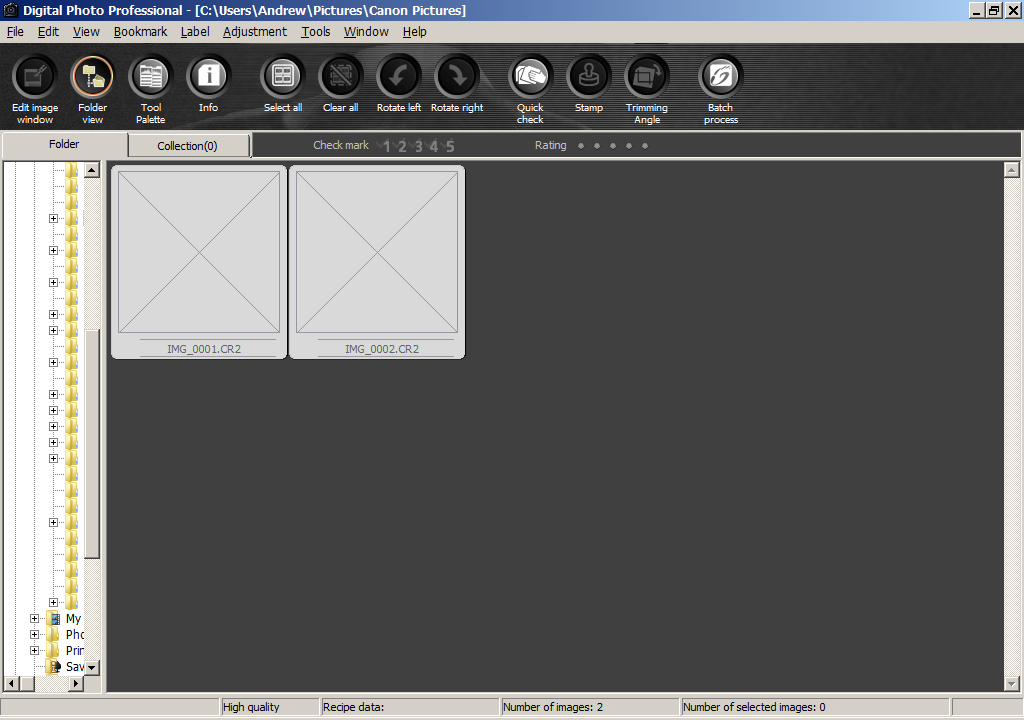
I upgraded to a T6i and loaded up the newer version of EOS utilities. However, DPP 3 that I used with the Rebel XS 1000D will not show images taken with the new camera. See below.

If I load up DPP 4, I can edit the images, but I then lose the circle crop feature from DPP 3 that I really like to use before converting to JPG's. Any ideas? Is there a way to fix it or will I have to use another program to circle crop the RAW?


Dpp-Is-Not-Showing-Raw-Images
Rest in Peace
dave700x's Avatar
United States
10625 Posts
 Posted 09/09/2016  08:38 am  Show Profile   Bookmark this reply Add dave700x to your friends list Get a Link to this Reply
I'm still using DPP3 and a 1000D so I obviously don't have an answer, just a suggestion, maybe try Canon tech support.

Valued Member
United States
441 Posts
 Posted 09/09/2016  1:30 pm  Show Profile   Bookmark this reply Add andywoj00 to your friends list Get a Link to this Reply
Dave700x,
Sent an email to Canon on this topic..waiting for a response. I put this out here for the field experts to see if a similar issue came up with them. Hope to have a solution (or not) soon.
Pillar of the Community
Canada
2784 Posts
 Posted 09/09/2016  3:46 pm  Show Profile   Bookmark this reply Add rocky to your friends list Get a Link to this Reply
hello andy I have windows 10. some how I got and it has changed my computer. my DPP has shut down. I had to upgrade to canon new digital pro. I had a tec come in to try to fix my computer. he told me that soon a lot of these old programs. will be shutting down. I like the old version. the tec got it reloaded back on to my computer. he set up a folder system with sub folders. I am very happy that it is back up. I am like you I really like the old version. hope you get it sorted out Andy have a great one.
Valued Member
United States
441 Posts
 Posted 09/09/2016  3:51 pm  Show Profile   Bookmark this reply Add andywoj00 to your friends list Get a Link to this Reply
Thanks Rocky. BTW, what is Canon New Digital Pro? Is that unique to Windows 10? I have Win 7 now...absolutely no desire to go to Win 10.
Pillar of the Community
Canada
2784 Posts
 Posted 09/09/2016  10:17 pm  Show Profile   Bookmark this reply Add rocky to your friends list Get a Link to this Reply
Andy canon new digital photo professional. this is there state of the art editing program. Andy it has a learning curve. It dont matter what camera you attach to your computer. it grabs all pictures Sony any canon camera. the nikon camera pictures. it takes them all in automatically. it sets then up thou in there own groups. canon eos 70d Sony A7R mark II. Nikon d7100. I like that feature. I am starting to get use to using this program. Its a lot more advanced. if you try it take your time. it gets easier the more you work with it. dont even has to use photo shop elements. this new program has it all. I wish you luck. Andy you are taking excellent photos very well done.
Pillar of the Community
Learn More...
BStrauss3's Avatar
United States
4593 Posts
 Posted 09/10/2016  11:37 am  Show Profile   Bookmark this reply Add BStrauss3 to your friends list Get a Link to this Reply
I suspect the old Canon camera driver was not compatible with Win10 - I had to download and install the new driver and then everything works, but I don't use DPP.

Also check the associations - the raw files (.cr2 or whatever) might not be associated with Canon's program, meaning no preview capability.
-----Burton
50+ year / Life / Emeritus ANA member (joined 12/1/1973)
Life member: Numismatics International, CONECA
Member: TNA, FtWCC, NETCC, EveryCountry (online) coin club
Owned by three cats and a wife of 40+ years (joined 1983)

Author: 3rd Edition of the Sample Slabs book, https://www.sampleslabs.info/
  Previous TopicReplies: 6 / Views: 1,818Next Topic  

To participate in the forum you must log in or register.


Disclaimer: While a tremendous amount of effort goes into ensuring the accuracy of the information contained in this site, Coin Community assumes no liability for errors. Copyright 2005 - 2026 Coin Community Family- all rights reserved worldwide. Use of any images or content on this website without prior written permission of Coin Community or the original lender is strictly prohibited.
Contact Us  |  Advertise Here  |  Privacy Policy / Terms of Use

Coin Community Forum © 2005 - 2026 Coin Community Forums
It took 0.3 seconds to rattle this change. Forums