| Author |
 Replies: 23 / Views: 4,942 Replies: 23 / Views: 4,942 |
|
Pillar of the Community
United States
666 Posts |
Aaaack! I just finished writing a rather long post, clicked on "Post New Topic", and received the dreaded error message: "Sorry, Topic Titles must be at least 20 characters long." Boom! Entire post gone. Of course, I should have written it in a word processor with auto-save first, and then copied-and-pasted it into the forum, but alas, I did not do so. Oh well, lesson learned (again).
Ok, so I'll try again. (I am typing this in a Word doc first...)
These will be newbie questions, so bear with me! I am finally getting back to this after a long delay due to multiple factors including a vexing medical condition, although that seems to be gradually getting better. (Yay!)
Here are my initial questions:
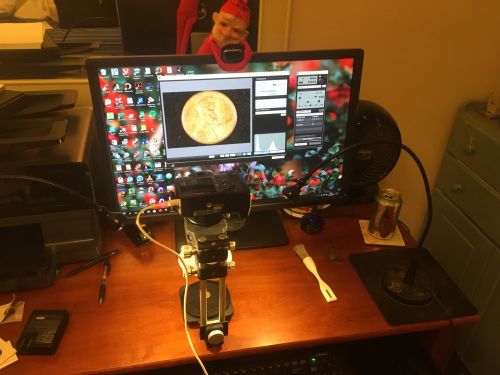
 Do you see any problems with my physical setup, e.g., placement of the lights or anything else? Do you see any problems with my physical setup, e.g., placement of the lights or anything else?
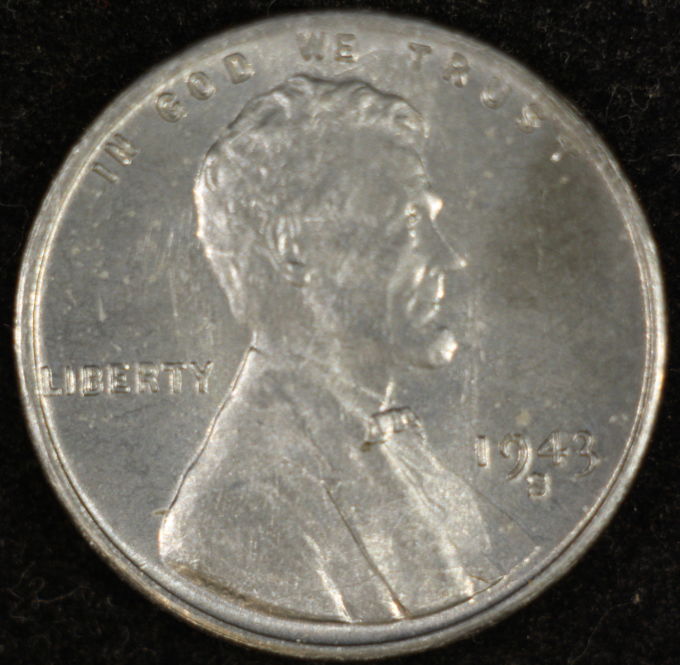
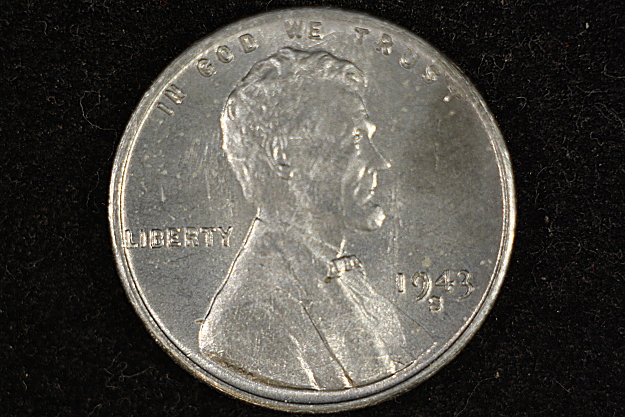
Looking at the photo below (1943-S Lincoln Cent), what might I be doing wrong?
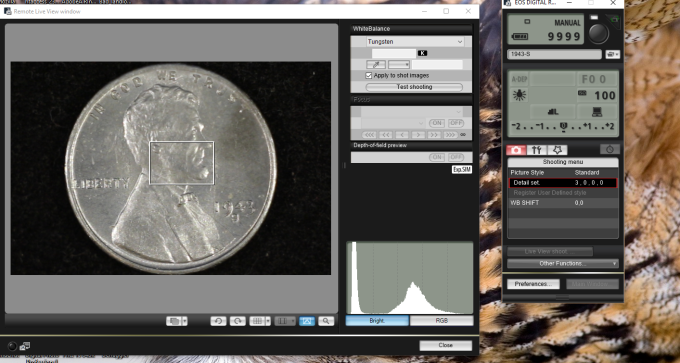
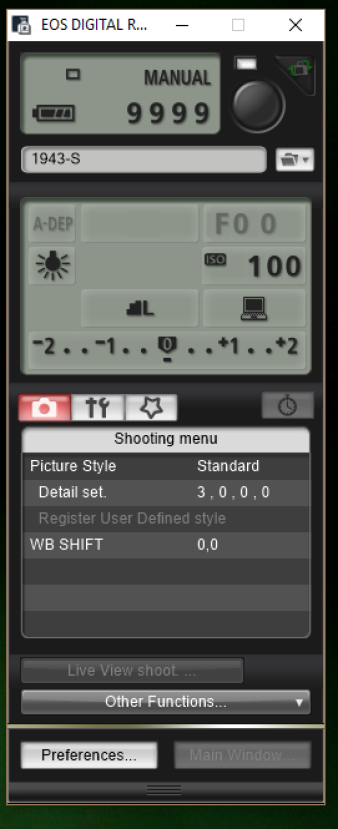
Are my camera settings correct?
Here is a photo of my physical setup:
My settings for the Shooting menu are:
Picture Style: Standard
Detail set. 3, 0, 0, 0
WB SHIFT 0,0
Screen shots of camera settings:
Here is the coin I photographed today, first the 'raw' photo, i.e., without any editing other than the CCF Free Image Optimizer:
And then after some editing using Digital Photo Professional (although I need to read more about how to use that program effectively) and LunaPic, an online editor.
Thank you in advance for any suggestions, advice, or pats on the head for my little elf. 
~ Mark Edited by dd27
12/30/2016 12:58 am
|
|
|
|
Bedrock of the Community
United States
12477 Posts |
I'd say that's a nice setup. Here's mine:  Seriously, though, I really like the setup and pictures and think the edited one is definitely an improvement. My actual setup is me hovering over the coin/s with a phone camera and using apps to edit so I have a looong way to go. The problem I run into is the line between making a more life-like photo and over-editing and making something look better than it actually is, especially with toned coins, and wondering what it actually looks like on everyone else's screen. In Memory of Crazyb0 12-26-1951 to 7-27-2020
In Memory of Tootallious 3-31-1964 to 4-15-2020
In Memory of T-BOP 10-12-1949 to 1-19-2024
Edited by spru
12/30/2016 01:14 am
|
|
Bedrock of the Community
United States
12477 Posts |
Revisiting it, I can't exactly tell what the light sources are, maybe because I'm not familiar with the equipment. I believe that multiple lights from different angles yield a better and shadow-reduced image.
For coins, diffused light seems to work the best so that reflection off of lustry surfaces does not hide detail.
As far as settings go, it is probably coin specific. If you used the same setup and shoot settings for a copper cent you wouldn't get the same results. So, white balance is very important to recreate what you see.
Also, any objects near the coin being photographed can reflect their color onto the coin if not blocked, so a light box would probably work better.
Just like white balance, the background can effect the image in a negative way and different colored coins (even the difference between silver and nickel) may require a slightly different colored background to achieve the best results. As long as you have full manual control of the settings, this shouldn't be a problem but it may effect the end result if just in the slightest of ways.
In Memory of Crazyb0 12-26-1951 to 7-27-2020
In Memory of Tootallious 3-31-1964 to 4-15-2020
In Memory of T-BOP 10-12-1949 to 1-19-2024
|
|
Pillar of the Community
United States
1305 Posts |
The "raw" photo seems out of focus. Ham
|
|
Valued Member
United States
441 Posts |
Here's my humble advice/critique. Hope it can help:
- lighting is too harsh and needs to be positioned differently to allow some shadowing on the coin to bring out detail. 10 and 2 would be a good start
-pic is out of focus a bit. I would elevate the coin to allow focus more on coin vs on the background.
-set the camera mode to Aperture Priority
-setup is in a bad spot in comparison to the location of the monitor. Lighting from the monitor will be on/affect the coin pic
-white balance needs to be adjusted. With those lights, I'd use Tungsten or calibrate the WB with a white card
-try dropping the EV a few thirds to prevent blowing out the highlighted parts of the coin. When using Live View, make sure the white box is over the brightest part of the coin to help adjust exposure
Please provide model of camera and what lens you're using and the f-stop on the lens
|
|
Pillar of the Community
 United States
4051 Posts |
In addition to the excellent advice above, I'd add the following:
I find that undiffused Jansjos work best with Lincoln Cents at around 100-125mm from the coin. They should also be at a higher angle vs the coin, basically as high as you can make them. By "high" I am saying get them as close to vertical pointing down at the coin as possible, which usually means up against the lens or even slightly between the lens and the coin if the 100-125mm distance is between the lens and coin.
I would recommend f8 for Cents.
|
|
Pillar of the Community
 United States
666 Posts |
Thank you so much everyone!  Very helpful advice.  I shall return with an update next year. ~ Mark P.S. My son got me with "I'll see you next year" - I experienced a couple seconds of parental panic before I realized that since he is going to a New Year's Eve party, I won't see him until tomorrow, i.e., 'next year'.  Edited by dd27
12/31/2016 11:24 am
|
|
Pillar of the Community
United States
666 Posts |
I didn't get everything fixed, but I've made some progress thanks to y'all's help.  Also, I forgot to mention that I purchased this system from MacroCoins.com, a company I highly recommend for excellent customer service, great prices, and in-depth knowledge of coin photography. Plus, the owner ( rmpsrpms) is an active member of this forum, and, as he just did in response to my post, often responds to requests for assistance. And that's in addition to all the other experienced coin photographers here on CCF, such as andywoj00, who share their expertise with those of us in the early stages of the learning process. Quote:
I find that undiffused Jansjos work best with Lincoln Cents at around 100-125mm from the coin. They should also be at a higher angle vs the coin, basically as high as you can make them. By "high" I am saying get them as close to vertical pointing down at the coin as possible, which usually means up against the lens or even slightly between the lens and the coin if the 100-125mm distance is between the lens and coin. - I have the lights pointing almost straight down, 110mm from the coin, just above the lens and the diffuser that is attached to the lens so that the light is shining down through the diffuser. Quote:
I would recommend f8 for Cents. - Done. Quote:
-set the camera mode to Aperture Priority. - Done. Quote:
-setup is in a bad spot in comparison to the location of the monitor. Lighting from the monitor will be on/affect the coin pic. - I now am turning the monitor off when I take the picture. Quote:
-white balance needs to be adjusted. With those lights, I'd use Tungsten or calibrate the WB with a white card - I have it set on Tungsten (which is what Ray had also recommended when I purchased the setup from him). Quote:
-try dropping the EV a few thirds to prevent blowing out the highlighted parts of the coin. When using Live View, make sure the white box is over the brightest part of the coin to help adjust exposure. - What is EV? I searched through the Canon manual but could not find that term. (I will be taking an intro photography course next week though, so I'll be learning... ;o) Quote:
Please provide model of camera and what lens you're using and the f-stop on the lens. Camera: Canon EOS Rebel XS Lens: Nikon 39-42mm (...Or is that the lens adapter? Ray will know the correct answer.  ) F-Stop: 8 (per Ray's recommendation). Photographs taken today (no editing) after making (most of) the suggested adjustments: 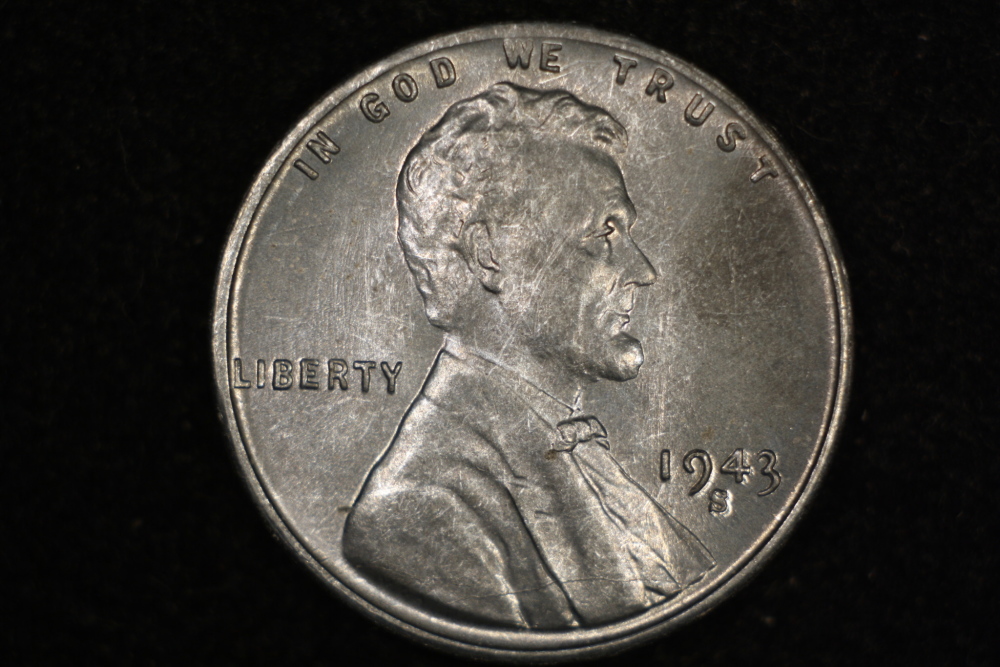  Please let me know of any other suggested adjustments I might make. THANK YOU! Mark Edited by dd27
01/02/2017 11:23 pm
|
|
Pillar of the Community
 United States
5720 Posts |
EV is for exposure compensation (exposure value). On Canon SLRs you can adjust with the Av button on the back of the camera. That's a great looking setup! Much nicer than mine...
|
|
Pillar of the Community
United States
9395 Posts |
Looks good with the high-angle lighting. One thing you can try is turning off one light or the other. Sometimes this gives a more 3D look, although it isn't necessarily better for all coins. With a lens attached to the diffuser, you can move the lights around: for example, one close (less diffuse) and one farther from the diffuser (more diffuse), until you get the look you want.
|
|
Pillar of the Community
United States
1970 Posts |
Nice! I'm still tinkering with my camera.
|
|
Bedrock of the Community
United States
12477 Posts |
Quote:
Nikon 39-42mm (...Or is that the lens adapter? That sounds like an upstep filter adapter. If then, what filter are you using? I'm assuming UV or polarizing... Just another thing to consider. In Memory of Crazyb0 12-26-1951 to 7-27-2020
In Memory of Tootallious 3-31-1964 to 4-15-2020
In Memory of T-BOP 10-12-1949 to 1-19-2024
|
|
Pillar of the Community
United States
1305 Posts |
The diffuser you mention that is attached to the lens-could you show us what that looks like (pic), and how is it made? Thanks, Ham.
|
|
Pillar of the Community
United States
666 Posts |
Quote:
EV is for exposure compensation (exposure value). On Canon SLRs you can adjust with the Av button on the back of the camera. That's a great looking setup! Much nicer than mine... Thank you! Ah, I had read about exposure compensation in the Canon manual. I will go back and read it again with my new understanding that exposure value is an equivalent term. Much appreciated! ~ Mark |
|
Pillar of the Community
United States
666 Posts |
Quote:Quote:
Quote:
Nikon 39-42mm (...Or is that the lens adapter? That sounds like an upstep filter adapter. If then, what filter are you using? I'm assuming UV or polarizing... Just another thing to consider. I'll see if Ray can clarify regarding the adapter. The lens is a Nikon EL-Nikkor 63 mm f/2.8 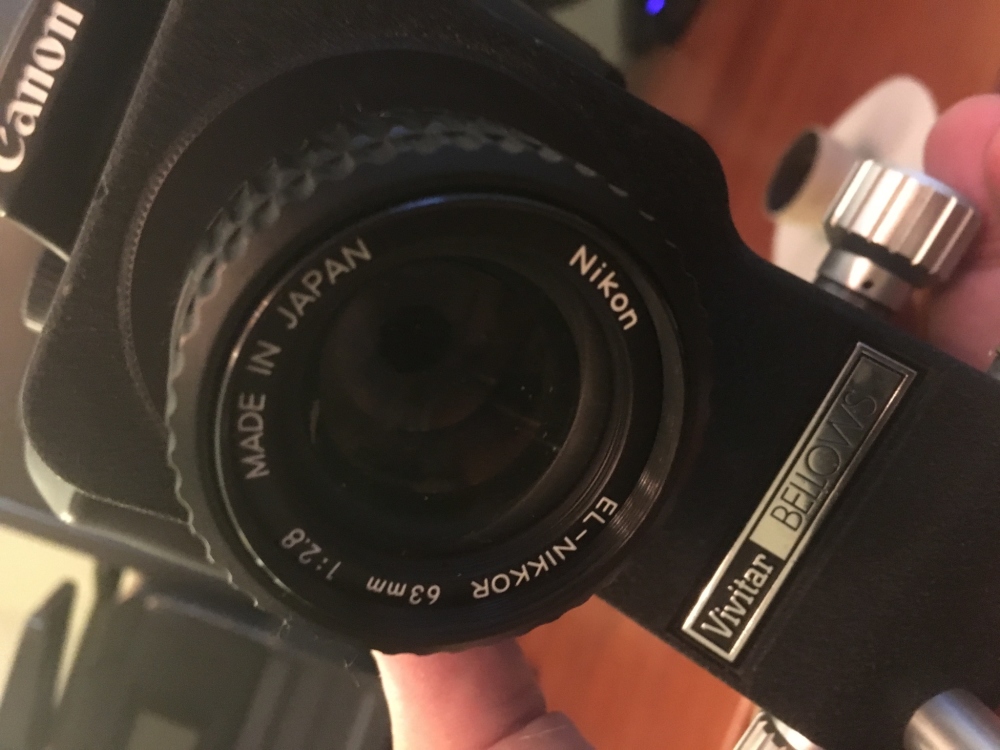 |
|
Pillar of the Community
United States
666 Posts |
Quote:
The diffuser you mention that is attached to the lens-could you show us what that looks like (pic), and how is it made? Thanks, Ham. Ray ( rmpsrpms) handmade the diffuser for me, so I will let him describe how he makes them. Btw, he also refers to this as a 'director', which might be a more accurate name  . Here are some pics: 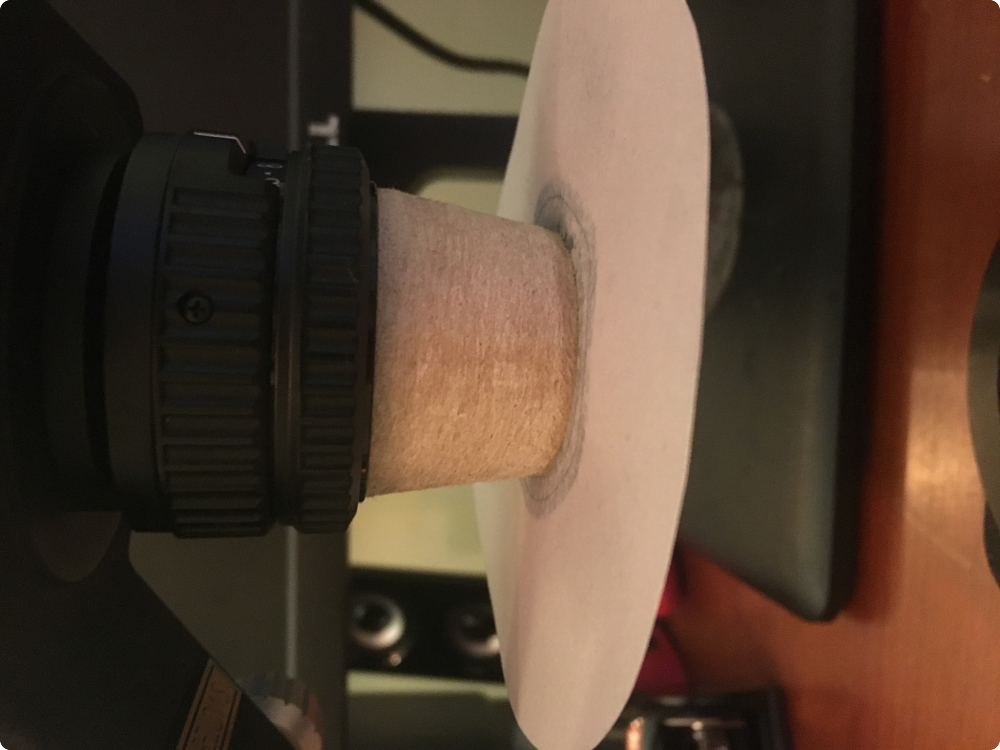    |
| |
Replies: 23 / Views: 4,942 |









 Posted 12/30/2016 03:46 am


