Coin Community Family of Web Sites Join Thousands of Coin, Bullion, & Money Collectors
Coin, Banknote and Medal Collectors's Online Mall Specializing in Modern Numismatics Vancouvers #1 Coin and Paper Money Dealer Join Thousands of Coin, Bullion, & Money Collectors Royal Estate Auctions - $1 Coin AuctionsRoyal Canadian Mint products, Canadian, Polish, American, and world coins and banknotes. 300,000 items to help build your collection!


Username:
Password:
Save Password
Forgot your Password?


This page may contain links that result in small commissions to keep this free site up and running.

Welcome Guest! Registering and/or logging in will remove the anchor (bottom) ads. It's Free!

Im Having Trouble Editing Images...

To participate in the forum you must log in or register.
Author Previous TopicReplies: 9 / Views: 1,396Next Topic  
Pillar of the Community
dbrablec's Avatar
United States
1944 Posts
 Posted 12/04/2017  1:16 pm Show Profile   Bookmark this topic Add dbrablec to your friends list Get a Link to this Message Number of Subscribers
at the end of last week I posted two images of a coin - images taken with a USB microscope.

the images were not all that good, but were viewable.

after that I took two more images with a regular digital camera. the images look better - but when I try to crop and improve the images - I get so far as to promt "crop images" AND NOTHING happens after that.

i have posted images fairly frequently - but I do not know how to proceed beyond this point...

can anyone assist?
Pillar of the Community
Tunnioc's Avatar
United States
3179 Posts
 Posted 12/04/2017  3:10 pm  Show Profile   Bookmark this reply Add Tunnioc to your friends list Get a Link to this Reply
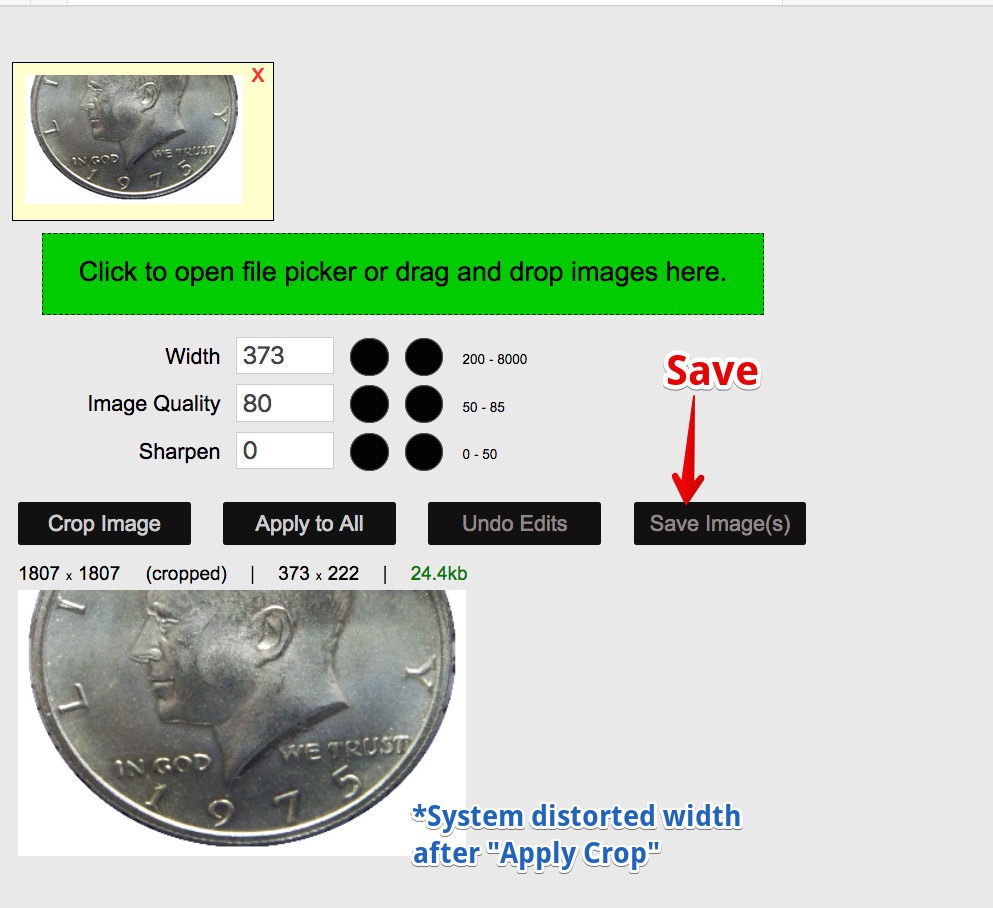
After cropping, hit the save button.
Then download.
Pillar of the Community
dbrablec's Avatar
United States
1944 Posts
 Posted 12/04/2017  3:15 pm  Show Profile   Bookmark this reply Add dbrablec to your friends list Get a Link to this Reply
i dont find a "save" tab...
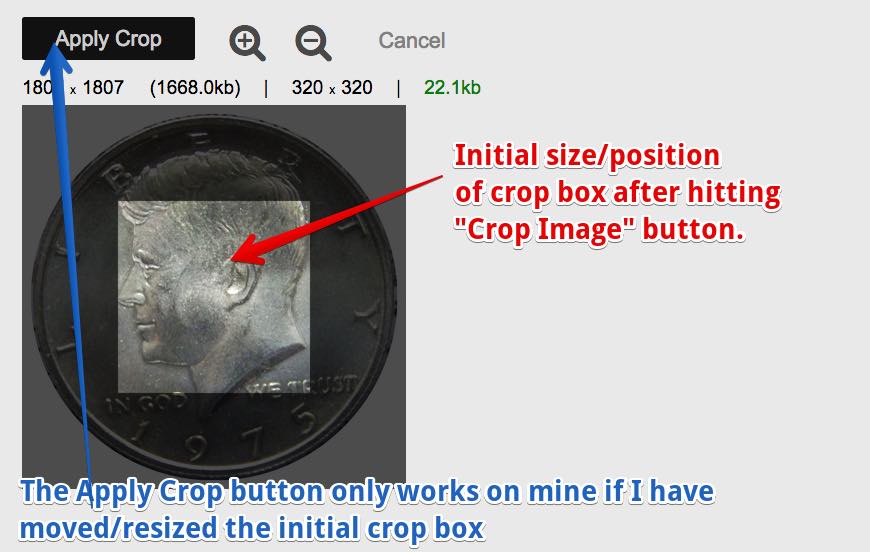
i do find a "apply crop" tab. when I huvor over it with the curson and click on it - nothing happens...nothing...
Pillar of the Community
kanga's Avatar
United States
5825 Posts
 Posted 12/04/2017  4:12 pm  Show Profile   Bookmark this reply Add kanga to your friends list Get a Link to this Reply
What is your editing software?
Bedrock of the Community
Earle42's Avatar
United States
10038 Posts
 Posted 12/04/2017  4:18 pm  Show Profile   Bookmark this reply Add Earle42 to your friends list Get a Link to this Reply
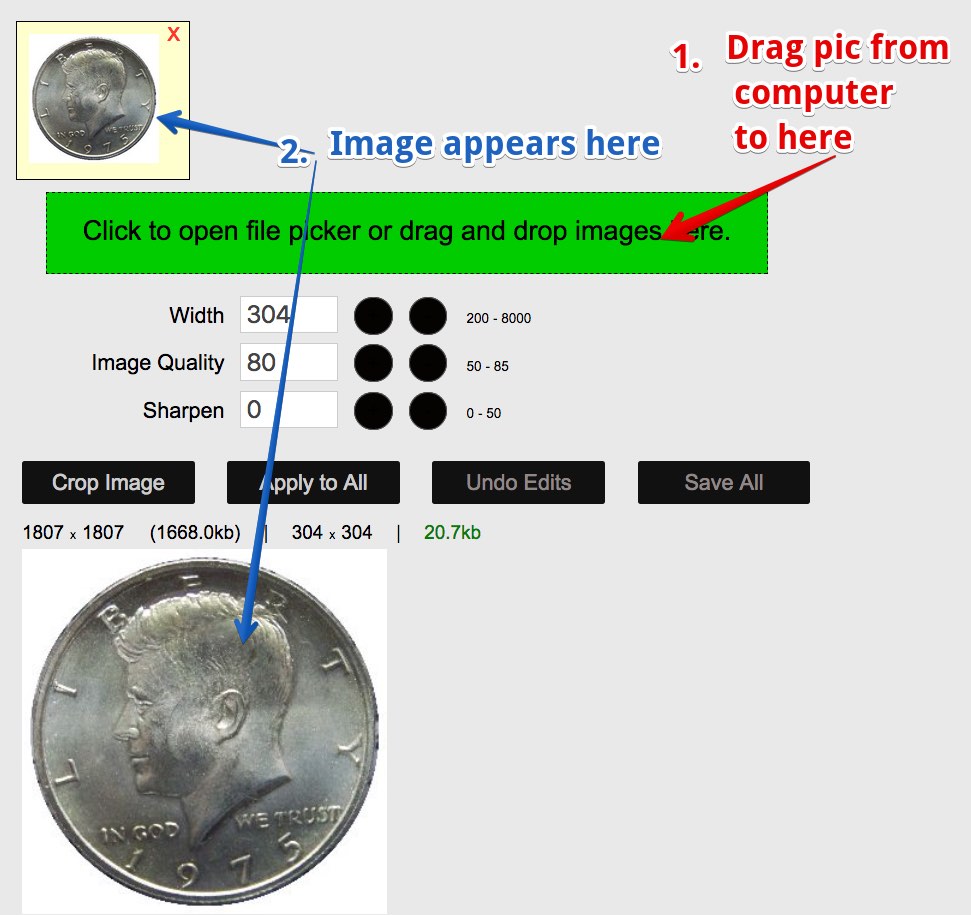
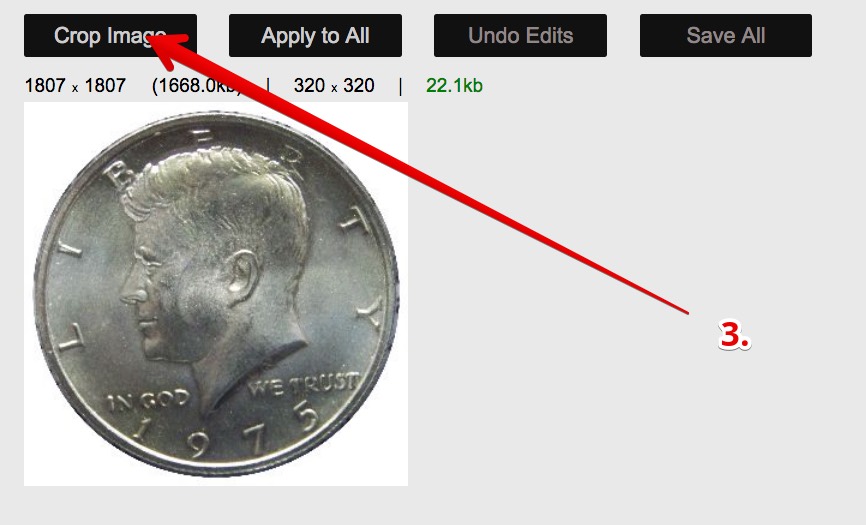
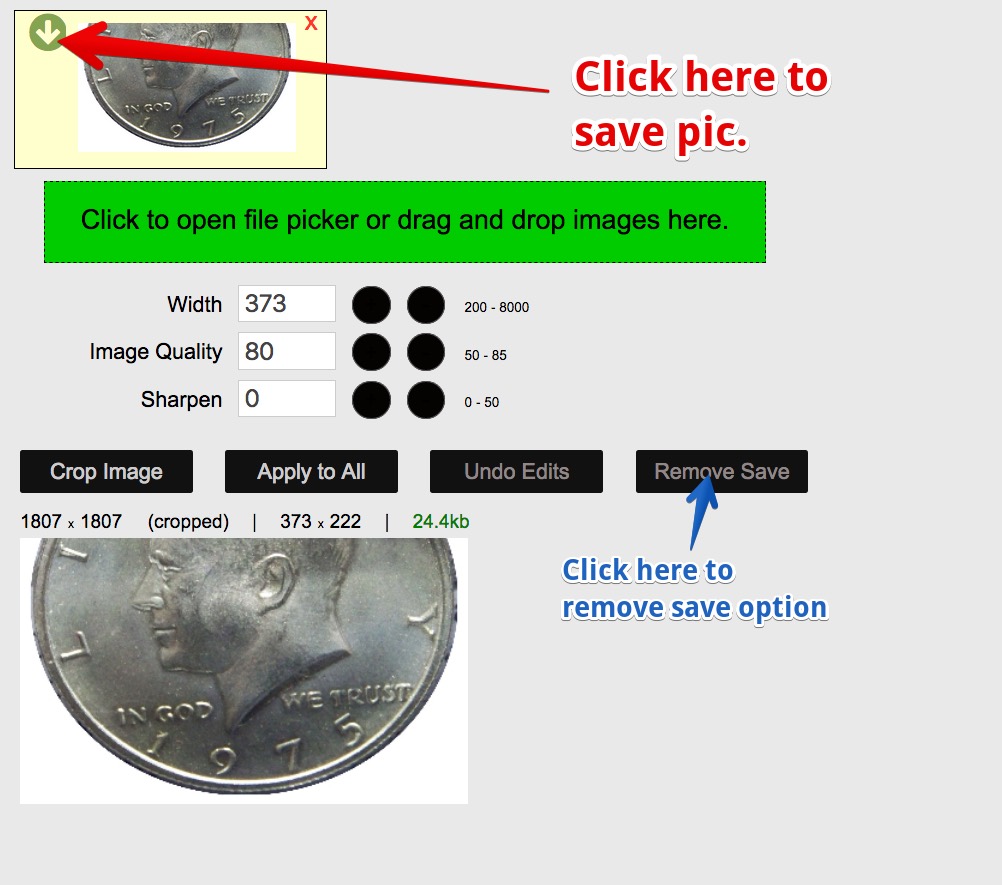
Admittedly I had a little problem myself - but here are the steps I used. I had to hit the Crop Image and then cancel the crop when nothing happened. I then figured out I needed to move/resize the initial crop box. Even then it did not always work. The following crop took three tries


Using a Mac, El Capitan, and Cliqz browser.

Im-Having-Trouble-Editing-Images...
How much squash could a Sasquatch squash if a Sasquatch would squash squash?
Download and read: Grading the graders
Costly TPG ineptitude and No FG Kennedy halves
https://ln5.sync.com/dl/7ca91bdd0/w...i3b-rbj9fir2
Edited by Earle42
12/04/2017 4:21 pm
Pillar of the Community
dbrablec's Avatar
United States
1944 Posts
 Posted 12/04/2017  4:54 pm  Show Profile   Bookmark this reply Add dbrablec to your friends list Get a Link to this Reply
i am trying to use the free image optimizer, on this site.

when I get to step 3 - nothing happens....
and nothing is available past that...

sorry - probably operator error....
Rest in Peace
T-BOP's Avatar
United States
18456 Posts
 Posted 12/04/2017  6:01 pm  Show Profile   Bookmark this reply Add T-BOP to your friends list Get a Link to this Reply
I feel your pain .
Rest in Peace
Crazyb0's Avatar
10197 Posts
 Posted 12/04/2017  6:07 pm  Show Profile   Bookmark this reply Add Crazyb0 to your friends list Get a Link to this Reply
sure am glad have photoshop, what a bunch oh whoowee! if I had to do that, I would never even bother posting a pic. Just go in crop/size save and upload.

Forum Dad
Learn More...
bobby131313's Avatar
United States
24170 Posts
 Posted 12/04/2017  6:08 pm  Show Profile   Bookmark this reply Add bobby131313 to your friends list Get a Link to this Reply
dbrablec, I just used Chrome and it worked flawlessly. You're using a pretty old version though. You're are on 49 and the current version is 62. Please update it and see what happens.
Pillar of the Community
Coconutjoe's Avatar
United States
1475 Posts
 Posted 12/04/2017  8:02 pm  Show Profile   Bookmark this reply Add Coconutjoe to your friends list Get a Link to this Reply

Quote:
dbrablec, I just used Chrome and it worked flawlessly. You're using a pretty old version though. You're are on 49 and the current version is 62. Please update it and see what happens.


I'll bet this will solve your problem
  Previous TopicReplies: 9 / Views: 1,396Next Topic  

To participate in the forum you must log in or register.


Disclaimer: While a tremendous amount of effort goes into ensuring the accuracy of the information contained in this site, Coin Community assumes no liability for errors. Copyright 2005 - 2026 Coin Community Family- all rights reserved worldwide. Use of any images or content on this website without prior written permission of Coin Community or the original lender is strictly prohibited.
Contact Us  |  Advertise Here  |  Privacy Policy / Terms of Use

Coin Community Forum © 2005 - 2026 Coin Community Forums
It took 0.32 seconds to rattle this change. Forums