Coin Community Family of Web Sites Join Thousands of Coin, Bullion, & Money Collectors
Specializing in Modern Numismatics Vancouvers #1 Coin and Paper Money Dealer Join Thousands of Coin, Bullion, & Money Collectors Royal Canadian Mint products, Canadian, Polish, American, and world coins and banknotes. Coin, Banknote and Medal Collectors's Online Mall 300,000 items to help build your collection! Royal Estate Auctions - $1 Coin Auctions


Username:
Password:
Save Password
Forgot your Password?


This page may contain links that result in small commissions to keep this free site up and running.

Welcome Guest! Registering and/or logging in will remove the anchor (bottom) ads. It's Free!

Need Help Posting Pictures Please

To participate in the forum you must log in or register.
Author Previous TopicReplies: 9 / Views: 1,092Next Topic  
New Member

United States
1 Posts
 Posted 03/16/2018  09:11 am Show Profile   Bookmark this topic Add Jimjames2981 to your friends list Get a Link to this Message Number of Subscribers
I need help if someone could walk me through this I'd appreciate it very much...I'm going to post I'm going through free image optimizer an down loading it

When I go to my account an look it says I don't have anything in my pics

*** Moved by Staff to a more appropriate forum. ***
Bedrock of the Community
Dorado's Avatar
Canada
24885 Posts
 Posted 03/16/2018  09:28 am  Show Profile   Bookmark this reply Add Dorado to your friends list Get a Link to this Reply
Moderator
Learn More...
John1's Avatar
United States
56855 Posts
 Posted 03/16/2018  09:38 am  Show Profile   Bookmark this reply Add John1 to your friends list Get a Link to this Reply
to CCF. I have trouble as well and I have been a member for awhile now. I have asked for more detailed steps but...
Check your download file on your computer.
John1
New Member
United States
1 Posts
 Posted 03/16/2018  10:00 am  Show Profile   Bookmark this reply Add Jimjames2981 to your friends list Get a Link to this Reply
Thanks guys ..an John 1 I don't have a computer o only have a phone or I would but thanks anyway I posted like 20 pictures of CV a Question I need to ask an have no idea where they went lol

Moderator
Learn More...
nss-52's Avatar
United States
54282 Posts
 Posted 03/16/2018  10:02 am  Show Profile   Check nss-52's eBay Listings Bookmark this reply Add nss-52 to your friends list Get a Link to this Reply
There are multiple ways of doing this, this is just one:

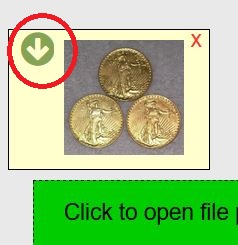
After clicking save....
Need-Help-Posting-Pictures-Please

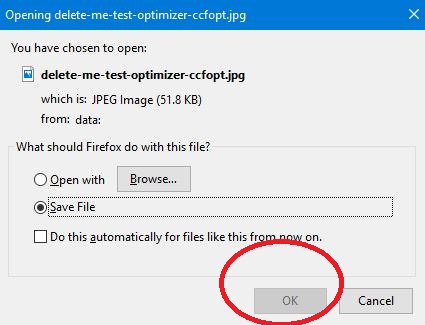
you will get save dialog...
Need-Help-Posting-Pictures-Please

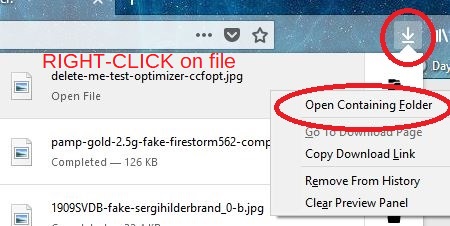
This is using Firefox, click the download icon, then right click on the file and it will take you to the folder. Now you will know where it is saving the files.
Need-Help-Posting-Pictures-Please

In Chrome, it will at the bottom of your screen, and the right click will be "show in folder".
New Member
United States
1 Posts
 Posted 03/16/2018  10:02 am  Show Profile   Bookmark this reply Add Jimjames2981 to your friends list Get a Link to this Reply
A penny not CV lol
Moderator
Learn More...
nss-52's Avatar
United States
54282 Posts
 Posted 03/16/2018  10:03 am  Show Profile   Check nss-52's eBay Listings Bookmark this reply Add nss-52 to your friends list Get a Link to this Reply
...oh, I don't know how it works on a phone.
New Member
United States
1 Posts
 Posted 03/16/2018  10:06 am  Show Profile   Bookmark this reply Add Jimjames2981 to your friends list Get a Link to this Reply
After saving I don't get the dialog thing
New Member
United States
1 Posts
 Posted 03/16/2018  10:10 am  Show Profile   Bookmark this reply Add Jimjames2981 to your friends list Get a Link to this Reply
Nss-52
I don't get the dialog
Pillar of the Community
Learn More...
BigSilver's Avatar
United States
2843 Posts
 Posted 03/16/2018  10:27 am  Show Profile   Bookmark this reply Add BigSilver to your friends list Get a Link to this Reply

Quote:
When I go to my account an look it says I don't have anything in my pics

The image optimizer is only a tool for reducing the file size of your pictures. After you save them and download them they will not appear under your photos in your account. They will be on the device that you are using (either a phone or a computer) in your downloads folder or wherever you chose to save them when you downloaded them.
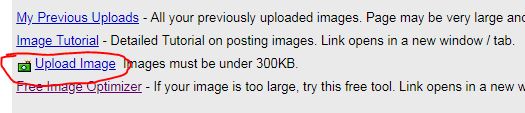
The photos under your account are the photos that you uploaded using the "Upload Image" button.
I hope that clears thing up.
Need-Help-Posting-Pictures-Please
Edited by BigSilver
03/16/2018 10:28 am
  Previous TopicReplies: 9 / Views: 1,092Next Topic  

To participate in the forum you must log in or register.


Disclaimer: While a tremendous amount of effort goes into ensuring the accuracy of the information contained in this site, Coin Community assumes no liability for errors. Copyright 2005 - 2026 Coin Community Family- all rights reserved worldwide. Use of any images or content on this website without prior written permission of Coin Community or the original lender is strictly prohibited.
Contact Us  |  Advertise Here  |  Privacy Policy / Terms of Use

Coin Community Forum © 2005 - 2026 Coin Community Forums
It took 0.27 seconds to rattle this change. Forums