Coin Community Family of Web Sites Join Thousands of Coin, Bullion, & Money Collectors
Join Thousands of Coin, Bullion, & Money Collectors Royal Canadian Mint products, Canadian, Polish, American, and world coins and banknotes. Coin, Banknote and Medal Collectors's Online Mall Specializing in Modern Numismatics Royal Estate Auctions - $1 Coin AuctionsVancouvers #1 Coin and Paper Money Dealer 300,000 items to help build your collection!


Username:
Password:
Save Password
Forgot your Password?


This page may contain links that result in small commissions to keep this free site up and running.

Welcome Guest! Registering and/or logging in will remove the anchor (bottom) ads. It's Free!

Do These Photos Look Okay?

To participate in the forum you must log in or register.
Author Previous TopicReplies: 36 / Views: 5,252Next Topic
Page: of 3
Pillar of the Community
BadDog's Avatar
United States
1375 Posts
 Posted 06/25/2018  5:33 pm  Show Profile   Bookmark this reply Add BadDog to your friends list Get a Link to this Reply
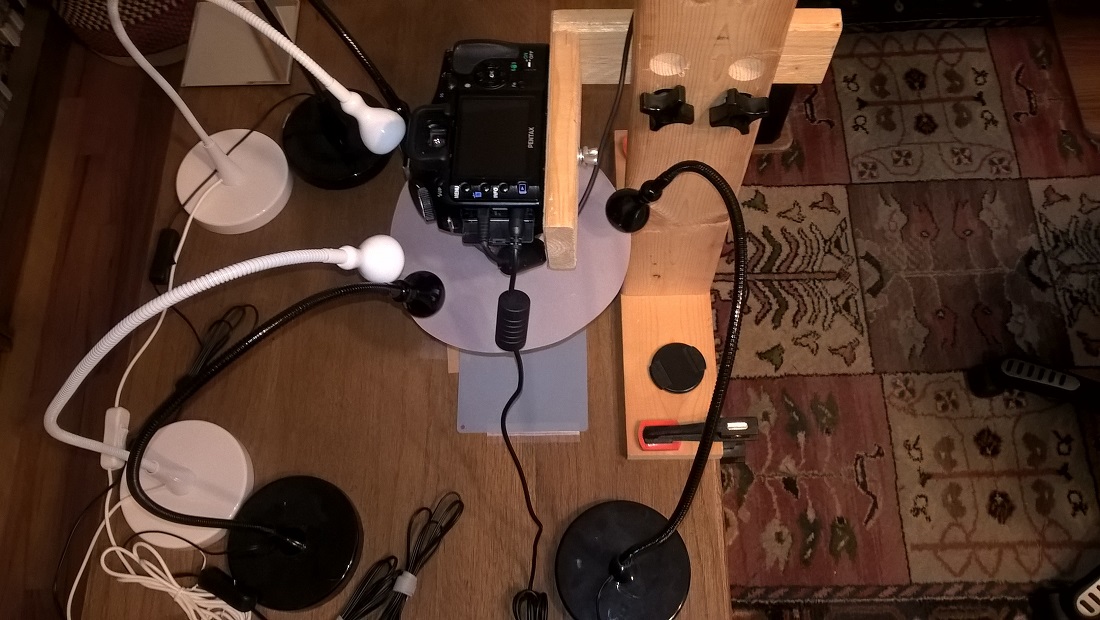
Here's a photo of my camera setup
Do-These-Photos-Look-Okay?

The lights are positioned at 10, 2 and 6. The lights at 10 and 2 can be doubled with both the high (the white Jansjos are about 1 7/8 inches higher) and low (the black Jansjos) on, or on singly (either high or low. I never tried one high and one low light on).

To continue the lighting and aperture comparison I took the following shots...

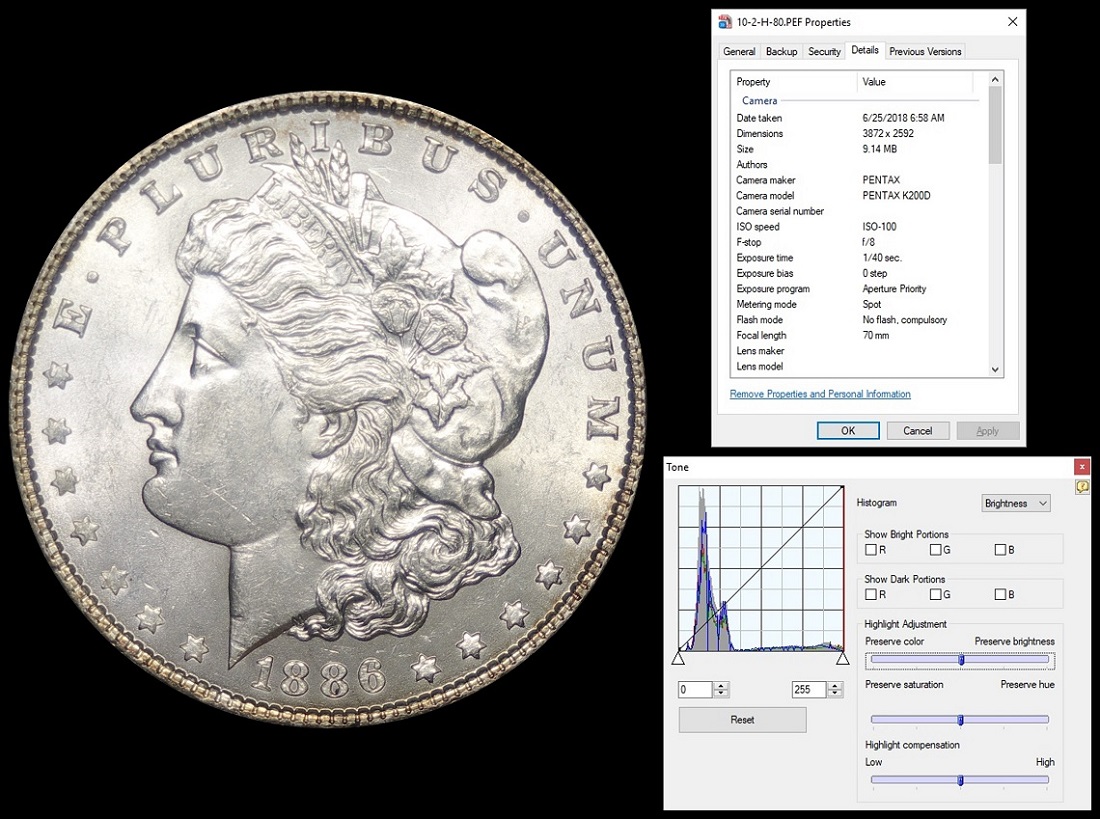
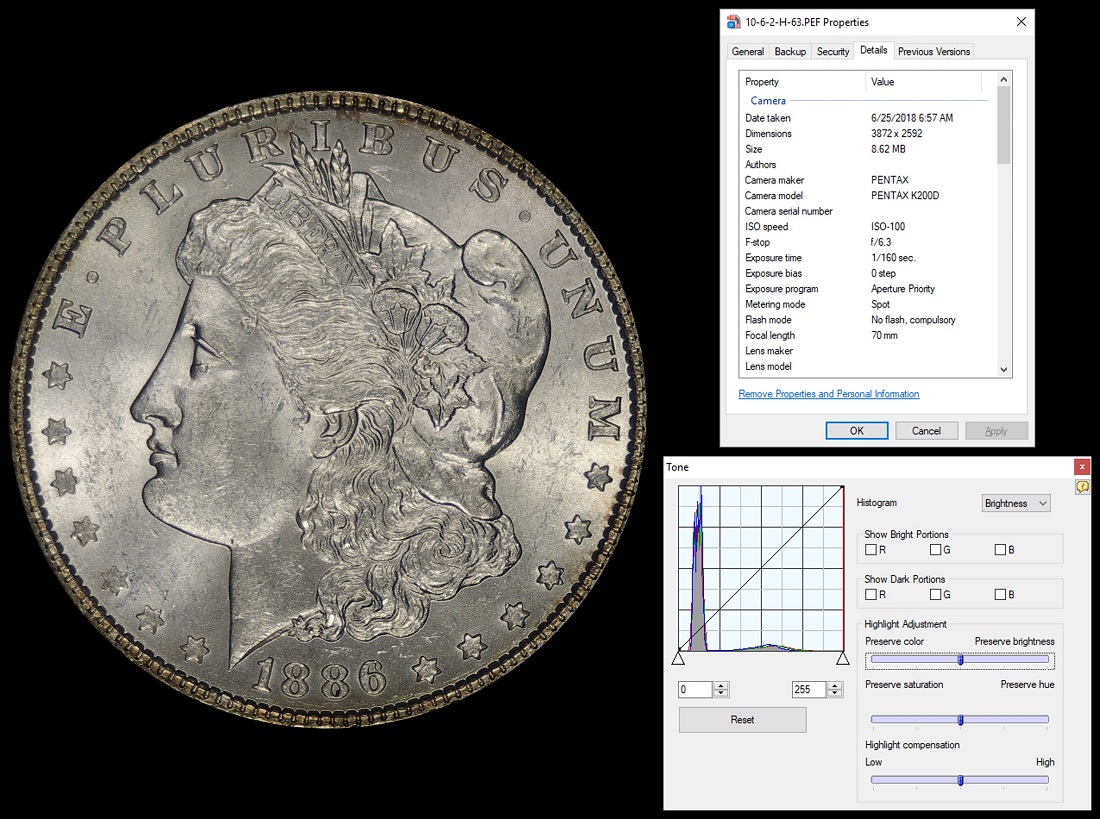
These first two photos compare the difference in aperture. Both photos are with lights at 10 - 2 in what I'm calling the high position (only the white Jansjos are on)
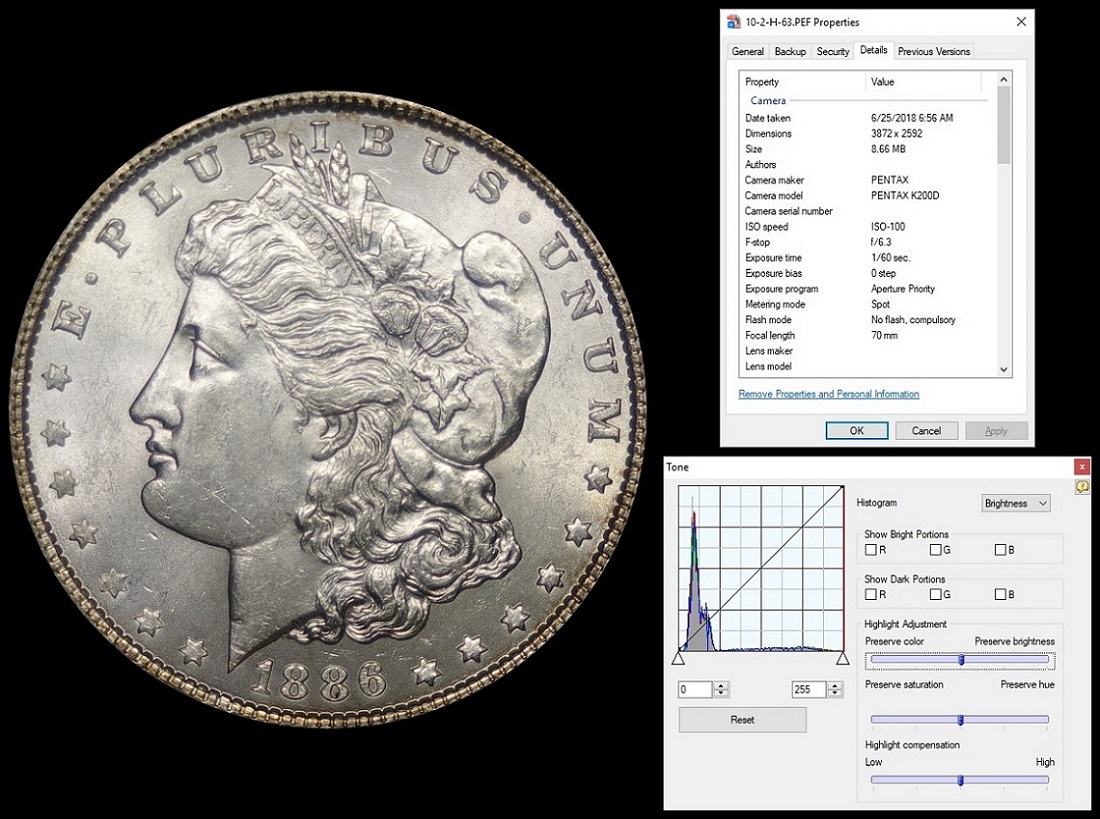
Do-These-Photos-Look-Okay?
As expected, the larger aperture size at f/6.3 resulted in a faster shutter speed. The f/6.3 shot seems fairly reasonably exposed, but does seem a bit dark in the 4 - 8 region (lower part of the coin).

Also as expected, at f/8.0 the shutter speed decreased to allow more light to reach the sensor through the smaller aperture size, but the photo looks over exposed. The histogram shows much more light reaching the sensor at f/8.0. As with my previous photos, all of the f/8.0 shots seem to be overexposed. It looks like the camera may be setting the shutter speed too slow at f/8.0 for some reason.

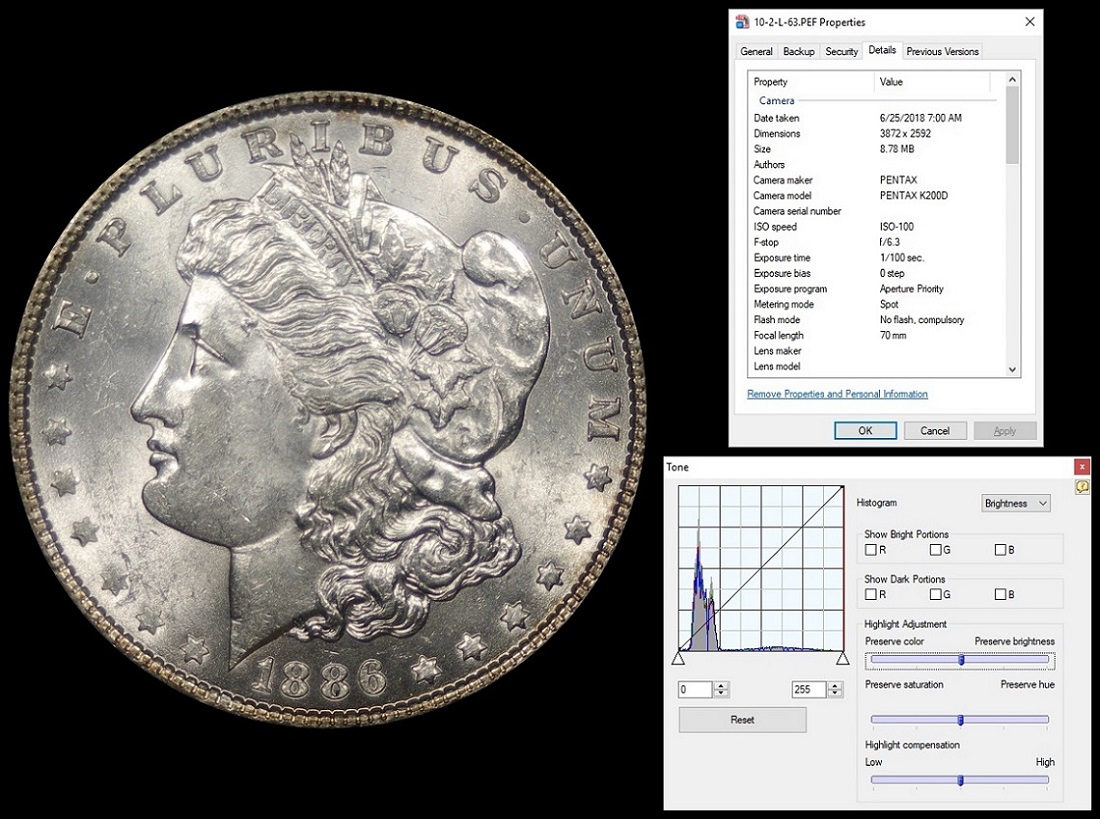
The next two shots compare high and low lighting. Only the lights at 10 - 2 are on. Either both black Janjos (low) or both white Janjos (high).

Here's the high photo (same photo as above)
Do-These-Photos-Look-Okay?
and the low photo (white Jansjos off, black Jansjos on)
Do-These-Photos-Look-Okay?

It looks like the lower lights resulted in less diffusion and as a result the shutter speed was faster.

The next two shots compare the effect of adding a light (low) at the 6 position. The 10 -2 lights remain in the high position (white Jansjos are on).

Here's the without light at 6 photo (again same as before)
Do-These-Photos-Look-Okay?
and with a light at the 6 position
Do-These-Photos-Look-Okay?
The additional light results in a faster shutter speed, removes the shoulder on the first histogram peak, but increases the second histogram peak as well. To me, this image seems a bit sharper and might look fairly nice with a bit of post processing.

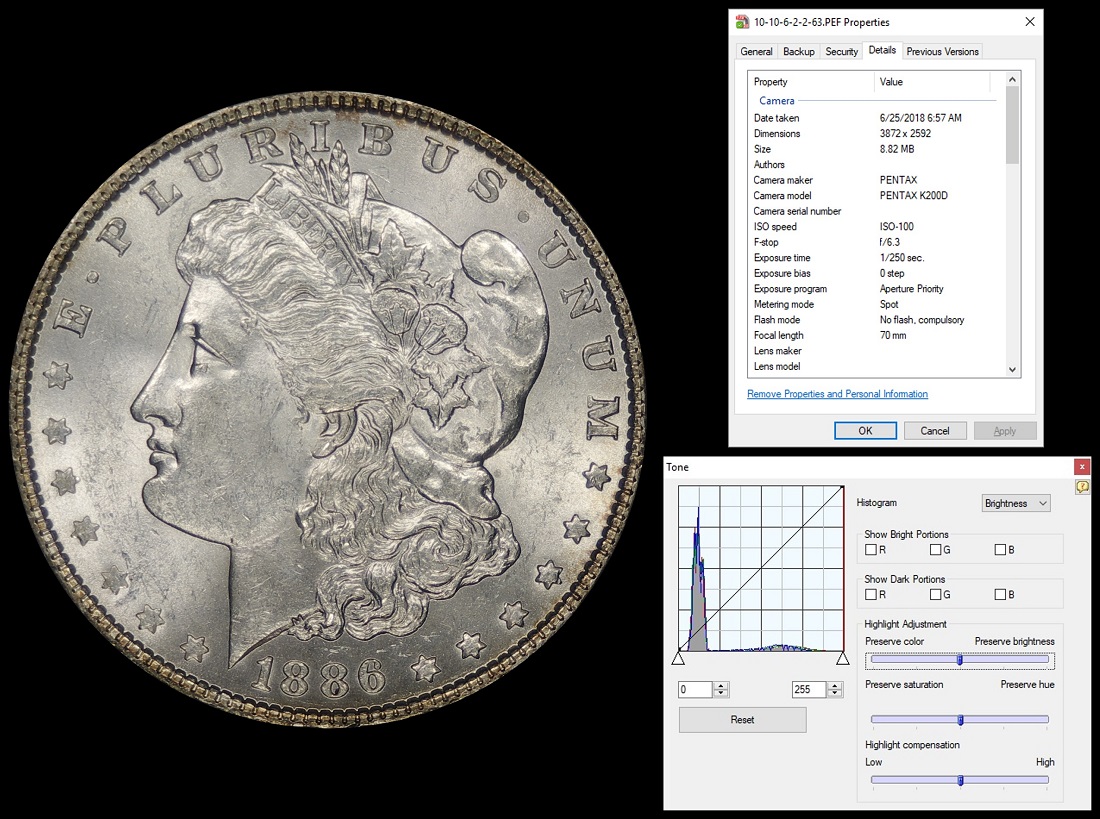
My last comparison is to turn on the additional low lights (the black Jansjos) at the 10 and 2 positions. Here's the 10-6-2 photo again
Do-These-Photos-Look-Okay?
and one with both high and low lights on at 10 and 2
Do-These-Photos-Look-Okay?
With the additional lights, the shutter speed once again increased and, to my eyes, the overall lighting of the coin became a bit more even.

I could have thrown in a few more shots at f/8.0, but since they all seem over exposed I didn't include them. It looks like with my camera/lens combo that I will need to apply some exposure bias if I want to use the f/8.0 aperture setting.

It's been a pretty long post, thanks for reading
Any comments are welcome
Pillar of the Community
Learn More...
United States
4038 Posts
 Posted 06/26/2018  5:48 pm  Show Profile   Bookmark this reply Add rmpsrpms to your friends list Get a Link to this Reply
It looks like the camera is not adjusting exposure time quite right, or perhaps I just don't understand how Pentax Aperture Priority mode works. Anyway, the last pic does look good, though still a bit over-exposed. Does the camera have an exposure compensation function? I'd suggest reducing the exposure by 1/3 or maybe 2/3 EV. And can you adjust the contrast in the camera? If so, reduce it a click or two and see how those two work together. The EV reduction alone is probably enough to eliminate the over-exposure.

It looks like you're trying to fix all the problems with lighting, rather than doing any post-processing, is this correct? It would be much easier to fix these items in post than to adjust the lights so precisely.
Contact me for photographic equipment or visit my home page at:
http://macrocoins.com
Pillar of the Community
BadDog's Avatar
United States
1375 Posts
 Posted 06/26/2018  6:49 pm  Show Profile   Bookmark this reply Add BadDog to your friends list Get a Link to this Reply
Ray,

Thanks for the comments.

I agree that it does look like the camera isn't adjusting the shutter speed quite right. Particularly, at the f/8.0 it's leaving the shutter open too long and letting too much light in.

As you indicate, I can change all the settings in post processing. I'm just trying to get the lighting close enough that I can limit the post processing.

As far as the camera goes, it does have the ability to set an exposure bias prior to taking the photograph (you can see in data for each photo that the bias is set to 0 for these shots). You can also adjust the saturation, hue, sharpness and contrast in the camera before taking the photo. I've never thought there was an advantage to adjusting all these parameters prior to the shot versus adjusting in post processing. Do you see an advantage to setting them pre-shot?
Pillar of the Community
Learn More...
United States
4038 Posts
 Posted 06/27/2018  1:23 pm  Show Profile   Bookmark this reply Add rmpsrpms to your friends list Get a Link to this Reply
Yes, there is a huge advantage if you are not doing raw processing. Once the shot is taken, you cannot fix problems that occur in jpg processing. Your camera likely has 10 or 12 bit dynamic range in raw, and this is compressed into 8 bits for jpg. If there is any over-exposure, those areas are "lost" since the tonal information is gone. The camera generally will adjust exposure so that highlights are pushed to over-exposure, but this is like playing your stereo all the time to the point where the amplifiers are clipping...it's just not the best fidelity. By adjusting the exposure bias, you can ensure the camera does not over-expose the highlights, and thus preserve details in the highlights. Of course, this makes the shadows darker. This can be compensated by increasing diffusion, but maybe at the expense of the overall look of the image. You can improve this with settings by decreasing the contrast. This has the effect of increasing the brightness of the dark areas of the image so they map better into the jpg dynamic range.

Over-sharpening is another thing that can't be recovered in post. It's always better to shoot at minimum sharpness, then do any final sharpening when you do cropping or levels adjustments.

So, it's your job to ensure that highlights are not over-exposed, while same time ensuring that shadows are not crushed to black. This is tough to do with standard camera settings, so to achieve it you must make changes to contrast, exposure compensation, etc.
Contact me for photographic equipment or visit my home page at:
http://macrocoins.com
Pillar of the Community
BadDog's Avatar
United States
1375 Posts
 Posted 06/27/2018  2:36 pm  Show Profile   Bookmark this reply Add BadDog to your friends list Get a Link to this Reply
Ray,
if you're saving the photos out as JPG files.

I was really asking about RAW (which for some reason Pentax saves as PEF) files. Should have been more clear about that.

It seems like everything that can be set on the camera pre-shot can be adjusted as post processing for RAW files. So, the only advantage that I see is if you're making the same adjustments to all photos, then you might as well do it one time with the camera settings.
Pillar of the Community
BadDog's Avatar
United States
1375 Posts
 Posted 06/28/2018  07:30 am  Show Profile   Bookmark this reply Add BadDog to your friends list Get a Link to this Reply

Quote:
Your camera likely has 10 or 12 bit dynamic range in raw, and this is compressed into 8 bits for jpg.


Ray,

If you look at the histograms I attached to the above photos, it shows levels from a min of 0 to a max of 256. Doesn't this indicate 8 bit dynamic range? or is a higher dynamic range already being compressed for processing, even for RAW processing?
  Previous TopicReplies: 36 / Views: 5,252Next Topic
Page: of 3

To participate in the forum you must log in or register.


Disclaimer: While a tremendous amount of effort goes into ensuring the accuracy of the information contained in this site, Coin Community assumes no liability for errors. Copyright 2005 - 2026 Coin Community Family- all rights reserved worldwide. Use of any images or content on this website without prior written permission of Coin Community or the original lender is strictly prohibited.
Contact Us  |  Advertise Here  |  Privacy Policy / Terms of Use

Coin Community Forum © 2005 - 2026 Coin Community Forums
It took 0.25 seconds to rattle this change. Forums