| Author |
 Replies: 9 / Views: 1,473 Replies: 9 / Views: 1,473 |
|
|
Pillar of the Community
United States
1801 Posts |
Having been inspired by several of the collections I have viewed on this forum, I have recently acquired access to a nice scanner and have decided to create a digital record of my collection. This is the first coin in digital record and I wanted to share with the group. I had to reduce the size/detail to fit the forum guidelines. The original scan is 720x720 and allows for very clear closeups, better than a hand help magnifier. The coin is a 1733MoF Pillar dollar. This coin was found in the "Coffins Patch" wrecksite off the Florida Keys by a friend of mine and then carefully "curated" (the current politically correct term for cleaning) by electrolitic reduction at very low voltage. For a coin that spent approx 250 years on the bottom of the ocean, it is in great shape. 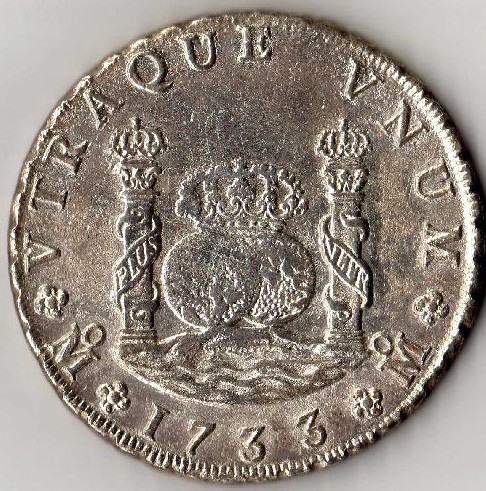 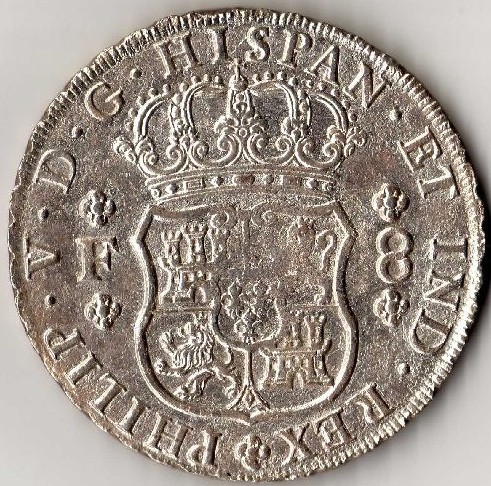 fixed and consolidated fixed and consolidated
-GO |
|
|
|
Pillar of the Community
United States
3499 Posts |
Not a bad plan at all. I was doing that too until my comp suddenly decided to hate the flash drives to which I was saving the images.
|
|
Pillar of the Community
United States
1713 Posts |
I tried once upon a time to keep a digital record of my collection. Too much work for me and I abandoned the effort. Now the task is too daunting for me to even make a second effort as my collection is at least 10x what it was in the beginning.
|
|
Pillar of the Community
 United States
1801 Posts |
Archraz...I have run into my own issues with the computer also. I have finished my main date run of Mexico Pillars and I already have had to acquire a external hard drive to store them. I can't imagine what the size of the folder will be after I finish the portraits and cap and rays. But I like the idea of looking on my computer everytime I am offered a possible upgrade instead of having to go to the bank and get into the safe boxes.
|
|
Pillar of the Community
United States
3499 Posts |
jfransch- yeah I know just what you mean. And it would be great to just throw some images onto a flash drive and showing off your coins to a friend that way.
|
|
Pillar of the Community
United States
1415 Posts |
I've been thinking about this (archiving pics). I thought putting the images into a database - this would make things much easier. It would not take much of a front end. Then it should be possible to link the database to a web app. This would eliminate your fears about the 'flash' drives. The database would automagically backup itself.  |
|
Moderator
 Australia
17002 Posts |
I haven't been systematically imaging my collection; the only ones that get imaged are the ones I want to show here on the forums or print in my coin club magazine. So my image database is very haphazard. I've got 7889 coins in the database, but only 590 coin pictures saved. Assuming an average on 1.9 pictures per coin (I don't always take pics of both sides), that's only 5.3 percent of the collection.  Don't say "infinitely" when you mean "very"; otherwise, you'll have no word left when you want to talk about something really infinite. - C. S. Lewis
|
|
Pillar of the Community
United Kingdom
1077 Posts |
I have scans of my entire collection, front and back, that's 2483 coins or 4966 scans. It was hard going to start with but I was scanning them 18 at a time and then dividing the scans into 2000 pixel squares (1000 pixels per inch). They don't take up too much space on my hard drive, about 6GB. I then have them backed up to an external drive just in case. I saved them as jpegs at 90% quality so each scan averages about 750kb. I can then look at them at twice the size of my monitor screen, if I want to look at the finer details, without losing any clarity.
I love the ability it gives me to organise my collection in more than one way as well. For example I can have a seperate folder with everything from 1963 in, without having to remove the coins from their usual spot, alphabetical by country. I have another folder with every silver coin I have.
It also means I can take a scan of a coin from Czechoslovakia, for example, and place one copy I'm my Czech Republic folder, and one in my Slovakia folder.
|
|
Pillar of the Community
United States
1415 Posts |
That would drive me crazy! Keeping 5K of files straight. My brain is already full! That is why I like the Db approach. The Db engine keeps it all straight. I got one db file - and the pics are inside. If I need, I can move a copy out, for posting or the like. Also with the db, I can have specific info and sort accordingly.
Just started development so has a long way to go.
Most of the effort is in the ancients. They don't classify as easily.
Any suggestions would be appreciated -
|
|
Pillar of the Community
Poland
3201 Posts |
I'm working on a list of my coins. As my amount of them is rather meagre, I remember in what condition they are. But I don't remember all the dates, so I need a list to help. I keep the list online just in case.
Edited by DL20K
07/16/2008 12:29 pm
|
| |
Replies: 9 / Views: 1,473 |
|










 Posted 06/29/2008 11:30 am


