| Author |
 Replies: 12 / Views: 2,049 Replies: 12 / Views: 2,049 |
|
|
Pillar of the Community
United States
1328 Posts |
If you look at an e-bay listing you will see a section under the title that is labeled as "Condition:--". Some sellers use this area to put in seller notes. I can't figure out how this is done.
|
|
|
|
Bedrock of the Community
United States
10284 Posts |
Clicking on Sell, then Latest drafts
then complete instead of delete
Could they be using the
Condition description
box where they can type just about anything in there?
|
|
Bedrock of the Community
United States
12477 Posts |
For certain categories of condition one may select, there is the option to add more specific details when listing. I use the mobile app so for me, when I select a condition, a text line will appear below my selection if I want to clarify.
In Memory of Crazyb0 12-26-1951 to 7-27-2020
In Memory of Tootallious 3-31-1964 to 4-15-2020
In Memory of T-BOP 10-12-1949 to 1-19-2024
|
|
Bedrock of the Community
United States
10284 Posts |
For the record spruuuuuuu . I just clicked on your ebay to browse your stuff but there's nothing there? ( Just like mine )  |
|
Pillar of the Community
United States
509 Posts |
When you are listing an item there is a box labeled "condition Description" This is that info you see under the title. 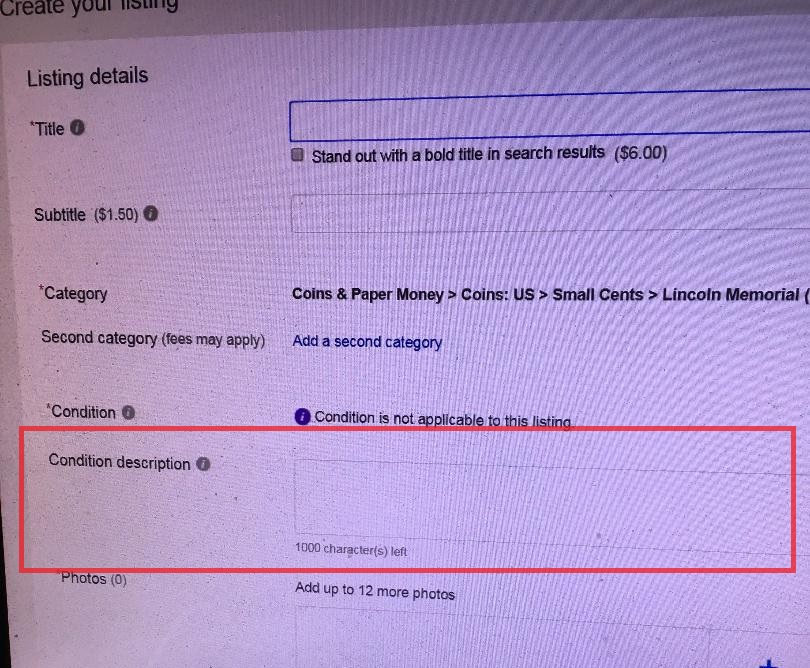 |
|
Bedrock of the Community
United States
12477 Posts |
Thanks for the pic, jst1dreamr!  Quote:For the record spruuuuuuu . I just clicked on your ebay to browse your stuff but there's nothing there? That's because I don't have anything currently listed under the "Coins & Paper Money" category. I have other things listed, but viewing through CCF filters the results, as it should.  In Memory of Crazyb0 12-26-1951 to 7-27-2020
In Memory of Tootallious 3-31-1964 to 4-15-2020
In Memory of T-BOP 10-12-1949 to 1-19-2024
|
|
Bedrock of the Community
United States
12477 Posts |
By the way, I have been considering requesting a username change to "spru" or a variation with any number of u's.  I'm sure you know the feeling, TNG.  In Memory of Crazyb0 12-26-1951 to 7-27-2020
In Memory of Tootallious 3-31-1964 to 4-15-2020
In Memory of T-BOP 10-12-1949 to 1-19-2024
Edited by spru
10/14/2018 01:25 am
|
|
Bedrock of the Community
United States
10284 Posts |
jst1dreamr that is exactly the box I was talking about. That Buffalo nickel Hat is very nice but too small for by head but I do have a Minnetonka hat and like it a lot. Spruuuuuuu Spruuu & Spruuuuuuuuuu all look good to me. LOL  |
|
Pillar of the Community
 United States
1328 Posts |
Thanks for screen capture, dreamr. This is not the template I get when creating a listing. It is more basic. I am a relatively new seller, so maybe e-bay is trying something different as they so often do.
|
|
Bedrock of the Community
United States
10284 Posts |
On most every page when signed in, there is a "sell" tab up top next to My ebay. again, Clicking on Sell, then Latest drafts then complete instead of delete Then Condition description |
|
Pillar of the Community
United States
534 Posts |
Click on the sell button. Then in the top right corner it says "advance tool." Click on that and switch and then you will get the option to enter condition description in the template.
|
|
Pillar of the Community
United States
1328 Posts |
TNG, what you said made no sense until I clicked on "Advanced Tool", which turns out to be the more detailed form you show in screen capture. E-bay recommended that I not use it. It's supposed to be more for power sellers. I will try it next time I list. It definitely gives extra options than dummed-down default form.
Thanks, SjlundCoin. Your post just came up as I was finishing this draft.
|
|
Bedrock of the Community
United States
10284 Posts |
I'm glad you have direction and good luck.
|
| |
Replies: 12 / Views: 2,049 |
|










 Posted 10/14/2018 12:05 am


