Coin Community Family of Web Sites Join Thousands of Coin, Bullion, & Money Collectors
Join Thousands of Coin, Bullion, & Money Collectors Royal Estate Auctions - $1 Coin AuctionsVancouvers #1 Coin and Paper Money Dealer 300,000 items to help build your collection! Royal Canadian Mint products, Canadian, Polish, American, and world coins and banknotes. Coin, Banknote and Medal Collectors's Online Mall Specializing in Modern Numismatics


Username:
Password:
Save Password
Forgot your Password?


This page may contain links that result in small commissions to keep this free site up and running.

Welcome Guest! Registering and/or logging in will remove the anchor (bottom) ads. It's Free!

Picking A Background Color For Coin Pics

To participate in the forum you must log in or register.
Author Previous TopicReplies: 24 / Views: 7,252Next Topic
Page: of 2
Pillar of the Community
BadDog's Avatar
United States
1375 Posts
 Posted 07/20/2019  4:48 pm  Show Profile   Bookmark this reply Add BadDog to your friends list Get a Link to this Reply
Using the two different light sources will cause problems. The sensor in the digital microscope won't be able to adequately compensate.

I would try turning off the LEDs on the microscope and just use an external light source. You can try the flashlight and if you want to diffuse that light you can just rubber band a piece of tissue paper over it.

You want to try to remove all other light sources, so taking the photos in a darkened room might work best.
Edited by BadDog
07/20/2019 4:54 pm
Moderator
Learn More...
Spence's Avatar
United States
34416 Posts
 Posted 07/20/2019  4:54 pm  Show Profile   Bookmark this reply Add Spence to your friends list Get a Link to this Reply
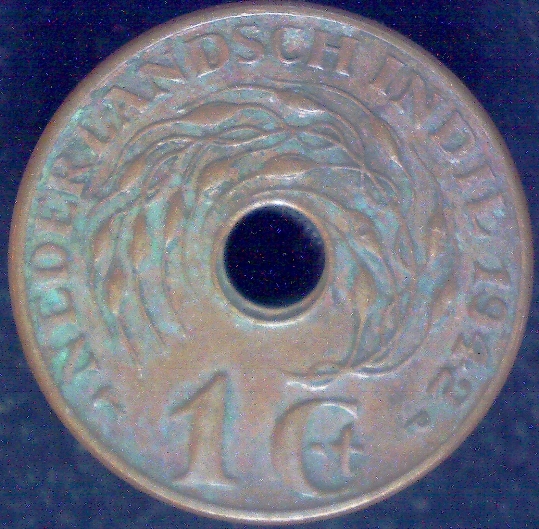
I've been playing around with this some today and think that I have a solution, at least for my setup. For whatever reason, the color of the coin is truer with the white background, but the black background is overall more pleasing. What I have discovered is that if I include a slip of white paper in the pic, the color remains pretty true and then I can crop out this portion. I'm sure that this effort is necessary due to the cheapness (and potentially age) of my Celestron camera. What do all y'all think of these?


Picking-A-Background-Color-For-Coin-Pics


added:
Quote:
Not sure where you pulled that quote from, it isn't in this thread


Check the bottom of my first post in this thread.
"If you climb a good tree, you get a push."
-----Ghanaian proverb

"The danger we all now face is distinguishing between what is authentic and what is performed."
-----King Adz
Edited by Spence
07/20/2019 4:56 pm
Moderator
Learn More...
Spence's Avatar
United States
34416 Posts
 Posted 07/20/2019  5:00 pm  Show Profile   Bookmark this reply Add Spence to your friends list Get a Link to this Reply
As recommended @BD, here is a pic with the room pretty much dark and a tissue over the flashlight. I agree that having the two types of light must be an issue for this camera. Maybe this latest one is even better?


Picking-A-Background-Color-For-Coin-Pics
"If you climb a good tree, you get a push."
-----Ghanaian proverb

"The danger we all now face is distinguishing between what is authentic and what is performed."
-----King Adz
Pillar of the Community
Learn More...
GrapeCollects's Avatar
United States
8938 Posts
 Posted 07/20/2019  5:20 pm  Show Profile   Bookmark this reply Add GrapeCollects to your friends list Get a Link to this Reply
Much better, but maybe slightly brighter?
Moderator
Learn More...
Spence's Avatar
United States
34416 Posts
 Posted 07/20/2019  5:45 pm  Show Profile   Bookmark this reply Add Spence to your friends list Get a Link to this Reply
@GC, ok thanks. As bright as the one above it, or somewhere in the middle?
"If you climb a good tree, you get a push."
-----Ghanaian proverb

"The danger we all now face is distinguishing between what is authentic and what is performed."
-----King Adz
Pillar of the Community
BadDog's Avatar
United States
1375 Posts
 Posted 07/20/2019  7:37 pm  Show Profile   Bookmark this reply Add BadDog to your friends list Get a Link to this Reply
Are you sure that the coin and the microscope camera are parallel to each other? It looks like the top of the coin is more in focus than the bottom. This usually means the two aren't parallel.
Moderator
Learn More...
Spence's Avatar
United States
34416 Posts
 Posted 07/20/2019  7:51 pm  Show Profile   Bookmark this reply Add Spence to your friends list Get a Link to this Reply
Yes good point @BD. I definitely need to improve the parallelism between the camera lens and the coin. What are your thoughts on the color?
"If you climb a good tree, you get a push."
-----Ghanaian proverb

"The danger we all now face is distinguishing between what is authentic and what is performed."
-----King Adz
Pillar of the Community
BadDog's Avatar
United States
1375 Posts
 Posted 07/20/2019  8:43 pm  Show Profile   Bookmark this reply Add BadDog to your friends list Get a Link to this Reply
You're really the only one who can comment on color as you're the only one who's seeing the coin in hand.

We can give comments that can help you achieve accurate color, but that's about it

What you really need is to be able to white balance your images. You can do this, but not with the software you're currently using. If you want to explore white balancing, then there is a free program, GIMP, that can help you do that. It's the program I use, but it does have a fairly steep learning curve.

Without doing image post processing, the best you can really do is to achieve good focus, reduce stray light, reduce reflections and use a single source of light, or multiple sources that are exactly the same.
Pillar of the Community
pepactonius's Avatar
United States
9395 Posts
 Posted 07/20/2019  9:33 pm  Show Profile   Bookmark this reply Add pepactonius to your friends list Get a Link to this Reply

Quote:
What you really need is to be able to white balance your images. You can do this, but not with the software you're currently using. If you want to explore white balancing, then there is a free program, GIMP, that can help you do that. It's the program I use, but it does have a fairly steep learning curve.


It looks like your only method of controlling white balance and brightness is by varying the background color. This means the best background may be different for each coin, unless a lot of post-processing is done.

One answer to this problem is the "$400 setup" described in a long thread on this subforum.

With that setup, you can:

- adjust white balance to match the lighting
- get best focus via magnified live view on the PC screen
- choose the best aperture to balance DOF and diffraction blur
- control the coin exposure regardless of the background
- get parallelism using mirrors and live view
- have great lighting flexibility using a lens-attached diffuser and Jansjo lights
- use microscope objectives, if needed
- use focus stacking, when needed
- use axial or pseudoaxial lighting when needed
  Previous TopicReplies: 24 / Views: 7,252Next Topic
Page: of 2

To participate in the forum you must log in or register.


Disclaimer: While a tremendous amount of effort goes into ensuring the accuracy of the information contained in this site, Coin Community assumes no liability for errors. Copyright 2005 - 2026 Coin Community Family- all rights reserved worldwide. Use of any images or content on this website without prior written permission of Coin Community or the original lender is strictly prohibited.
Contact Us  |  Advertise Here  |  Privacy Policy / Terms of Use

Coin Community Forum © 2005 - 2026 Coin Community Forums
It took 0.32 seconds to rattle this change. Forums