| Author |
 Replies: 16 / Views: 2,410 Replies: 16 / Views: 2,410 |
|
New Member
United Kingdom
2 Posts |
Hi all I'm based in the UK and have recently inherited a large collection of coins which are not organised at all. Can anyone advise the best approach to take to getting these inventoried please? I'm happy to take the time and was thinking of some kind of excel spreadsheet but other than the coin year and denomination I'm not sure if there is any other information I need to be capturing. Any advice welcome! Thank you |
|
|
|
Moderator
 United States
56855 Posts |
|
|
Valued Member
United States
95 Posts |
 There isn't likely a one size fits all solution. I would start with excel and capture any key info such as year, type, country, etc and go from there. |
|
Bedrock of the Community
United States
19543 Posts |
Agree with the above. Begin with a basic excel solution--can always add additional columns and rows as needed--country, year, mint, denomination, composition, KM number (when appropriate), condition, variety, error, other interesting characteristics.
|
|
Bedrock of the Community
United States
20753 Posts |
Send them all to me and I'll do it.   No simple method. Just sit down and separate them the best you can. Edited by just carl
08/21/2022 08:21 am
|
|
Bedrock of the Community
Australia
21789 Posts |
Eekbubbie: to the CCF !First of all, put each individual coin in a 2x2, so that any information relating to the coin can be written on the holder. If the collection need to be re arranged, the information relating to the coin moves with it. With this approach, a spreadsheet in support is favored by some collectors, but is not essential. Valuable coins should be photographed. A mobile 'phone camera is OK for this purpose. Slabs are highly favored by some collectors, but they can severely interfere with the abovementioned storage and display approach. When it comes to arranging the collection For modern coins categorize by -Country -denomination -date. Ancient and Medieval coins will require a different arrangement of the collection, but are most probably outside the scope of this post. |
|
Pillar of the Community
United States
668 Posts |
I recommend joining/using NUMISTA.COM (it's free) to research and create a database for your collection. After creating, you can download all the below listed information to an Excel spreadsheet automatically, with the click of a button. Quote:
Begin with a basic excel solution--can always add additional columns and rows as needed--country, year, mint, denomination, composition, KM number (when appropriate), condition, variety, error, other interesting characteristics. The below is a snippet from my collection downloaded from Numista and modified to my needs. 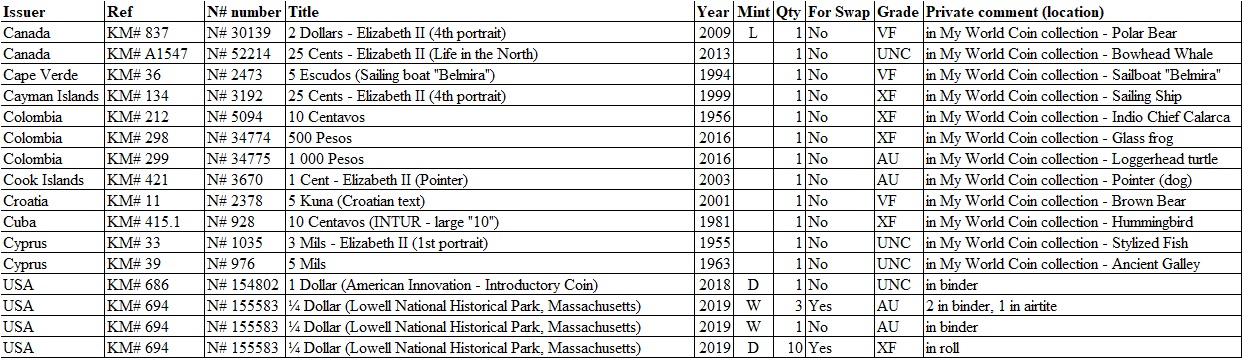 |
|
New Member
 United Kingdom
2 Posts |
Thanks for all the advice! Much appreciated.
|
|
Rest in Peace
United States
18456 Posts |
I'm still old school ,I did my inventory in two different books with 6 columns each : Denomination & type , Date & Mint , Inventory # , Comments , Raw Grade , and price paid & when . |
|
Valued Member
United States
65 Posts |
I use Exact Change. Global coin & currency capable or can limit to your specific needs. Very easy to use. Pricing, Image catalogs and other tools. https://www.exactchange.info/ |
|
Bedrock of the Community
United Kingdom
18693 Posts |
I keep mine on an Excel worksheet but I also have a pocket-size notebook that I can carry around to coin fairs and coin shops.
|
|
Pillar of the Community
 United States
6514 Posts |
I have it all in my head.   God help me.  |
|
Moderator
United States
195203 Posts |
I am in the spreadsheet camp.  (Microsoft Excel, LibreOffice Calc, Google Sheets, etc.) to the Community! |
|
Pillar of the Community
Russian Federation
1558 Posts |
This summer I systematized my entire collection. I used the ucoin website and also created an Excel table. For myself, I created the following columns: country, denomination, year, mint, description (for example, commemorative coin), condition of the coin (I limited myself to letters), KM# number, date of purchase, purchase price in rubles and dollars. Quote:
I have it all in my head. This is a good solution when you have a small collection, but over time I look into my phone more and more often to make sure that I don't have this coin year/type. Edited by Slerk
08/24/2022 10:35 pm
|
|
Pillar of the Community
United States
755 Posts |
I agree with fplagge! I use Numista to inventory my collection. It's easy to use and has a huge database of coins and gives you lots of information. As fplagge showed, it's easy to export a spreadsheet at any time.
|
|
Pillar of the Community
United States
3784 Posts |
Over the years, I've built a fairly extensive set of Excel spreadsheets cataloging all the different parts of my collection. It's easy to sort, arrange and summarize the information across my full collection in any way I want. It's easily expandable and adaptable when, for example, I add or remove an area of collecting interest.
It took a good bit of time to get them set up as I wanted, but I felt it has been very worth it in the long run.
|
| |
Replies: 16 / Views: 2,410 |





 Posted 08/21/2022 08:05 am





