| Author |
 Replies: 28 / Views: 5,874 Replies: 28 / Views: 5,874 |
|
Valued Member
United States
68 Posts |
I think it is easier to scan the pictures into my computer rather then photograph them. Does anyone else do it this way?
|
|
|
|
Pillar of the Community
United Kingdom
1077 Posts |
Yes, I use a scanner for the simplicity, speed and quality control. The scans can come off a little flat and you can't get the artistic merit that can be achieved from a good photo with excellent lighting but for catalogueing your collection and such it is perfect. The other thing is that there are very few photographers that can get artistic merit from a photo either. There are an awful lot more bad photos than good ones. If only every seller on ebay could get the message to scan rather than use their cell/mobile phone. |
|
Pillar of the Community
United States
1571 Posts |
QuickSilver, I have a question fot you, and also any one else who would like to comment. I have a new cannon scanner, and also a new canon camera. I understand that both can produce a picture. my problem is with the scanner, all I get is a small picture, that is the same size as the coin. With the camera same thing, except I can get a bigger picture. In either case I want LARGE picture which I can use some program to crop out what I want to show. So far neither has done the job. How do I get a large scan?. How do I get a large picture, such as those that KurtS posts? The same with SuperDave, and the 100mm lens. All of mine come out small! Frustrated!   Dick Edited by livingdinasaur
03/10/2009 11:56 pm
|
|
Pillar of the Community
United States
2669 Posts |
Dick, both the scanner and the camera have size settings. For the camera, what you want is the biggest picture you can get - you can always make the picture smaller if you need to, but can't make it larger without losing quality. In your camera menu you should have a setting to take 640x480 or 800x600, etc. Choose the highest one.
The software that came with your scanner should have Settings or Options - go in there and see where it has a setting for DPI (dots per inch) and see if you can choose 600x600. You can go larger if it has the option, but it will take forever to scan. The larger the dpi setting, the longer you'll be sitting there twiddling your thumbs. But definitely experiment, and see what a happy medium would be.
|
|
Pillar of the Community
United Kingdom
1077 Posts |
Dick,
On the scanner the setting you need to change is the magnification setting. While the dpi will give you more detail it is increasing the magnification that makes the overall jpeg (or whatever) larger.
I don't have a canon, but the 2 scanners I have work the same way.
|
|
Pillar of the Community
United States
1571 Posts |
xshift, QuickSilver, thank you both, for your suggestions. I wil try and see what happens. It will have to join the list of "Honry-do" items! "Tis that time of the year!
Dick
|
|
Rest in Peace
United States
1729 Posts |
Dick, you'll probably have to change a default setting from something like "Automatic" to "Professional" before the various settings are activated. Plus you may have to play with settings - like contrast, dpi, target size, etc., before you achieve the results that you want.
Also, I had a problem with my software crashing when I scanned with the color setting on - and this was with a Mac and a ten-dollar garage sale scanner. I finally realized that I needed to download an upgrade from Epson to solve my problems, and after I did, all was well.
|
|
Pillar of the Community
United States
1841 Posts |
I intentionally waited until I learned how to use my digital camera properly before I started archiving my collection. I think scans make coins look awful. They bury luster and make toning disappear. Check out how to use the macro function on your camera. Once you have that figured out, you just need a little lighting and you well are on your way. If you have questions, post them on the forum. There are some very good photographers here who are willing to share their secrets.
Edited by snowman
03/12/2009 2:47 pm
|
|
Pillar of the Community
United Kingdom
1077 Posts |
I think it comes down to time, patience, skill and what you want to do with the end result. Anyone can scan a coin and end up with a decent image, in perfect focus with the minimum of skill and very quickly. They are very cheap and do not require complicated frames for holding cameras still or lighting or any of the other paraphernalia. If you have 3000 coins that you need to catalogue for insurance purposes and therefore need 6000 pics, a scanner works wonders. For a start you can do 20 or more at a time. It doesn't make a work of art like a good photograph. And it can make coins look dull and flat, depending on the coin. But you have to weigh up the pros and cons of each and decide what is best for what you want. The biggest problem with photos of coins is that 90% of people take lousy photos. (Take a quick look on ebay) Unless you have the patience to practice and learn how to take good photos most people will be disappointed with the results. If along with coins, photography is also a bit of a hobby and therefore you enjoy the time spent learning to do it that is fine. While I agree there are absolutely beautiful photos of coins, a lot of them on this website. They are probably taken by less than 10% of the people. How many threads are there of people asking for help with a coin, only to be told "We need better pics" If they would just scan them we wouldn't have that problem. For practical purposes you can't beat a scan. For artistic merit be prepared to put in some time with your camera. Like snowman says "there are some very good photographers on this website". The problem is not just about getting tips and others sharing their secrets. At the end of the day with any type of photography you also need some God given talent to take exceptional photos. But not to use a scanner. |
|
Moderator
 United States
23522 Posts |
Quote:
At the end of the day with any type of photography you also need some God given talent to take exceptional photos. In the specific case of coins, I would beg to differ. It's admittedly difficult to learn to use lower-end equipment to take really nice coin photos, because a simple camera is going to have a very narrow window of ability - you have to discover and learn to maximize the camera's specific strengths. You'll likely also have to learn postprocessing software, to finish the job the camera started. On the other hand, if you buy the same equipment I own, I can have you taking photos just as good as mine in one hour or less, and I don't care if you've never touched a camera before. Frankly, I have a harder time getting good results from my scanner than I do my dSLR. |
|
Pillar of the Community
United Kingdom
1077 Posts |
Like I said, exceptional photos  Just kidding, I looked through your gallery and your photos are wonderful. I think you are doing yourself an injustice. You obviously have a talent for it! Having said that, the fact that you own a dSLR tells me you must be quite keen on photography. One of those will set you back quite a bit more than a scanner. At least they do over here? Edited by QuickSilver
03/12/2009 7:37 pm
|
|
Pillar of the Community
United Kingdom
1077 Posts |
Here are three scans at random. First folder I went into. I chose these three because they are all different metals. Plonk on the glass and press scan. You don't even need processing software, just the software with the scanner. Not art and they won't win any prizes but better than 95% of ebay pics. It just depends what you want the pics for I guess. 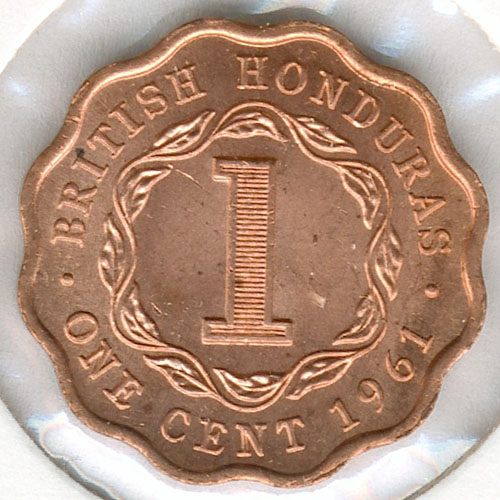 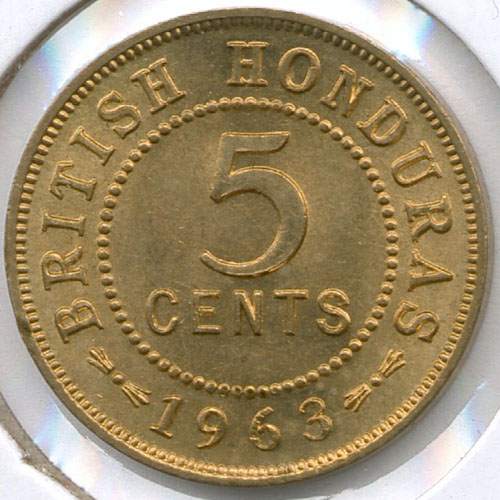 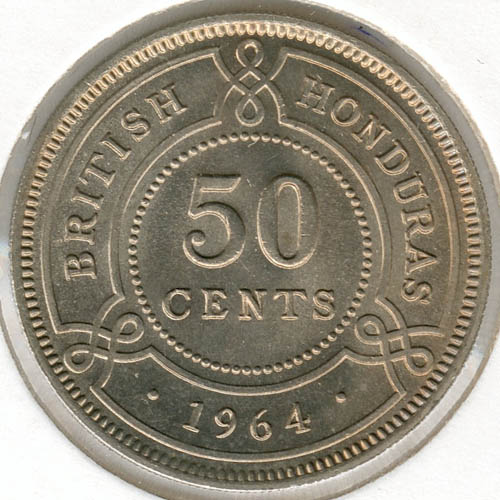 |
|
Pillar of the Community
United States
655 Posts |
QuickSilver, your demonstration of the scanner is very convincing. Since when did scanners pick up such accurate colors? As I remember it (some time ago), when I used a scanner to scan objects they appeared dark and b&w. You know what, I might be confusing the scanner with a copier. I don't have a scanner now because Windows XP didn't like my old one and said I needed to upgrade it.
While the photos on professional auction sites like Teletrade are excellent, I can't get those results. The main problem I see with photos from those that know how is that they apparently can skew them anyway they want, like a good photographer can make a not so attractive woman look good. I don't trust a lot of photos because I feel they're really disguising or purposely not showing scratches, and dark or bad toning.
Ron
|
|
Pillar of the Community
United Kingdom
1077 Posts |
One of the "faults" if you like of a scanner is that it does pick up every little detail, scratch and bag mark. You will often see comments from people who have used scanners saying that the coin "looks better in hand".
If you are buying a coin from a scan I would say that is an advantage, but it doesn't look as good in your portfolio as a photo can.
With either method you can always play around afterwards in photo editing software, to "improve" the picture. So you can manipulate a scan as much as a photo if you have the time and can be bothered.
Also note that these coins were scanned in their 2x2 holders. They come up a little clearer and slightly more in focus if they are flat on the glass.
|
|
Pillar of the Community
United States
1571 Posts |
shadow, maybe you will read this thread again, (as I have done), and see my question.
You scan your pictures to computer. doesn't this take up a lot of space on the HD? I have a computer that the VA gave me, for my vision , and it doesn't have that kind of space on it. Can I scan to a CD, or a zip-drive, (100MB)? That would make it easier to recover the series of images that have been taken, woould it not? I am about as new on the computers, as I am in photography, AND collecting, but I am learning, slowly. Thanks for your opinion,
Dick
|
|
Pillar of the Community
Canada
9780 Posts |
QuickSilver, what type of scanner are you useing?
|
| |
Replies: 28 / Views: 5,874 |










 Posted 03/10/2009 11:54 pm


