| Author |
 Replies: 13 / Views: 656 Replies: 13 / Views: 656 |
|
|
Pillar of the Community
United States
2243 Posts |
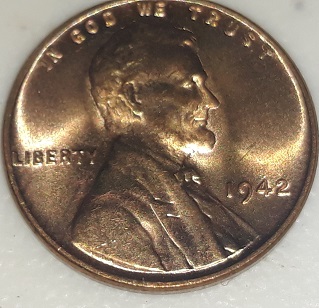
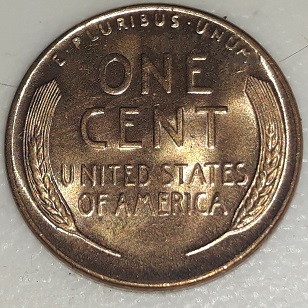
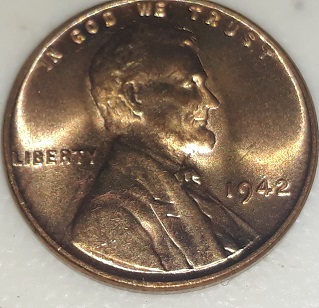 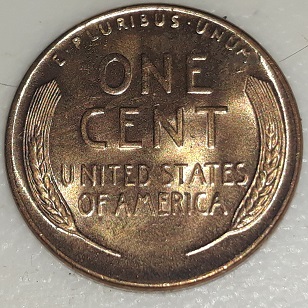 I'd say probably MS64/65.
|
|
|
|
Pillar of the Community
United States
3207 Posts |
pics are too distored by overmagnifcation and compression to tell whether that's dust or dings on the surfaces
|
|
Bedrock of the Community
United States
94367 Posts |
This cannot be the true color?  |
|
Pillar of the Community
 United States
2243 Posts |
Maybe I will take phone photos.
|
|
Pillar of the Community
United States
2243 Posts |
Edited by CalzoneManiac
05/17/2023 10:16 pm
|
|
Bedrock of the Community
 United States
18921 Posts |
tough call with small photos. when you get past 65 you need really good photos. lots of shadowing here. do not use overhead lighting of flash.
light chatter on the shoulder and lapel are typically die related
MS65RD without better photos
|
|
Pillar of the Community
United States
2243 Posts |
Are there methods of taking better photos using a phone or scanner?
|
|
Bedrock of the Community
United States
19575 Posts |
Suggest not using a scanner. I use a phone (recent technology) mostly, and a DLSR for more deliberate coin photography. As far as grade goes--with the current photos posted, I'd say the coin falls somewhere in the MS62-64 range. Nice example.
|
|
Pillar of the Community
United States
2243 Posts |
As for phone, I have a Samsung Galaxy J7 (the 2018 model), with 13MP camera and up to 1080p resolution.
|
|
Bedrock of the Community
United States
18921 Posts |
here is what I tell folks. this gives you about the best photo you can get from a phone if you want to try it. also your photos look like they are at a slight angle. this will create shadowing. straight on shot only
1. if coin is in holder, remove coin from holder if possible
2. turn off flash
3. place coin on flat surface with indirect natural light. maybe a window sill in a cloudy day. Use a black or white background to avoid any reflective color
4. move phone about 3in from coin
5. zoom in using your fingers until the coin comes into focus and fills the cameras view finder. if your phone has a portrait selection use that and then press and hold on the coin in the view finder to AF lock it
6. hold phone steady. if you cant then place something on either side of the coin (like books) at that distance and lay phone between them. this will hold it steady and allow you to zoom and take the photo without any blurring
|
|
Bedrock of the Community
United States
94367 Posts |
The problem is, the fields on both sides are mostly too dark to see the surface details clearly.
|
|
Valued Member
United States
293 Posts |
Quote:
As for phone, I have a Samsung Galaxy J7 (the 2018 model), with 13MP camera and up to 1080p resolution. I have one of those and have been trying to get decent shots for 5 years. Does great on larger outdoor photos. |
|
Pillar of the Community
United States
3207 Posts |
based on the modified photos, I'd say 63 or 64
|
|
Bedrock of the Community
United States
20043 Posts |
|
| |
Replies: 13 / Views: 656 |
|










 Posted 05/17/2023 5:58 pm