



Coin Community Family of Web Sites Join Thousands of Coin, Bullion, & Money Collectors
Coin, Banknote and Medal Collectors's Online Mall 300,000 items to help build your collection! Royal Canadian Mint products, Canadian, Polish, American, and world coins and banknotes. Shop for APMEX Bullion on eBay!Specializing in Modern Numismatics Join Thousands of Coin, Bullion, & Money Collectors Vancouvers #1 Coin and Paper Money Dealer


Username:
Password:
Save Password
Forgot your Password?


This page may contain links that result in small commissions to keep this free site up and running.

Welcome Guest! Registering and/or logging in will remove the anchor (bottom) ads. It's Free!

Saving Coin Forum Tips And References To A Local Collection

To participate in the forum you must log in or register.
Author Previous TopicReplies: 9 / Views: 910Next Topic  
Valued Member
mike31093's Avatar
United States
354 Posts
 Posted 10/03/2023  2:17 pm Show Profile   Bookmark this topic Add mike31093 to your friends list Get a Link to this Message Number of Subscribers
There is no method or function within the forum to save a collection of tips and references that one finds useful. If you have found a helpful post and want easier access to it, here's one method of saving that information to your local drive.

For my collection I use a MicroSoft Word document as the container since hyperlinks will retain their linking capability.

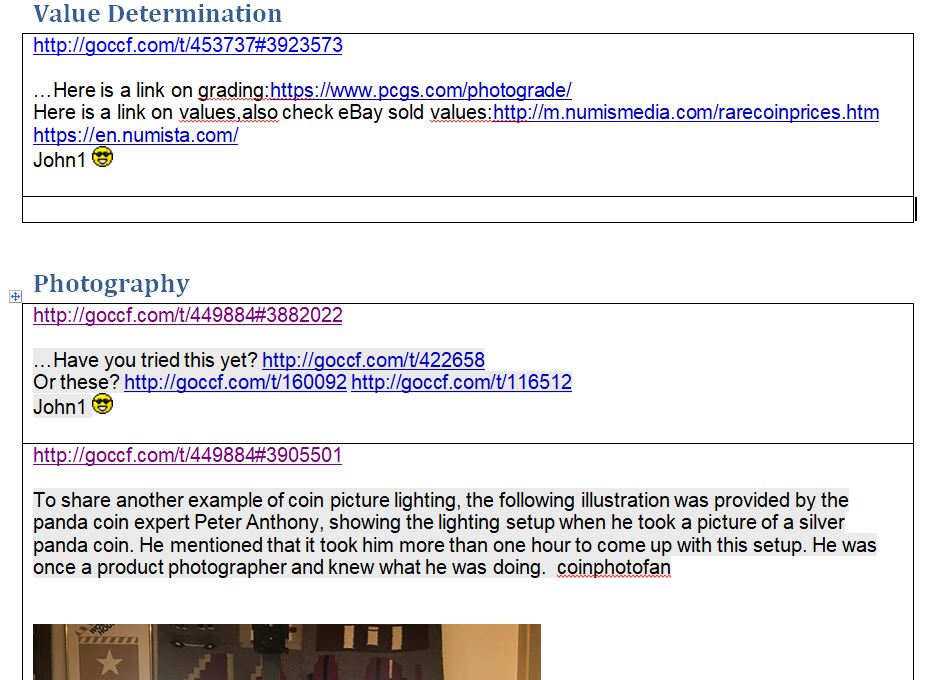
My document is organized using Headings to allow using Word's navigation pane to move within the document. Beneath each heading I add a single column table entry. Each tip will occupy one row.

Each tip is comprised of two elements. First a hyperlink to the post. You can get this link by clicking the javascript:OpenLinkMePreview('http://goccf.com/t/453737','1','3923573') icon and saving the resulting link to the clipboard. The clipboard is then pasted to the beginning of the row.

Second a copy all or part of the post you want to save. Paste it beneath the post link.

Here's a snippet of the beginnings of my tip collection which I'll add to as necessary. I hope this doesn't violate post rules.


Saving-Coin-Forum-Tips-And-References-To-A-Local-Collection
Edited by mike31093
10/03/2023 2:17 pm
Moderator
Learn More...
jbuck's Avatar
United States
187950 Posts
 Posted 10/03/2023  3:36 pm  Show Profile   Bookmark this reply Add jbuck to your friends list Get a Link to this Reply
I use the CCF bookmark feature to save posts I want to reference later. Just hit the Saving-Coin-Forum-Tips-And-References-To-A-Local-Collection above the post you want to save.

However, the Word document is not a bad idea! I have a Word document that goes back to the Windows XP days with links and snippets of "tips and tricks" for configurations, customizations, etc. It also has stuff for the various browsers. I just recently got a new laptop with Windows 11, so many new things are being added lately.
Valued Member
mike31093's Avatar
United States
354 Posts
 Posted 10/03/2023  4:25 pm  Show Profile   Bookmark this reply Add mike31093 to your friends list Get a Link to this Reply

Quote:
I use the CCF bookmark feature to save posts I want to reference later. Just hit the above the post you want to save.


The problem I've experienced with that option is that clicking the bookmark jumps to the end of the webpage. At least it does in Edge (Version 116.0.1938.81 (Official build) (64-bit)). Initially it homes in on the actual post, though.
Moderator
Learn More...
jbuck's Avatar
United States
187950 Posts
 Posted 10/03/2023  4:36 pm  Show Profile   Bookmark this reply Add jbuck to your friends list Get a Link to this Reply
For what it is worth, they all work fine for me with Firefox and the other browsers I use (Chrome, Edge, Opera... all three are Chromium based).

I seem to recall someone having that problem in past. I will need to search for the resolution.
Pillar of the Community
kbbpll's Avatar
United States
4233 Posts
 Posted 10/03/2023  11:59 pm  Show Profile   Bookmark this reply Add kbbpll to your friends list Get a Link to this Reply
I have a "coins" folder on my desktop. Under that are separate folders that may be for countries, years, series/denomination or topic. Then I'll have a Notepad file in the specific folder typically called "notes" or "work", and I copy/paste links in there with a brief note or quote. The folder also contains images and whatever other documents etc I may have decided to download, drafts and final of any articles written, etc. My .txt file is pretty similar to what you're doing but perhaps more specific. I suppose it would be easier to use a format that allows hyperlinks, but it's simple to just copy and then "paste and go" in my browser. Rudimentary I suppose but it works for me. Since my references are from all over the place it makes more sense for me to keep them separate from a particular forum or website (like the bookmark feature here).
Moderator
Learn More...
jbuck's Avatar
United States
187950 Posts
 Posted 10/04/2023  09:53 am  Show Profile   Bookmark this reply Add jbuck to your friends list Get a Link to this Reply

Quote:
Rudimentary I suppose but it works for me.
This is all that matters.
Valued Member
mike31093's Avatar
United States
354 Posts
 Posted 10/04/2023  09:54 am  Show Profile   Bookmark this reply Add mike31093 to your friends list Get a Link to this Reply
Jbuck, did you know that the images in you 7070 post are broken? I only see a small square for each image.
Moderator
Learn More...
jbuck's Avatar
United States
187950 Posts
 Posted 10/04/2023  12:27 pm  Show Profile   Bookmark this reply Add jbuck to your friends list Get a Link to this Reply

Quote:
Jbuck, did you know that the images in you 7070 post are broken? I only see a small square for each image.
Yeah, because the CCF gallery site is "not secure" (HTTP instead of HTTPS).

Try this:

For those who are using Chrome or Chromium based browsers (Edge, Opera, etc) and cannot see CCF Gallery images, please try this:

  • Click on the padlock in the address bar.

  • Click on site settings.

  • Under Permissions, scroll down to 'Insecure content' and set to Allow.

  • Reload the page and images should load.


This will only affect CCF. Mixed content will remain blocked on all other sites until you allow it.


For those who are using Firefox:

  • Click on the padlock in the address bar.

  • Click the down arrow where it says 'HTTPS-Only Mode' and select 'Off Temporarily'

  • Page will reload automatically


If you cannot get to those settings, you can go to the gallery directly and view the images there...

http://www.coincommunity.org/galler...p?album=1039
Valued Member
mike31093's Avatar
United States
354 Posts
 Posted 10/04/2023  10:32 pm  Show Profile   Bookmark this reply Add mike31093 to your friends list Get a Link to this Reply
No luck with suggestions. I sometimes use a Fire tablet which uses a Silk browser. Clicking padlock does nothing. I can use the gallery link, though.
Moderator
Learn More...
jbuck's Avatar
United States
187950 Posts
 Posted 10/05/2023  10:23 am  Show Profile   Bookmark this reply Add jbuck to your friends list Get a Link to this Reply
I am glad you can see them directly.

I have been slowly copying my images from the CCF gallery site to the main CCF site. I still need to do the 7070 images and update my topic.
  Previous TopicReplies: 9 / Views: 910Next Topic  

To participate in the forum you must log in or register.


Disclaimer: While a tremendous amount of effort goes into ensuring the accuracy of the information contained in this site, Coin Community assumes no liability for errors. Copyright 2005 - 2026 Coin Community Family- all rights reserved worldwide. Use of any images or content on this website without prior written permission of Coin Community or the original lender is strictly prohibited.
Contact Us  |  Advertise Here  |  Privacy Policy / Terms of Use

Coin Community Forum © 2005 - 2026 Coin Community Forums
It took 0.35 seconds to rattle this change. Forums