| Author |
 Replies: 13 / Views: 1,871 Replies: 13 / Views: 1,871 |
|
|
Pillar of the Community
Canada
1931 Posts |
I am trying to learn how to do picture overlays. (not sure that is the right term) I want to be able to put one picture on top of another to compare them. Somehow where one is outlined in one color and the other has a different color?
Does anyone know how to do this?
malissa
|
|
|
|
Pillar of the Community
United States
632 Posts |
I want to learn how also, for die clashes.  |
|
Bedrock of the Community
United States
10045 Posts |
Do either of you have Photoshop? That's by far the optimum tool to use because of its layering capabilities. There's a bit of steep learning curve on that software, but I think it's worth the effort.  Coop might drop by and suggest his methods, which I deem to be better-developed than my own. The overlays I do are a combination of photos and outlines to confirm positions of overdates, such as below. Here I use two programs--Adobe Photoshop and Illustrator, which I find gives clearer results--but is a little more work.  |
|
Pillar of the Community
Poland
3201 Posts |
I've never done before but it looks like a basic overlay is easy to do provided you've got pics of the obv and rev of exactly the same size. Apart from that problem, is this done correct? 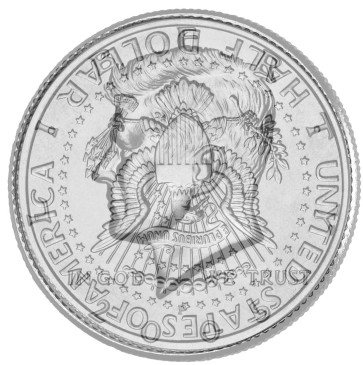 Edited by DL20K
04/08/2009 12:43 pm
|
|
Bedrock of the Community
United States
10045 Posts |
DL, That looks like a nice example to me. I imagine that one's used to predict the position of a die clash?  |
|
Pillar of the Community
Poland
3201 Posts |
Yup, that was supposed to be one of those.
It's been done like this:
- Get pictures of obverse and reverse,
- Flip the reverse in the correct position*,
- Open Photoshop / Gimp,
- Open the obverse file in PS / G,
- Add new layer of the same size as the picture of the obverse,
- Copy and paste the reverse in the new layer,
- Lower the opacity of both layers (it's 69% here),
- Move one of the layers if it's not in precisely the right place, so that the rims are exactly one over the other.
* I use Irfan View for the simple things, of course you can flip the photo later on in PS / G.
Edited by DL20K
04/08/2009 1:10 pm
|
|
Moderator
 United States
195559 Posts |
GIMP is free, Photoshop will eat into your coin budget!  GIMP is available for Windows, but I use it on my Linux system. GIMP is included with many of the linux distros, like Ubuntu (also free). |
|
Bedrock of the Community
United States
10045 Posts |
 save your $$$...Photoshop is best when your company pays for it. |
|
Moderator
United States
195559 Posts |
Quote:
Photoshop is best when your company pays for it Most definitely! Of course, being a "sound" guy, I could only justify the purchase of Adobe Audition. If I wanted to use Photoshop at work, I would have to bribe marketing to give me some Mac time.  |
|
Pillar of the Community
United States
632 Posts |
DL...thats what I was looking for...Thanks so much.
|
|
Bedrock of the Community
United States
10045 Posts |
Quote:
If I wanted to use Photoshop at work, I would have to bribe marketing to give me some Mac time. And PS works quite well on XP--I switched everything over a few years ago, no regrets at all. |
|
Pillar of the Community
Poland
3201 Posts |
* PS does seem to run better on XP than Gimp.
* From what I've heard, most agree that PS is easier to use than Gimp.
|
|
Moderator
United States
195559 Posts |
I would have to agree with both of those comments. I had some issues with GIMP when I installed it on Windows 2000 a few years back, but according to the support forum discussions, the problems were related to my (older) ATI video card. I did install it on another machine (nVidia video) with better results. That said, GIMP on my Linux system is rather nice; ATI video and all! Edited by jbuck
04/08/2009 4:45 pm
|
|
Pillar of the Community
United States
1571 Posts |
I believe coop uses ver 5.5. He has been using it for about ten years, and is quite capable. You have seen some of his work on this, and other forums. I had ver 4.0, but it wouldn't setup, so my "guru", wsent me a copy of 7.0. I have used it a bit, but it is hard, (for me) to get a hold of, unless one uses it constantly. I wanted to make the overlays for determining clash remnant sources, on Canadian coins.
Dick
|
| |
Replies: 13 / Views: 1,871 |
|










 Posted 04/08/2009 12:24 pm


