Coin Community Family of Web Sites Join Thousands of Coin, Bullion, & Money Collectors
Join Thousands of Coin, Bullion, & Money Collectors 300,000 items to help build your collection! Specializing in Modern Numismatics Royal Canadian Mint products, Canadian, Polish, American, and world coins and banknotes. Shop for APMEX Bullion on eBay!Vancouvers #1 Coin and Paper Money Dealer Coin, Banknote and Medal Collectors's Online Mall


Username:
Password:
Save Password
Forgot your Password?


This page may contain links that result in small commissions to keep this free site up and running.

Welcome Guest! Registering and/or logging in will remove the anchor (bottom) ads. It's Free!

1930-D - Grading & Photo Opinions

To participate in the forum you must log in or register.
Author Previous TopicReplies: 7 / Views: 1,897Next Topic  
Pillar of the Community
dbrablec's Avatar
United States
1944 Posts
 Posted 05/13/2009  7:55 pm Show Profile   Bookmark this topic Add dbrablec to your friends list Get a Link to this Message Number of Subscribers
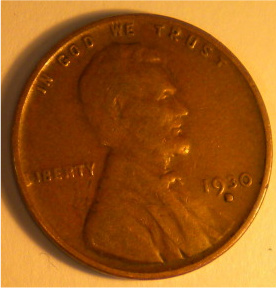
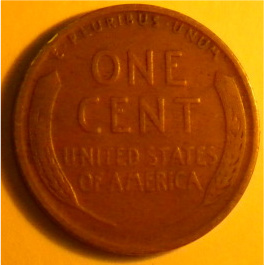
i have been on this forum for a few months, and up until now I have posted only scanned images of coins. I have recently had to replace my aging digital camera, and here is my first attempt at actually photographing and posting a coin. 1930D. I know it is not a rare or valuable coin, but I am curious if this is of sufficient quality to establish a grade accurately. I notice it is slightly blurry, but I hope it can be graded. I am still working on the camera and lighting settings.

thanks

Image: 1930-D---Grading-&-Photo-Opinions 1930Dobv.jpg
40.08 KB

Image: 1930-D---Grading-&-Photo-Opinions 1930Drev.jpg
32.88 KB
Edited by dbrablec
05/13/2009 7:58 pm
Pillar of the Community
bill069's Avatar
United States
608 Posts
 Posted 05/13/2009  8:40 pm  Show Profile   Bookmark this reply Add bill069 to your friends list Get a Link to this Reply
I'll call it a VG from what I can see. does anybody agree?
Bill
Pillar of the Community
Irishraider's Avatar
United States
1454 Posts
 Posted 05/13/2009  8:54 pm  Show Profile   Bookmark this reply Add Irishraider to your friends list Get a Link to this Reply
The pictures are sort of small which makes it hard to grade. Have you checked out SuperDave's coin picture taking tutorial in the Coin Photography section? It's really good and has lots of good tips and pointers.

https://goccf.com/t/29441


Edited by Irishraider
05/13/2009 8:55 pm
Moderator
Learn More...
echizento's Avatar
United States
23731 Posts
 Posted 05/13/2009  9:08 pm  Show Profile   Bookmark this reply Add echizento to your friends list Get a Link to this Reply
Hard to tell from the pictures a little too small, but from what I can make out I'll say F-15.
Bedrock of the Community
BadThad's Avatar
United States
19935 Posts
 Posted 05/13/2009  10:33 pm  Show Profile   Bookmark this reply Add BadThad to your friends list Get a Link to this Reply
First off, you can post pictures here up to 100k. Your pics are only about 30k, don't reduce them so much. I resize to about 800x600 and it works about to be about 100k or so from the my camera starting resolution.

Use a white background for your pictures. Before snapping, use your camera's white balance calibration to set it properly. Just point at the white background (copy paper works great) and calibrate. Use optial zoom to fill the camera frame, do NOT use any digital zoom, just optical. I highly recommend a full spectrum light. I bought a REALLY nice one from Lowes for $20. Lighting is extremely important with a digital camera.

Once you have the pictures, use image editing software to resize, keep resizing until the images are about 100k. With some experience, you'll know the exact size you need to use to get around 100k.
Lincoln Cent Lover!
VERDI-CARE™ INVENTOR
https://verdi.care/

Pillar of the Community
mklpatrick's Avatar
United States
580 Posts
 Posted 05/26/2009  1:27 pm  Show Profile   Bookmark this reply Add mklpatrick to your friends list Get a Link to this Reply

Quote:
Use optial zoom to fill the camera frame, do NOT use any digital zoom, just optical.


My camera is rated at 2.8 x on optical and 10 x on total of optical and digital zooms. How do I discern between the two?
Bedrock of the Community
BadThad's Avatar
United States
19935 Posts
 Posted 05/26/2009  10:27 pm  Show Profile   Bookmark this reply Add BadThad to your friends list Get a Link to this Reply
You should be able to turn off digital zoom in the camera menu....or....it should display the zoom level on the LCD as you change it.
Lincoln Cent Lover!
VERDI-CARE™ INVENTOR
https://verdi.care/

New Member
United States
25 Posts
 Posted 07/09/2009  10:12 pm  Show Profile   Bookmark this reply Add Ultvikefan to your friends list Get a Link to this Reply
I would call it a f-12 but oh so hard from the lighting from the pic
  Previous TopicReplies: 7 / Views: 1,897Next Topic  

To participate in the forum you must log in or register.


Disclaimer: While a tremendous amount of effort goes into ensuring the accuracy of the information contained in this site, Coin Community assumes no liability for errors. Copyright 2005 - 2026 Coin Community Family- all rights reserved worldwide. Use of any images or content on this website without prior written permission of Coin Community or the original lender is strictly prohibited.
Contact Us  |  Advertise Here  |  Privacy Policy / Terms of Use

Coin Community Forum © 2005 - 2026 Coin Community Forums
It took 0.23 seconds to rattle this change. Forums