| Author |
 Replies: 17 / Views: 4,680 Replies: 17 / Views: 4,680 |
|
Moderator
 United States
56855 Posts |
Here are two examples of a whole coin photo I took, the second shot is after making adjustments on Photobucket, in-put? John1    |
|
|
|
Bedrock of the Community
United States
12437 Posts |
Too much glare, not enough natural copper color. You will have to adjust your lighting set up, try to place a sheet of white paper or a coffee filter in front of the light to reduce glare.
|
|
Pillar of the Community
United States
3077 Posts |
and check your white balance you will be suprized what a diffrence that can make
|
|
Moderator
 United States
56855 Posts |
Can't use the paper idea because the leds are around the lens and there is no white balance adjustment for me to access.Thank you for the in-put. John1 |
|
Pillar of the Community
United States
3077 Posts |
no white balance... what are you using a kodak X15
|
|
Pillar of the Community
1844 Posts |
Hi John, I know lots of people use Photobucket... My self I love the Picassa program... I hope you dont mind I took the liberty to attempt to correct your scan... I think you might like this.. I hope I did not step out of bounds in doing so..If I did I am sorry.... 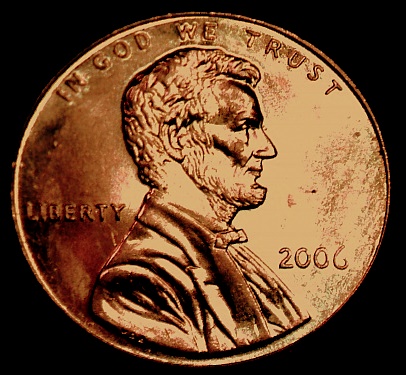 |
|
Moderator
United States
56855 Posts |
artdio, You did not step out of bounds and no need to apologies,I appreciate all in-put. The photo looks a lot better then the original. Is the Picasa program a free one? Thanks for looking. John1 |
|
Pillar of the Community
Canada
4227 Posts |
|
|
Pillar of the Community
1844 Posts |
Hello again, and thanks... Its actually called Picasa 3 and is totally free.. Its a wonderful program .. Once you test a few coin pics you will see how easy it is to use and how simple it is to get nearly perfect color without really messing with any settings......... If you have any trouble with it give me a shout....
|
|
Pillar of the Community
Philippines
1156 Posts |
Hi John1, another programme you can use is Microsoft Office Picture Manager, comes free with Microsoft Office. Easy to use, Since your original is almost black and white, you can shift the color, contrast,etc,anywhere from shades of Lincoln green to lincoln blue, here's your same pic as an extreme Lincoln red  I like the programme, it has one advantage over others, the "edit pic" that allows the programme to reset all aspects of pic in just one button click. 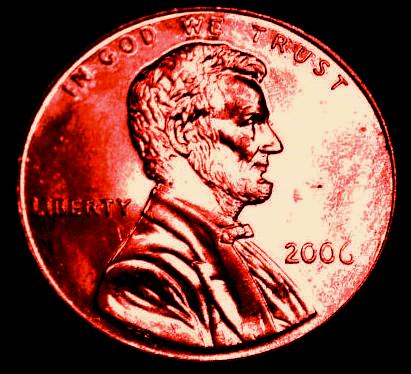 |
|
Valued Member
United States
125 Posts |
Quote:
try to place a sheet of white paper or a coffee filter in front of the light to reduce glare. I never would have thought of using a coffee filter. Just goes to show, no matter how old you get, there is always something to learn! |
|
Moderator
United States
56855 Posts |
Nic, Thanks for your in-put, I do use Microsoft Office Picture Manager and I also have used adjustments on Photobucket. I just wish that my USB digital microscope took better photos so I wouldn't have to mess with fixing the color all the time. artdio, I will check out the Picasa 3 program, thanks. John1
|
|
Pillar of the Community
1844 Posts |
Hi John1, once again your welcome... You will see that the Picasa 3 is the simplest program to use... You will have a great time and be amazed at how easy it is.. The great thing is by hitting the auto color, it adjusts the coins color to near perfect detail... But you can play with all the functions ..I love it.. Another great feature is you can save the pic.. and go back to it any time , remove the save and re-adjust .. I love this when doing Family photos..You can go from color to black & white and all kinds of good stuff...... Anyhow check it pout and if you need a bit of help let me know....
|
|
Pillar of the Community
United States
4085 Posts |
I'll second Picasa as a great photo editor. It is part of Google's suite of free software tools.
Ken
|
|
Pillar of the Community
Australia
9774 Posts |
This is how I take my pics, with a few of Bobby131313's ideas. Prepare a black background and mount a screw into it, then add some felt on top to hold the coin in place.  Balance the coin on top, lean the coin to one side slightly if you have to, to save reflection from coin.  Place cut-down juice or milk container over the coin. This not only stops glare but gives you a steady platform for taking the pic. Try different length containers until you find one that you can focus closest with.  I then place an old magnifying glass on top to increase the size of the pic. At this point you could place a piece of paper with a hole cut in it, and shoot through this to stop the glare of LED's.  I then shine light through the side of the container, this stops the glare. You can adjust the height of the light to add or subtract the amount of light on the coin surface. I only have one light, but two might work better.  This is the coin pic after editing in Microsoft Picture Manager. No colour adjustment, just cropped and darkened a little. All this on fully automatic setting on the camera.  Hope this helps Steve |
|
Pillar of the Community
United States
588 Posts |
|
| |
Replies: 17 / Views: 4,680 |







 Posted 08/14/2009 12:24 pm





