| Author |
 Replies: 20 / Views: 3,884 Replies: 20 / Views: 3,884 |
|
New Member
United States
26 Posts |
Could anyone here please give me some suggestions on getting close up shots of the lettering and mint marks on a penny? I have a digital camera with a lens that goes up to 90mm and I put on a 0.5X macro lens on top of that and put the camera in close up mode, but I'm not getting the same clear photos as a lot of the ones I see here.
I've also tried editing the pictures on my computer by zooming in on the areas I want to show, but they get too blurred to see detail when I do that. Would a scanner do better? I've only used this camera twice so maybe I'm just not doing something right with the settings.
Also, some of the first pictures I took came out really good. I tried duplicating what I did the first time and it didn't work. I must be missing something.
Thanks for any help you can give.
|
|
|
|
Moderator
 United States
23522 Posts |
What camera is it? The possibility exists that you're getting the lens too physically close to the coin for it to focus; knowing the specific camera's capabilities will help.
|
|
Bedrock of the Community
United States
12437 Posts |
Are you manually shooting or using a tripod/copystand? Manually shooting macro pictures is a good way to get blur.
|
|
New Member
 United States
26 Posts |
It's a Canon Rebel and I wasn't using the tripod. I haven't figured out how to set that up yet. I had the zoom on 90mm with the macro lens on too, and I was maybe 8-10 inches away from the coin. Is that too close?
Thanks for helping me figure this out.
|
|
Pillar of the Community
United States
2669 Posts |
hmm.. the Canon macro lenses are stand-alone.. are you using one of those slender add-on-the-front-of-the-lens types? I've never had good luck with those. Your Zoom lens is actually going to be worse in this situation as you are too close to focus with that one. Try the regular lens and have it auto-focus on the coin. You can place it closer or further away from there if you need to, and try the add-on lens if you want. And like Bio said, you also should definitely set up the tripod, and turn on the shutter timer so it will take the picture a few seconds after you've pressed the button (any amount of shake, including from pressing the button, equals a blurry picture when taking close up shots). I'm sure SD & Bio will be back with a lot more pointers, too  Edited to clarify  Edited by xshift
11/02/2009 1:37 pm
|
|
Pillar of the Community
United States
2669 Posts |
oh.. also, make sure you have it set to take the largest picture possible, in RAW if you can, as well. The Canon software that came with your camera can edit the RAW pictures easier (like adjusting white balance if needed, brightening, etc) than you can a regular JPG file. The larger picture the better, as you can always resize down if you need to, but making something larger will lose a lot of detail.
|
|
New Member
United States
26 Posts |
Xshift, I guess I don't have a true macro lens. This is a thinner-looking lens that screws on to the end of the zoom lens. Thanks for all the great tips. I'm going to have to get out the instruction manual for my camera again and start reading. I haven't got past the sections of attaching a lens and turning on the camera.  But I'd like to try your suggestions so I'll read up on what to do. Thanks again. |
|
Pillar of the Community
United States
2669 Posts |
Quote:
This is a thinner-looking lens that screws on to the end of the zoom lens. Yep, that's the type.. I tried a couple of those before I asked Santa for a true macro lens for Christmas It made an incredible difference. I've still got lots of practicing to do myself, but now at least I know the issue is with my mad skillz and it's not the camera's fault  Let us know how it goes, and good luck! |
|
Pillar of the Community
United States
2797 Posts |
freshcurrency, When you're taking shots of mintmarks and letters/numbers, you are probably trying to show doubling, overdates, and repunches. I gave up trying to use macro-photography to capture these and switched to an inexpensive USB digital microscope. You'll lose color, but that isn't what you're trying to capture. Here's an example of what you'll get: 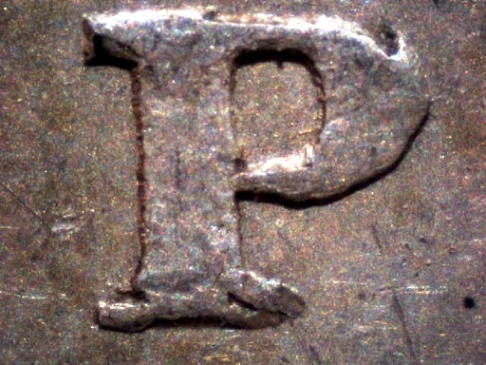 |
|
Pillar of the Community
Philippines
1156 Posts |
Hi SeatedNut, that is a fantastic close up shot. that has always been my difficult area. What is the brand and model of your USB digital microscope? and does it have its own stand? thank you
|
|
Pillar of the Community
United States
2797 Posts |
Nic
It's the QX45 that looks like a fat microscope. It's actually a kids' toy but you can see the results. It offers 10x, 60x and 200x magnification. The shot above was 60x. I haven't found a need yet for 200x and Morgans are just too fat to make that magnification work. The 10x gives a wider field of view to show multiple features. The whole thing cost about $75. It plugs into the USB port and has it's own internal lighting that can be moderately adjusted. I've had it over a year now and it consistently gives these type results.
There are other, more expensive models that will offer more true colors and tones, but I show that with my Canon on macro.
|
|
Moderator
United States
23522 Posts |
Quote:
I haven't found a need yet for 200x 200x on a QX5 will help resolve the minute doublng/tripling/quadrupling seen on some Morgan stars. There's not enough depth of field to shoot it, but you can count the layers as you progress the focus. |
|
Pillar of the Community
Philippines
1156 Posts |
Thank you seatedNut for the reply, QX45 I assume is the model number, what would be the brand name?
Pardon the inexperience and lack of info on this type of close-up equipment, I don't have any. thanks again
|
|
Pillar of the Community
United States
2797 Posts |
Nic,
I got an errant '4' in there. It's the Digital Blue QX5. Go to the Digital Blue website and they are $79.99 w/free shipping. It indicates they are currently out-of-stock with expected delivery of Nov 2009.
|
|
Pillar of the Community
United States
1571 Posts |
Digital Blue also makes the QX3. Same specs, etc, but it had a focus problem. It "bounced, and jerked" when adjusting the focus. I made a mounting ring that fits the body of the scope, and it sits on the dase of mt QSZ Stereo-Zoom scope. . nice smooth focus adj., and more light available. BTW, the lighting had to be "worked on, as well. I like that shot of the "P" I am currently working on that same thing, too, so I'll be following this thread very closely. If anyone can 'figure our your problems, it is SD, thanks for beibng there, Dave!
Dick
|
|
Pillar of the Community
United States
2797 Posts |
Oh, forgot to mention this ... in confirming Morgan and Peace dollar VAMs a 10x loupe doesn't quite get you there on some features. That's when I plug in the QX5 and observe features on my 20" LCD screen. It sure makes them stand out better than squinting through that tiny lens. So I use it as a mega-loupe too. |
| |
Replies: 20 / Views: 3,884 |





 Posted 11/02/2009 11:24 am





