



Coin Community Family of Web Sites
Shop CCF Members on eBay! Specializing in Modern Numismatics Vancouvers #1 Coin and Paper Money Dealer Royal Canadian Mint products, Canadian, Polish, American, and world coins and banknotes. Shop for APMEX Bullion on eBay!Coin, Banknote and Medal Collectors's Online Mall 300,000 items to help build your collection!


Username:
Password:
Save Password
Forgot your Password?


This page may contain links that result in small commissions to keep this free site up and running.

Welcome Guest! Registering and/or logging in will remove the anchor (bottom) ads. It's Free!

Image Glare

To participate in the forum you must log in or register.
Author Previous TopicReplies: 5 / Views: 1,613Next Topic  
Pillar of the Community
Nic's Avatar
Philippines
1156 Posts
 Posted 11/15/2009  8:53 pm Show Profile   Bookmark this topic Add Nic to your friends list Get a Link to this Message Number of Subscribers
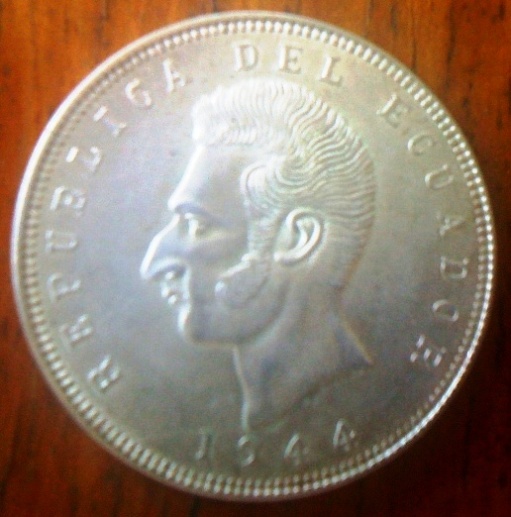
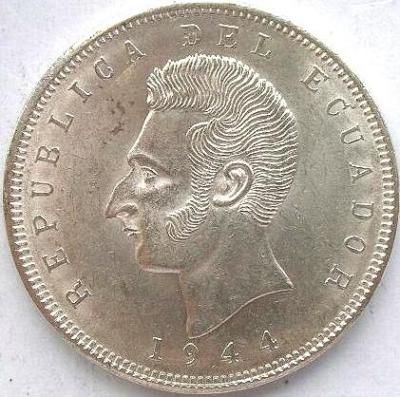
Hi, How do you take out that glare and have a clear picture like the one below?

1944 Ecuador 38mm silver coin Obv. the pic with wood background is my coin, full of glare. Thank you


Image-Glare


Image-Glare
Edited by Nic
11/15/2009 8:55 pm
Moderator
Learn More...
John1's Avatar
United States
56855 Posts
 Posted 11/16/2009  07:14 am  Show Profile   Bookmark this reply Add John1 to your friends list Get a Link to this Reply
Have you tried filtering the light? Also, your coin looks to be a little out of focus.
John1
Moderator
Learn More...
Sap's Avatar
Australia
16806 Posts
 Posted 11/16/2009  07:53 am  Show Profile   Bookmark this reply Add Sap to your friends list Get a Link to this Reply
Three things:

1. Don't use the camera's built-in flash; it's not really designed for close-up work on shiny metal objects; it's too bright. Use a separate light source (and there's plenty of threads in this subforum about proper lighting).

2. I agree with John1, it does look out-of-focus. If that's as good as your camera can get, it may not be the best kind of camera for taking closeups of coins.

3. The second picture looks like it was done with a scanner, rather than a camera. Scanners are (or can be) very good at capturing detail and imperfections, but are typically very poor at capturing lustre and colour. I've got a good scanner that works well for coins (not all scanners do), so when I want a nice clear pic of a coin that doesn't have too much lustre left, the scanner is my weapon of choice.
Don't say "infinitely" when you mean "very"; otherwise, you'll have no word left when you want to talk about something really infinite. - C. S. Lewis
Pillar of the Community
Canada
1248 Posts
 Posted 11/16/2009  10:55 am  Show Profile   Bookmark this reply Add hhbkiddo to your friends list Get a Link to this Reply
Hello SAP
what type, make etc scanner are you using?
AND, at what DPI do you usually scan?
color or B&W.. what settings?
thanks
H
Moderator
Learn More...
Sap's Avatar
Australia
16806 Posts
 Posted 11/16/2009  5:40 pm  Show Profile   Bookmark this reply Add Sap to your friends list Get a Link to this Reply
Mine's an old HP Scanjet 3770 scanner. Most of my scan jobs are for printing in my photocopied coin club magazine or posting here on the forum, neither of which usually need more than 300 dpi. I use the default colour mode.

Once scanned, for Magazine pics I usually then tweak up the contrast and brightness so the photocopier pics out the details properly. For forum pics I usually post them undoctored, unless it's a dark copper or zinc coin, in which case I'll also boost contrast and brightness so we can see the details.
Don't say "infinitely" when you mean "very"; otherwise, you'll have no word left when you want to talk about something really infinite. - C. S. Lewis
Pillar of the Community
Nic's Avatar
Philippines
1156 Posts
 Posted 11/16/2009  8:46 pm  Show Profile   Bookmark this reply Add Nic to your friends list Get a Link to this Reply
John1 thanks, now that you mentioned it as OOF, yes, and that's about the closest I could get my camera in.

Sap thanks too, I seldom use my scanner now as it has too many stages to go to, to arrive at the finished jpeg below 100k image

Is there a camera brand that would have its own miniature stand for use exclusively for coins? the pic above was taken using an iPhone3G through a 3xmagnifying glass - an improvised setup

thanks again for the info
  Previous TopicReplies: 5 / Views: 1,613Next Topic  

To participate in the forum you must log in or register.


Disclaimer: While a tremendous amount of effort goes into ensuring the accuracy of the information contained in this site, Coin Community assumes no liability for errors. Copyright 2005 - 2026 Coin Community Family- all rights reserved worldwide. Use of any images or content on this website without prior written permission of Coin Community or the original lender is strictly prohibited.
Contact Us  |  Advertise Here  |  Privacy Policy / Terms of Use

Coin Community Forum © 2005 - 2026 Coin Community Forums
It took 0.25 seconds to rattle this change. Forums