| Author |
 Replies: 18 / Views: 2,400 Replies: 18 / Views: 2,400 |
|
Pillar of the Community
United States
4000 Posts |
Back to the lot of RPM's I took a break from. Having a hard time ID'ing this one. I think it was mislabeled as #005. Is the stray column in the last bay normal, too? 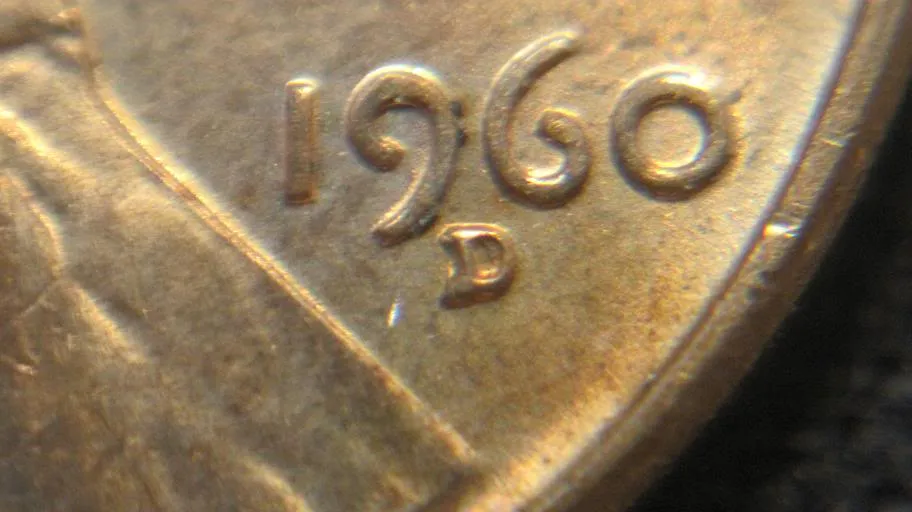 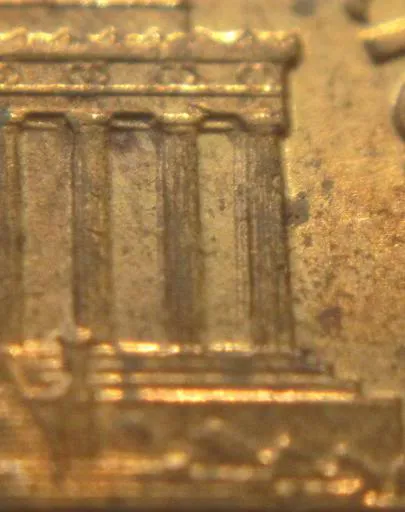 |
|
|
|
Bedrock of the Community
United States
62064 Posts |
Check markers or 003. An overlay confirms the correct location for this die. I think your example is earlier than the other examples pictured from what I can see on your image. Let me know if any markers match or not.
|
|
Pillar of the Community
United States
3640 Posts |
You may also want to check 007
Look for a straight hor. line (very short)
directly to the right of the G in FG (rev.)
Looks like this: G __ (just up a little higher though :)
as well as some polish lines lower middle fields (rev.)
|
|
Bedrock of the Community
United States
62064 Posts |
005, 006, 007 are all too far south to be from the die that made Scooby's coin.
|
|
Pillar of the Community
 United States
4000 Posts |
Thanks coop!
I see a NE-SW die scratch that runs from the shoulder fold onto the shoulder that looks very close to the EDS pic, but I do not see any of the other markers for this die state.
There also appears to be a very faint east-west scratch that shows on the lapel that is similar to the MDS pic, but I do not see any of the other markers for this die state either. So....
What about that stray column? Is that normal?
|
|
Bedrock of the Community
United States
62064 Posts |
Stray column? Are you talking about the bag mark on the cornice above the 11 th. column? I must be missing something here?
|
|
Pillar of the Community
United States
4000 Posts |
Inside left of the entire column in the last bay. I've seen the lines that are supposed to give it the depth or 3-D look, but never seen one so far to the left like that, and it seems like there is usually only one, not two.
|
|
Bedrock of the Community
United States
62064 Posts |
I checked the example of a LDS that I have several copies of, and it is part of the 3D appearance and the polishing has removed a portion the edge next to the 3D looking column that is there to make it look like it is a column farther back on the Memorial. Just die wear on the left edge of the 12th column.
|
|
Pillar of the Community
United States
4000 Posts |
Thanks coop! I'll take #003 and call this one done!
|
|
Bedrock of the Community
United States
62064 Posts |
Is the other 005 you have the same or different? It would be nice if the other one was 005.
|
|
Pillar of the Community
United States
4000 Posts |
It looks to be in about the right position for #005, but I can't match any markers up for it. It is definitely not the same as the one above, the mm is much lower.
Ironically, the one he did have labeled as #003, I think is mislabeled, too!
|
|
Bedrock of the Community
United States
62064 Posts |
The one he may have labeled as 003 might be 002? There are several that look close in spread and location. You just have to figure which one it is. I do so by first by spread and second by location. 002, 003, 005, 006, 007 & 060 look very similar. The overlay is the best way I know to determining which is which. ADDED: Thanks for including the full date and mint mark in the image you provided. It save me time to match an overlay quicker as I use the digits of the full date to: Level the date Crop the outside edges of the date Find an image and crop the two images exactly the same to match sizes of the date and find the locations of the mint marks with an overlay to find the locations of the two/three/more possibilities. So you save yourself and me time by including the full date and mint mark in the image.  Edited by coop
04/24/2010 10:21 pm
|
|
Pillar of the Community
United States
4000 Posts |
How are you doing these overlays?
|
|
Bedrock of the Community
United States
62064 Posts |
Ancient family secret.. LOL To read more about this check out these tags to see how it is done. I use Photoshop and I have a few suggestions on how to use it: http://www.coppercoins.com/forum/vi...ght=overlayshttp://www.coppercoins.com/forum/vi...ght=overlaysThat's basically how I do it. The best way to save it is highlight the whole post and do the control copy and post the whole thing on a word page. You can read/save/print from it. The areas you wish to print and what you don't want you don't need to print. But by having it on a word page, at least you can bring it up another time without trying to find it on coppercoins. Even images will transfer over. The only problem is that you can't open the individual images in photoshop from the word file. |
|
Pillar of the Community
United States
4000 Posts |
Awesme coop, I'll look into this and maybe save you a few headaches!
Of that lot, I was able to go through and confirm about 20-25 right off the bat. That still leaves a ton I need to research or confirm. It's starting to feel like a part-time job!
|
|
Bedrock of the Community
United States
62064 Posts |
But your LOVING it! That is why we call it a hobby. If it is a job, we've left the hobby realm. View each coin as a learning experience. After each one is atributed, then you know more about that die and can share with others.
|
| |
Replies: 18 / Views: 2,400 |









 Posted 04/24/2010 8:48 pm


