| Author |
 Replies: 10 / Views: 1,994 Replies: 10 / Views: 1,994 |
|
|
Pillar of the Community
United States
1599 Posts |
Superdave and others-you talk about tethering; I have looked for available software. What do some of you use, any recommendations, etc? Thanks! Ok-got it teathered, took about 100 pics, think I finally got one that looks ok. Any opinions, help? 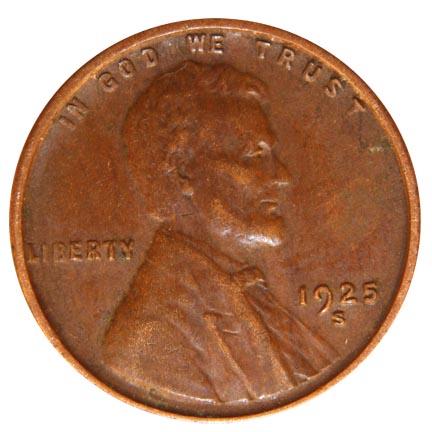 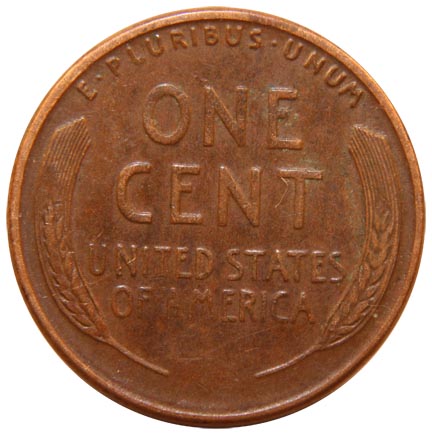 Edited by jprine
07/05/2010 2:15 pm
|
|
|
|
Moderator
 United States
23522 Posts |
All the tethering software you need, the exact same I use, came with your camera. It's part of ZoomBrowser. Have you installed it yet? If not, install the it and we'll talk about how to make it work for you.
Your T1i should have come with the cable to plug it into a USB port, I should think. Am I right?
|
|
Valued Member
United States
211 Posts |
On a Mac tethering is done with the EOS utility that comes with the camera.
|
|
Pillar of the Community
United States
1299 Posts |
|
|
Moderator
United States
23522 Posts |
Quote:
You could use PSRemote by Breeze Systems. Check their website. I have dSLR Remote from the same vendor. It's a very good piece of software. It costs $100. Canon's software is just as good, and came free with the camera jprine owns. That's better math.  PSRemote is the obvious choice for those who have certain Canon point-and-shoots which came with no tethering software. |
|
Pillar of the Community
 United States
1599 Posts |
SuperDave-loaded the software last night and played with it for awhile. Should have looked at the software that came with the camera earlier, but I have Adobe and never thought to mess with the camera software-duh. Anyway, my initial reaction is that this eliminates lots of problems I have, ie, having to make mulitple adjustments from the camera, not really being able to study the results of each shot immediately after it is shot, etc. I think I am really going to like this. Hope you will continue to give me some help. My biggest problem left is my lighting. I am using two 40 watt incandesent bulbs. Even adjusting the white balance, I cannot get the yellow out. I have been looking for halogens on a gooseneck or daylight bulbs. No success on either so far. Will make another run to Lowes, etc this afternoon. Thanks again for the help.
|
|
Moderator
United States
23522 Posts |
Quote:
I am using two 40 watt incandesent bulbs. Even adjusting the white balance, I cannot get the yellow out. Odd. I have no problem whatsoever getting a perfect custom white balance with my XSi, even with 20" and 26" LCD monitors washing the photography station. Do you have access to a suitable gray card? I set white balance against the gray base of my copystand, although I've had success with white as well. |
|
Valued Member
United States
211 Posts |
Yes! A grey card is indispensable for getting the white balance right. Many people on this sight use regular incandescent lights and white balance them. It should work well. They can be had at a camera store for $20.
An additional challenge with a desk light is that it does not throw even light on its subject, the center may be hotter than the edges. You can fix this by bouncing the light against foam core.
For years, movies were shot with 3200K incandescent lights and special 3200K film. Though the trend now its towards daylight balanced LED or fluorescents because they are energy efficient, cool burning, and balance with exterior shots.
Try properly color balanced lights. I am not sure Lowes will have them. I have bought them over the internet. You are looking for "daylight fluorescent bulbs". Color temperature of 5500K. The trend at Lowes is selling warm fluorescents - watch out for these.
If you google search "daylight fluorescent bulbs photography" you will see multitudes of hits.
|
|
Valued Member
United States
321 Posts |
Keep in mind that the light you use will make the coin look DRASTICALLY different in the photos.
I like incandescent because it represents the coin nicely. I would grade every one of my photos the same as the coin in hand. I use 1 incandescent and 1 halogen.
The halogen is good for accurate color and a little bit of added detail while the incandescent is good for true representation.
imho.
|
|
Valued Member
United States
321 Posts |
haha I take it back, halogens and sunlight bulbs all the way. did some experimenting this weekend.
|
|
Moderator
United States
23522 Posts |
The pattern of the light is far more critical than the color temperature. No camera instinctively "knows" what the correct color temperature is; regardless of which bulb type you use or which camera setting you trigger, someone, somewhere is causing the camera to compensate to achieve proper white balance. The camera doesn't see color - it sees digital information. Either it's a factory preset which is more or less accurate, or you're doing it yourself to achieve perfect accuracy. Furthermore, the color temperature of the ambient light has a bearing on what we see ourselves - we see individual colors differently at 5000k ambient than we do at 3800k. Therefore, how qualified are we to decide what the "right" color is? Another consideration is the screen upon which you look at the picture, once shot. Monitors have color balance settings too. Your opinion of whether or not you got the color right is therefore a direct function of the color settings on your monitor, which could be skewed one way or another. I use a dual-monitor setup, and I cannot for the life of me get them to perfectly match for color. Whatever I do, the Viewsonic is warmer than the Asus, and it leaves me looking at my shots on each to try and come up with a compromise which *might* look correct on your monitor. If yours is set at the same color temperature as mine. So, when I say, "Golly, you've got the color nailed," what I'm actually saying is, "Golly, you've got the color nailed on my monitor." Clarity, detail and contrast do not change. They are the same on my monitor as they are on yours. These are by wide margin the more important goals of successful coin photography. |
| |
Replies: 10 / Views: 1,994 |
|







 Posted 06/25/2010 02:10 am





