Coin Community Family of Web Sites Join Thousands of Coin, Bullion, & Money Collectors
Royal Estate Auctions - $1 Coin Auctions300,000 items to help build your collection! Specializing in Modern Numismatics Join Thousands of Coin, Bullion, & Money Collectors Coin, Banknote and Medal Collectors's Online Mall Royal Canadian Mint products, Canadian, Polish, American, and world coins and banknotes. Vancouvers #1 Coin and Paper Money Dealer


Username:
Password:
Save Password
Forgot your Password?


This page may contain links that result in small commissions to keep this free site up and running.

Welcome Guest! Registering and/or logging in will remove the anchor (bottom) ads. It's Free!

Difficult To Handle...

To participate in the forum you must log in or register.
Author Previous TopicReplies: 1 / Views: 1,633Next Topic  
Pillar of the Community

Australia
3831 Posts
 Posted 08/03/2006  11:37 pm Show Profile   Bookmark this topic Add gxseries to your friends list Get a Link to this Message Number of Subscribers
Actually I found it quite difficult to handle. To post the obverse and reverse together as one image, I'll have to combine them and edit them as one. And I'm afraid but I have to say it isn't too user friendly until you get the concept. What is more annoying is the point when you wish to rearrange them. Usually I have my images kept seperately in different folders and labelled the files as obverse and reverse and such. But with this, only the file name is taken, and so there are plenty of confusion with my own naming method. I guess I have to rename my files to fit in with the gallery here.
My partial coin collection http://www.omnicoin.com/collection/gxseries
My numismatics articles and collection: http://www.gxseries.com/numis/numis_index.htm
Regularly updated at least once a month.
Forum Dad
Learn More...
bobby131313's Avatar
United States
24170 Posts
 Posted 08/04/2006  12:06 am  Show Profile   Bookmark this reply Add bobby131313 to your friends list Get a Link to this Reply

quote:
Usually I have my images kept seperately in different folders


You can do that, they're just called albums instead of folders. Add as many as you want in the album manager.

quote:
labelled the files as obverse and reverse and such. But with this, only the file name is taken, and so there are plenty of confusion with my own naming method.


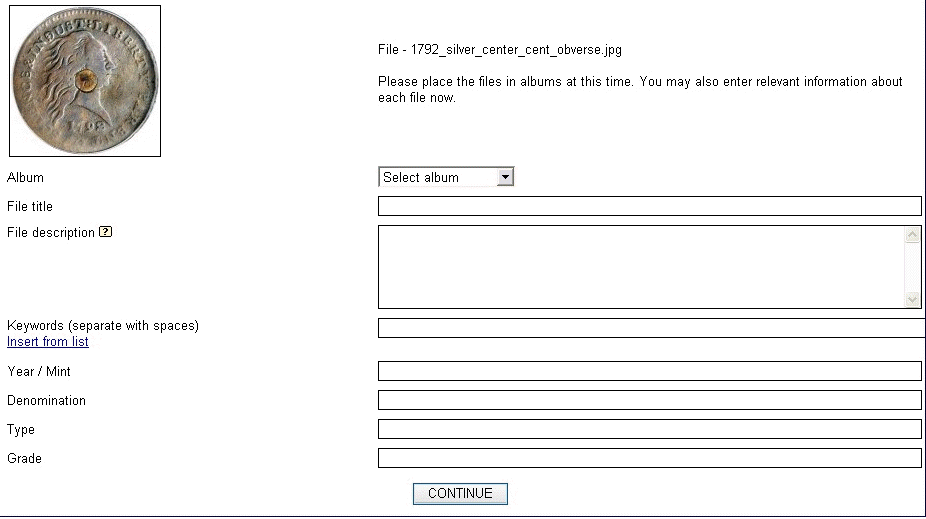
After you upload your images, it runs you through them all to put names and lots of other stuff. Here is what it should look like...

Click image to enlarge...

Difficult-To-Handle...

It should take you through for each image.

Any other questions, just post here!

  Previous TopicReplies: 1 / Views: 1,633Next Topic  

To participate in the forum you must log in or register.


Disclaimer: While a tremendous amount of effort goes into ensuring the accuracy of the information contained in this site, Coin Community assumes no liability for errors. Copyright 2005 - 2026 Coin Community Family- all rights reserved worldwide. Use of any images or content on this website without prior written permission of Coin Community or the original lender is strictly prohibited.
Contact Us  |  Advertise Here  |  Privacy Policy / Terms of Use

Coin Community Forum © 2005 - 2026 Coin Community Forums
It took 0.19 seconds to rattle this change. Forums