| Author |
 Replies: 15 / Views: 4,455 Replies: 15 / Views: 4,455 |
|
|
Valued Member
Canada
304 Posts |
In 35 poppy quarters bought today THREE have QC problems: 1) Not sure what this is:  2) blistered plating:  3) a much BIGGER blister?  Edited by malibu
10/27/2010 6:14 pm
|
|
|
|
Valued Member
Canada
311 Posts |
I am having trouble getting a good picture of the right Poppy on the reverse of the quarter, but I have found in the three quarters that I received in change, that on the right poppy, where there is a line of horizontal dots, two of the quarters have one dot at each end of the black line and one quarter has two dots at each end of the horizontal line. I have a feeling that there could be a lot of differences in these new quarters. I will endeavor to get pics. take care.
|
|
Pillar of the Community
Canada
864 Posts |
That top/first photo of the trail from the Crown to rim looks similar to the 2001 P Volunteers dimes "trails" from letters and images (raised parts called devices?) I've read comments about the trails as being "trail bleeds" due to a damaged or broken die and some damaged dimes were accidentally released. That trail from the crown in your photo looks like the same effects that caused the trails on the dimes. By the way, yesterday I received another of that Volunteer dime in change, it has some die bleeds trails too though not quite as strongly as the other two I have though. I'm guessing this dime was minted earlier in that die state. I've ocassionally seen dull matte-ish areas like your coin too, the dull matte area above 25 cents and the Veterans head. Looks like missing plating in those areas? I'm curious to read what people say about these effects too so I can know what I'm seeing too. I'm glad you started this thread  |
|
New Member
Canada
20 Posts |
Hi all: (First post). I just opened 10 rolls and here is what I've found. 8 in at least MS63/64 and 1 in MS65. Errors: Upper left trail from top of maple leaf to edge. Flaking "below" the words 25 cents, plating missing on the Queen's cheek. And one huge dye break from the top of the coin to the bottom, right across the middle of the queen. 8 errors in all. So, 17 keepers out of 10 rolls.
|
|
Valued Member
 Canada
304 Posts |
  Quote:
And one huge dye break from the top of the coin to the bottom, right across the middle of the queen gotta see a pic of this, could be post mint damage |
|
New Member
Canada
20 Posts |
Oh, I tried. 12 times I tried. I just have a crappy camera that shows the coins as blury shiney circles. Sorry. On another note, I opened up another 5 rolls yesterday with the same ratio of keepers, but one of them has a bite out of one of the edges. Not a clip but more like a chip. 10 rolls to go.
|
|
New Member
Canada
20 Posts |
Well, I managed to scan a good picture, but the file is too large to post here. Would anyone send me their email address so I could get a second opinion? I'm thinking now that I've seen it, it might just be a post-prodution scratch. Thanks.
|
|
Valued Member
Canada
304 Posts |
you could try cropping the part of the image you want to post. To do that you can use various free softwares e.g. Irfanview: http://irfanview.com/after cropping the image in Irfanview you can "Save As" into .jpg file using around 50% save quality, aiming to reduce the file size to below the CCF 90 kB maximum. Upload the file to CCF following the tutorial provided by CCF. Good luck and Merry Christmas to all! |
|
Pillar of the Community
Canada
1166 Posts |
Struck through debris:   |
|
Valued Member
Canada
306 Posts |
Hello ikandiggit
I see more "Flaw Planchet", is not debris.
|
|
New Member
Canada
20 Posts |
Good thinking malibu. Duh! :) Okay, here it is: Straight from a roll remember. Scratch or minining error. Thanks 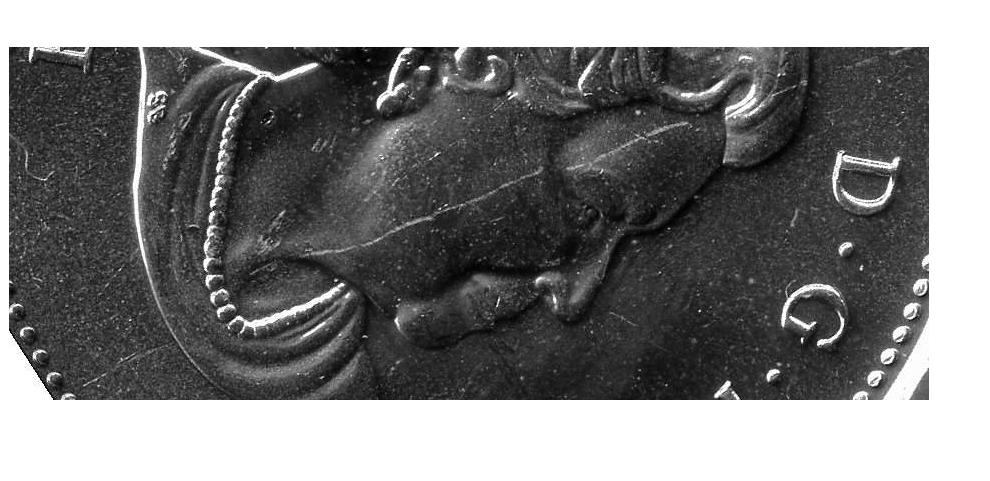 |
|
New Member
Canada
20 Posts |
ikandiggit, I opened a lot of rolls and found a half a dozen of your error in exactly the same spot. Interesting, eh?
|
|
Pillar of the Community
Canada
1166 Posts |
I, personally think it is a struck through by the way the devices in the area are affected, particularly the "n" and the "e" in "cents". I had this posted in another forum and coop's opinion was that it was a Struck Through Grease rather than a planchet error. With your finds, cpu, it confirms it. coop's answer: "Something to consider on Canadian coins is that they plate their dies before use. Sometimes the plating comes off. This happens near the rim area. But I agree with the Struck through error (grease) as the edges of the CENTS is weak near the un-struck areas." |
|
Valued Member
Canada
304 Posts |
CPU, that's not a die break, it looks more like a scratch (post mint damage). If you found this in a RCM roll, then I'm guessing it was scratched at the mint, e.g. fell on the floor, got kicked around, then maybe swept up by maintenance. I'm wondering if all the other errors reported here are related to delamination, plating issues, or planchet flaws. The mark under "25 cents" looks like a piece of plating or material broke off and stuck to the reverse die, since it's incuse on the coin and apparently was seen by at least two contributors on up to 9 different coins. |
|
Valued Member
Canada
75 Posts |
i have to open a few rolls of those 25 cent poppy .? right now.
|
|
Bedrock of the Community
United States
12437 Posts |
Quote:
I, personally think it is a struck through by the way the devices in the area are affected I concur, classic diagnostics of being Struck Through Grease. The first group of photos appear to have plating issues. |
| |
Replies: 15 / Views: 4,455 |
|









 Posted 10/30/2010 6:30 pm


