|
This page may contain links that result in small commissions to keep this free site up and running.

Welcome Guest! Registering and/or logging in will remove the anchor (bottom) ads and the security checks. It's Free!
To participate in the forum you must log in or register. | Author |
 Replies: 11 / Views: 3,112 Replies: 11 / Views: 3,112 |
|
|
Moderator
 United States
23522 Posts |
Moved this to its own topic.
Here are the settings you need to become familiar with on your S2 IS:
Manual control, "M" on the top knob. You'll want to be able to vary all the settings you can, to compensate for differing metals and degrees of luster. Lustrous MS coins don't photograph the same way circulated ones do.
Aperture. Generally, you want the lowest possible number here, which lets you use the shortest possible exposure time, which tends to give the sharpest picture. However, if you can't be straight-up perpendicular to the coin, you'll need to set it to 5.0 or larger (numerically), which widens the depth of field and lets you get clear shots of areas at differing distance from the lens.
Exposure. Ideally, you want aperture around 3.2, and exposures over 1/100 sec. As you close the aperture (higher number), exposure has to climb also to the point that at 8.0, exposures exceed a full second to get as bright a pic as 3.2-1/250 under the same light.
Once you're in Manual control, on the S2 these two settings are changed with the arrows on the large button, on the upper right of the camera back.
White Balance. With the camera on, hit the "FUNC" button. The first setting, "AWB", should be highlighted. Using the right arrow, go all the way to the right, "CUSTOM." With the lighting exactly as you're going to shoot with, and the camera mounted as you're going to shoot, put a piece of pure white paper where the coin will sit, large enough to fill the viewfinder. Hit the "SET" button to set a custom white balance corrected for your current lighting. This setting will be remembered until the next time you change it, even if you use the AUTO setting to take other pics (on AUTO, it'll do the right thing for white balance on its' own, without losing the setting you set in MANUAL).
Macro/SuperMacro. On the left side of the lens barrel are two buttons. The bottom one is the Macro button. Hit it once for Macro (a flower will appear in the viewfinder), push it and hold for Super Macro (an S will appear in the flower). Super Macro is tough to play with - you have to get close enough to the coin to make lighting difficult, but when you become familiar with side lighting, you can make great pics of coins that'll fill your whole computer monitor. You cannot Zoom in Super Macro.
Macro will be your normal setting. Zoom works, but you can't get close enough to fill more than half the viewfinder with a Morgan, probably even less with a smaller coin. I get clear pics of a Morgan that are about 900-1000px wide, plenty large considering that 600px posted here is good enough to grade from.
Delayed Shutter. On the top of the camera is a small button. With the camera on and looking through the viewfinder, press it twice. The first time, an icon resembling a pile of papers will appear. The second, a circle with a 2 in it. This will delay the shutter for two seconds after you press it, and it's the setting I use, to give myself time to get away from the camera before the shutter clicks.
That's a start. Edited by Morgan Fred
09/17/2006 8:50 pm
|
|
|
|
Moderator
 United States
23522 Posts |
Thanks for putting me where I belong, Fred.  This was originally a quick reply I typed up in response to a question, so it's nowheres near as detailed as it would have been if I'd written it as a tutorial. Now that we're here, though, I guess the best way to proceed is to entertain specific questions about anything I might have left unclear. The concepts apply to all digital coin photography. Only the specific controls on your camera will be different. |
|
Valued Member
United States
223 Posts |
You did it SuperDave!!!! I'm takeing pics. THANKS They are not the best,still got a long way to go. Lighting, distance, etc but a least I'll be able to post some half way decent ones.
|
|
Moderator
United States
23522 Posts |
Once you get the hang of it, you'll be able to tell easily in the viewfinder how your shot's going to come out. Me, I never use the LCD, because it kills battery life. I like 400+ shots on one set of rechargeables. Distance isn't really relevant if you're not using Super Macro - using Macro you can zoom. Figure 18-24" or so as a start point for Macro, and under 10" for Super Macro, which makes lighting a little tough. |
|
Rest in Peace
United States
2684 Posts |
Dave, I moved the post to its own topic since I was unable to move it to where you wanted. It deserved its own topic anyway since there's a number of us with S2 IS's. I finally got my own S2 IS into action a couple days ago after turning my stovetop into a photography studio. I followed your guidelines and am doing much better, but lighting is still my big bugaboo... or more specifically, adjusting the camera to match my lighting is proving to be a challenge; finding the right white balance will take time. I just need more time to work on it. I agree completely with using the viewfinder instead of the LCD display to save batteries. I'm using RayOVac and Energizer (the pink ones to support the Susan B. Komen Breast Cancer Foundation) rather than rechargeable AAs. I've also found el cheapo AAs from Walmart don't have enough voltage off the shelf to work the camera. In summary, I'm finding your guidelines to be a lot faster that reading through the manual  . Thanks for the great instructions! Fred |
|
Moderator
United States
23522 Posts |
I bought a set of Energizer rechargeables, with a charger, off the shelf at Best Buy for about $25, and they're doing yeoman's work. Fred, the white balance will take care of itself if you make sure the viewfinder is completely filled with white (on a dark surface, use a few sheets as layers) when you set it. If you have any post-processing software, you can make up for any minute differences that way. Lighting is a bear. I'm still not there - that's part of the reason I'm not posting images. Case in point - the same coin, under different lighting: 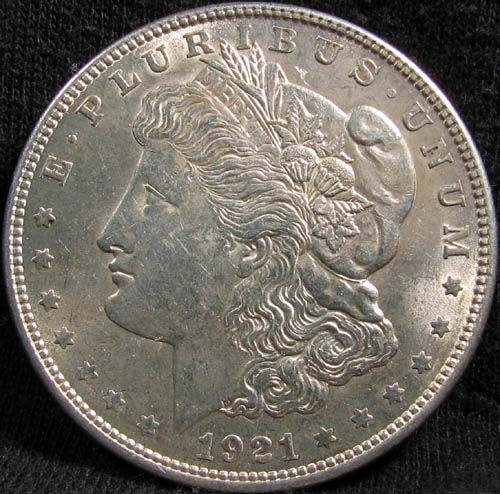 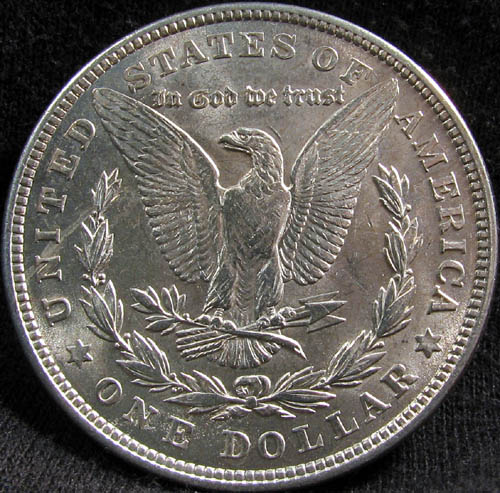 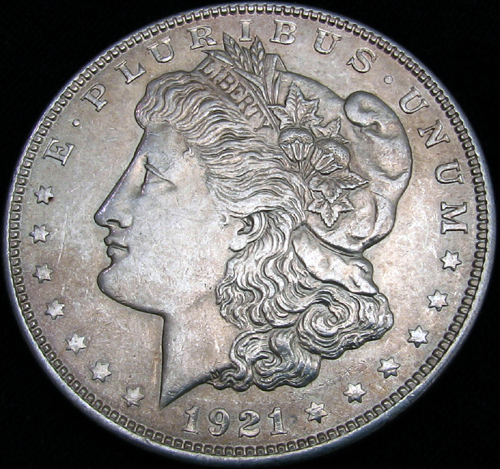 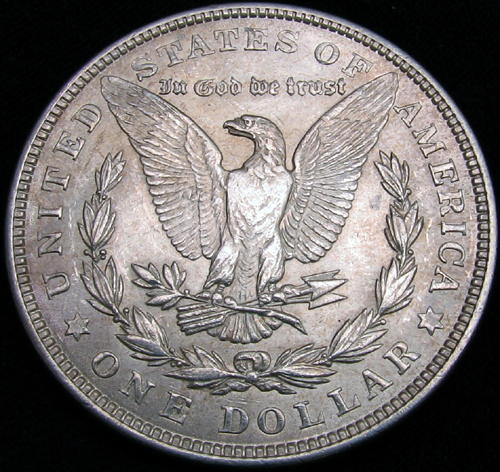 Side-lit on top, indirect lighting below. I've yet to rig a decent copystand and vertical lighting, and I'll have no clue just what the camera is capable of until then. |
|
Rest in Peace
United States
2684 Posts |
Dave, I think I've asked this before, but what are you using for lighting? At present, I'm using a screw-in flourescent bulb in a utility clamp lamp with reflector, mounting it almost over the camera and coin (gotta watch out for shadows). I'm thinking about going to a small flourescent fixture for even whiter light, but I'm still experimenting. You're light (sri) years ahead of me!
Fred
|
|
Valued Member
United States
218 Posts |
Dave,
Thank you sooo much for the help with the S2I2.
Fred,
I picked up an Alzo 100 "Cool Light" kit with camera stand for around $100. Comes with 2 lights on adjustable poles, Soft light tent for even lighting and a pretty hefty camera stand that can all fit on a desktop or in your case a stovetop. :)
|
|
Valued Member
United States
223 Posts |
SuperDave, Seem to have a problem. Now when I turn on the camera I get a quick flash of what I want to shoot then a menu screen pops up and I can't get out of it. Any ideas?
|
|
Moderator
United States
23522 Posts |
quote:
Originally posted by stmpcol
SuperDave, Seem to have a problem. Now when I turn on the camera I get a quick flash of what I want to shoot then a menu screen pops up and I can't get out of it. Any ideas?
Have you done the first-start setting of date and time, etc? If not, that's what it wants. |
|
New Member
United States
21 Posts |
quote:
Originally posted by SuperDave
Moved this to its own topic.
Here are the settings you need to become familiar with on your S2 IS:
Manual control, "M" on the top knob. You'll want to be able to vary all the settings you can, to compensate for differing metals and degrees of luster. Lustrous MS coins don't photograph the same way circulated ones do.
Aperture. Generally, you want the lowest possible number here, which lets you use the shortest possible exposure time, which tends to give the sharpest picture. However, if you can't be straight-up perpendicular to the coin, you'll need to set it to 5.0 or larger (numerically), which widens the depth of field and lets you get clear shots of areas at differing distance from the lens.
Exposure. Ideally, you want aperture around 3.2, and exposures over 1/100 sec. As you close the aperture (higher number), exposure has to climb also to the point that at 8.0, exposures exceed a full second to get as bright a pic as 3.2-1/250 under the same light.
Once you're in Manual control, on the S2 these two settings are changed with the arrows on the large button, on the upper right of the camera back.
White Balance. With the camera on, hit the "FUNC" button. The first setting, "AWB", should be highlighted. Using the right arrow, go all the way to the right, "CUSTOM." With the lighting exactly as you're going to shoot with, and the camera mounted as you're going to shoot, put a piece of pure white paper where the coin will sit, large enough to fill the viewfinder. Hit the "SET" button to set a custom white balance corrected for your current lighting. This setting will be remembered until the next time you change it, even if you use the AUTO setting to take other pics (on AUTO, it'll do the right thing for white balance on its' own, without losing the setting you set in MANUAL).
Macro/SuperMacro. On the left side of the lens barrel are two buttons. The bottom one is the Macro button. Hit it once for Macro (a flower will appear in the viewfinder), push it and hold for Super Macro (an S will appear in the flower). Super Macro is tough to play with - you have to get close enough to the coin to make lighting difficult, but when you become familiar with side lighting, you can make great pics of coins that'll fill your whole computer monitor. You cannot Zoom in Super Macro.
Macro will be your normal setting. Zoom works, but you can't get close enough to fill more than half the viewfinder with a Morgan, probably even less with a smaller coin. I get clear pics of a Morgan that are about 900-1000px wide, plenty large considering that 600px posted here is good enough to grade from.
Delayed Shutter. On the top of the camera is a small button. With the camera on and looking through the viewfinder, press it twice. The first time, an icon resembling a pile of papers will appear. The second, a circle with a 2 in it. This will delay the shutter for two seconds after you press it, and it's the setting I use, to give myself time to get away from the camera before the shutter clicks.
That's a start.
Thank You for leading me in this direction. I got a refurbished S3 IS with a 3 year extended warranty & 1 gig card for $380. WOW! After loading the Canon software I can connect, via included USB cord, directly to my computer. Then make all of the settings, zoom and actually release the shutter with the mouse while viewing the image on my monitor. This is absolutely too cool. I think anyway. Tomorrow I will set up my Photo Studio in a Box with lighting and we will find out for sure. I know this is going to work very well. You may well have saved me a year of hit and miss with your recommendation & instructions. John |
|
Valued Member
Canada
61 Posts |
I don't have a problem with Morgans in Supermacro but what settings should I have for pennies or other small coins. I tried taking a photo of a Lincoln Penny but it was blurry. UpdateI solved the blur problem but I'd like to know if these photos would be good enough for the grading forum. Image:  lincoln1937obv.jpg lincoln1937obv.jpg51.69 KB Image: lincoln1937rev.jpg50.85 KB Edited by bboudrot
01/09/2007 02:04 am
|
| |
Replies: 11 / Views: 3,112 |
|
To participate in the forum you must log in or register.
Disclaimer: While a tremendous amount of effort goes into ensuring the accuracy of the information contained in this site, Coin Community assumes no liability for errors. Copyright 2005 - 2026 Coin Community Family- all rights reserved worldwide. Use of any images or content on this website without prior written permission of Coin Community or the original lender is strictly prohibited.
Contact Us | Advertise Here | Privacy Policy / Terms of Use
|
| Coin Community Forum |
© 2005 - 2026 Coin Community Forums |
| It took 0.39 seconds to rattle this change. |
 |
|
| |
| |







 Posted 09/18/2006 4:49 pm


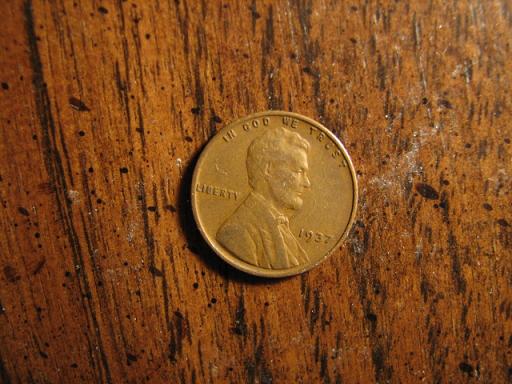 lincoln1937obv.jpg
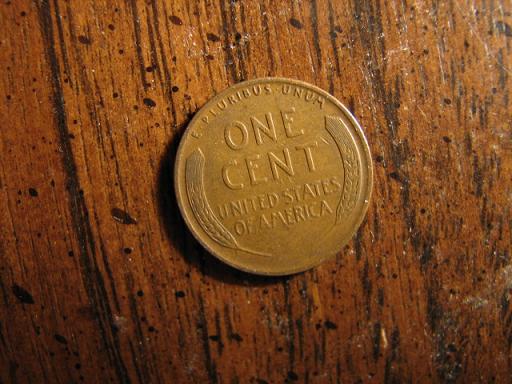 lincoln1937rev.jpg


