



Coin Community Family of Web Sites Join Thousands of Coin, Bullion, & Money Collectors
300,000 items to help build your collection! Coin, Banknote and Medal Collectors's Online Mall Specializing in Modern Numismatics Royal Canadian Mint products, Canadian, Polish, American, and world coins and banknotes. Join Thousands of Coin, Bullion, & Money Collectors Vancouvers #1 Coin and Paper Money Dealer Royal Estate Auctions - $1 Coin Auctions


Username:
Password:
Save Password
Forgot your Password?


This page may contain links that result in small commissions to keep this free site up and running.

Welcome Guest! Registering and/or logging in will remove the anchor (bottom) ads. It's Free!

Still Working The "Shoot The Bright BU Cent" Thing

To participate in the forum you must log in or register.
Author Previous TopicReplies: 2 / Views: 1,407Next Topic  
Pillar of the Community
timsumrall's Avatar
United States
1256 Posts
 Posted 02/17/2011  11:23 pm Show Profile   Bookmark this topic Add timsumrall to your friends list Get a Link to this Message Number of Subscribers
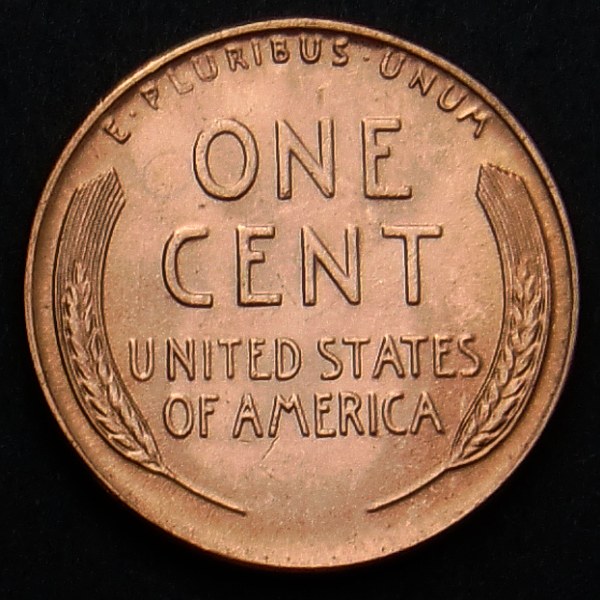
I was having trouble. Washed out glare, zero depth, pseudo dark spots on high points. I was over lighting.

This setup was free style, if you will, to test a lot of lighting options so the back grounds don't match. I like the potential.

Captured in shadow with ISO set to 64. White Balance set to Auto. 600x600 crop from a 4000x3000 shot. No reduction or software enhancements. As taken.

Still-Working-The-

Still-Working-The-

Yes, that is a squashed gnat on the obverse

Moderator
Learn More...
SsuperDdave's Avatar
United States
23522 Posts
 Posted 02/18/2011  9:27 pm  Show Profile   Bookmark this reply Add SsuperDdave to your friends list Get a Link to this Reply
Regardless of the limitations of your camera or lighting, you're well within the limits of the Gimp's ability to correct. Having your fullsize images to play with, you'll be able to do far better than my 30-second job:

Still-Working-The-

That was about 25% reduction in Levels, and 40% Sharpen. You could probably Sharpen 50% on the fullsize image without introducing too much noise (assuming you've reduced size as well as cropped - if this is the actual size of the coin in the pic, don't Sharpen any further).
Pillar of the Community
timsumrall's Avatar
United States
1256 Posts
 Posted 02/22/2011  10:22 pm  Show Profile   Bookmark this reply Add timsumrall to your friends list Get a Link to this Reply
I shot the same coin again with a different config and reloaded above. The fine detail in the fields is coming out. Compare the scatches under AM to Dave's save (thanks by the way. I lost my copy)

The shade of brass is very close.

I did resize from 820 down to 600 just so it would load fast. No sharpen after resize. No enhancements.

Full size images (1/2 meg) ...

http://sumrallworks.com/coins/image...WC1941PO.jpg

http://sumrallworks.com/coins/image...WC1941PR.jpg
  Previous TopicReplies: 2 / Views: 1,407Next Topic  

To participate in the forum you must log in or register.


Disclaimer: While a tremendous amount of effort goes into ensuring the accuracy of the information contained in this site, Coin Community assumes no liability for errors. Copyright 2005 - 2026 Coin Community Family- all rights reserved worldwide. Use of any images or content on this website without prior written permission of Coin Community or the original lender is strictly prohibited.
Contact Us  |  Advertise Here  |  Privacy Policy / Terms of Use

Coin Community Forum © 2005 - 2026 Coin Community Forums
It took 0.21 seconds to rattle this change. Forums