| Author |
 Replies: 16 / Views: 3,422 Replies: 16 / Views: 3,422 |
|
Pillar of the Community
United States
509 Posts |
Thanks to rmpsrpms and SD for advice/assistance. Here's my Canon 350D XT set-up with the Nikon el Nikkor f4 enlarging lens ($57), Asahi Pentax Bellows ($39.95), 2 adapters (15.94 for both). Not nearly as cheap as Earle42's set-up and maybe not as effective but far cheaper than buying a dedicated macro lens.  Still have lots of experimenting to do but these are first ones out of the chute. Un-retouched except for resizing.  This is as close as I seem to be able to get and stay in focus.  |
|
|
|
Pillar of the Community
United States
1256 Posts |
|
|
Bedrock of the Community
United States
10065 Posts |
 Very nice pics!  I need to work on my lighting. Your pics show the original luster well. What kind of bulb is in your lamp? Is it LED, Halogen, incandescent? How much squash could a Sasquatch squash if a Sasquatch would squash squash? Download and read: Grading the graders Costly TPG ineptitude and No FG Kennedy halveshttps://ln5.sync.com/dl/7ca91bdd0/w...i3b-rbj9fir2 |
|
Pillar of the Community
 United States
509 Posts |
For those pix I used a single compact flourescent (daylight) placed at 12 o'clock. I've tried other types of lighting but the flourescents seem to work best for me.
|
|
Bedrock of the Community
United States
10065 Posts |
Thanks for the info. So far I have taken very few coins pics. I have another hobby in which, for years, I have take pics of glass objects where surface details are sometimes important. The macro lens was made for that hobby. When I decided to become active in coins again, some of the learned technique helped, but not all of it! The pics I have taken of coins with luster have not done so well. The sunlight seems to change the coin color (steel shades instead of the "silver white") and knocks out the luster. The following coin actually has luster on it.   I hope by changing lights the coin surface show up as well in true color/luster as your pics do with your setup. edited for spelling How much squash could a Sasquatch squash if a Sasquatch would squash squash? Download and read: Grading the graders Costly TPG ineptitude and No FG Kennedy halveshttps://ln5.sync.com/dl/7ca91bdd0/w...i3b-rbj9fir2Edited by Earle42
05/24/2011 10:35 pm
|
|
Moderator
 United States
23522 Posts |
|
|
Pillar of the Community
United States
509 Posts |
Earle, the high luster coins still throw most people for a loop. The coin I'm showing here still has quite a bit of luster but it's also toned which really makes it quite a bit easier. The blast whites still give me fits. Nice coin BTW.
|
|
Bedrock of the Community
United States
10065 Posts |
This is one of my favorites. When silver was close to 50.00 I traded a roll of junk silver dimes for her. I had always wanted one of these and when I saw her, the literal 5.00 I had into the roll of dimes made it a no brainer to trade.  |
|
Pillar of the Community
United States
4050 Posts |
Looks really good, and glad to be of help.
Now for some constructive criticism...
Contrast could be improved. Have you checked your lens for haze and internal dust? Do this by shining a bright flashlight/penlight through the lens at different angles so you can look at the internal lens elements. BE CAREFUL not to flash the light at your eyes! If all the elements are clear and clean, then the contrast can be adjusted with camera settings. But if the lens is hazy, or has a lot of dust, it may be causing the problem. In that case let me know and I can walk you through the cleaning procedure for this lens if you like....Ray
Contact me for photographic equipment or visit my home page at: http://macrocoins.com |
|
Pillar of the Community
United States
509 Posts |
Thanks Ray and I was hoping for some critiques. I recall you saying any lens purchased from ebay would probably have haze but suffering from a long-term ailment called "lackapatience" I didn't want to wait on any bidding and got it from an on-line retailer. I'll take a look for any dust. |
|
Moderator
United States
23522 Posts |
Your contrast returned, with its' apologies - it was in the boy's room. 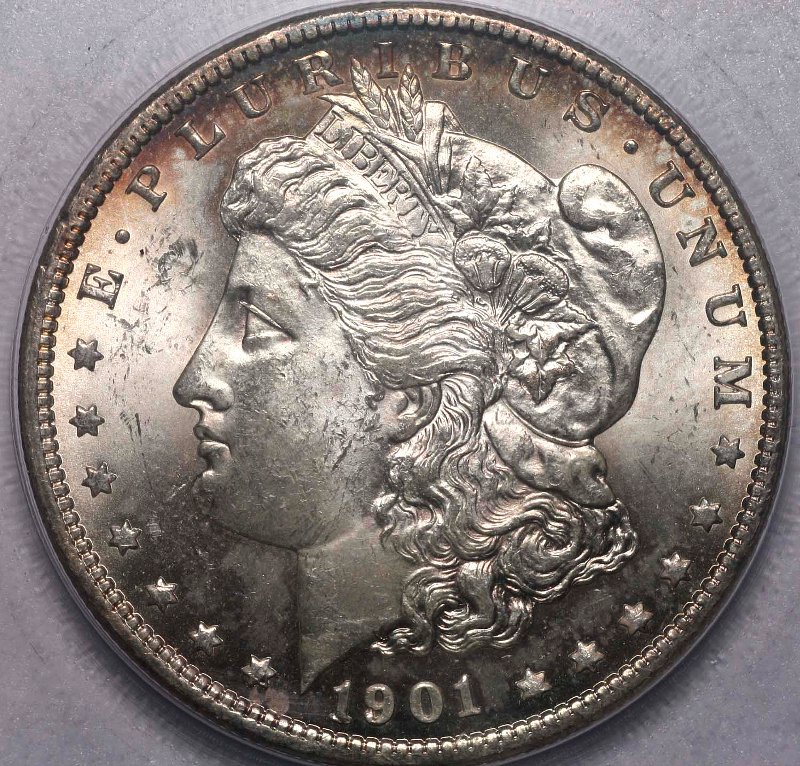 |
|
Pillar of the Community
United States
509 Posts |
Thanks SD. She definitely looks more purdier that way!
|
|
Pillar of the Community
United States
509 Posts |
Checked that lens and found specks on both sides of it and a smudge on one side. Had a lens cleaning kit which came with the Canon and gussied it all up. Looking into it with a flashlight couldn't see anything which might be dust although when holding it at an angle and rotating it I see something which "might" be haze. Not sure. It runs all around the peripherals but I can only see it when I'm rotating the lens. This this shot look any better? Same lighting set-up but went to f/11.  |
|
Pillar of the Community
United States
4050 Posts |
Contrast looks better but it may be due to stopping-down. The haze is around the periphery of the inner elements, right? That is common in these lenses and is caused by the black paint (used to eliminate light paths and reflections) "migrating" to the lens surface. I don't know why the paint isn't happy where it is and needs to find a clean spot on the lens to settle.
The later image isn't as sharp as the first. Maybe due to stopping-down? Or did you lose optimum focus?
Edited by rmpsrpms
05/25/2011 3:50 pm
|
|
Pillar of the Community
United States
509 Posts |
Quote:
The later image isn't as sharp as the first. Maybe due to stopping-down? Or did you lose optimum focus? Probably a combination of both. Focusing gets kinda exasperating. All I have is that tiny little viewfinder and it's a trial and error thing. Although I am tethered and use remote shooting, my particular camera model doesn't support the preview mode. That would be a luxury and save grunches of time. Yes the haze is on the inner side. Looked but doesn't seem to be any way to get the lens open. Nothing to be done about it? (blow torch, hair dryer?) Think it's affecting the photo quality? I think I'll start playing with the f/stops and look at changing the contrast parameters in my camera. Up to now I've been using default (0/0). To tell you the truth, I'm really pleased with the pix I've been able to get so far compared to my point and shoot but I know there's still lots of room for improvement. Amazing how many variants there are. |
|
Pillar of the Community
United States
509 Posts |
Last best effort. Same lighting but refocused and went to f/4, 1/200, ISO 100. Unretouched except for resizing.   This one looks gorgeous after a white balancing act through Gimp but unfortunately, doesn't much look like the real deal. Reminiscent of some of the ebay photo tricksters?  |
| |
Replies: 16 / Views: 3,422 |









 Posted 05/24/2011 7:34 pm


