| Author |
 Replies: 9 / Views: 1,593 Replies: 9 / Views: 1,593 |
|
|
Pillar of the Community
United States
3076 Posts |
Ok SD I have found how to set the mete4ring to "spot", and set the ISO to 3200 NOT 1 or 200 as I couldn't get the 1/100 or 1/250 (thinking this is shutter speed?) but at 3200 its 1/500 @f 2.8.....Focus mode choices are AF frame menu of, either center/ face AiAF or Tracking AF.. I chose center for these pics... the lighting is 2 GE 6500 daylight which I think is too bright...but thats what I'm working with..Thanks for your help... 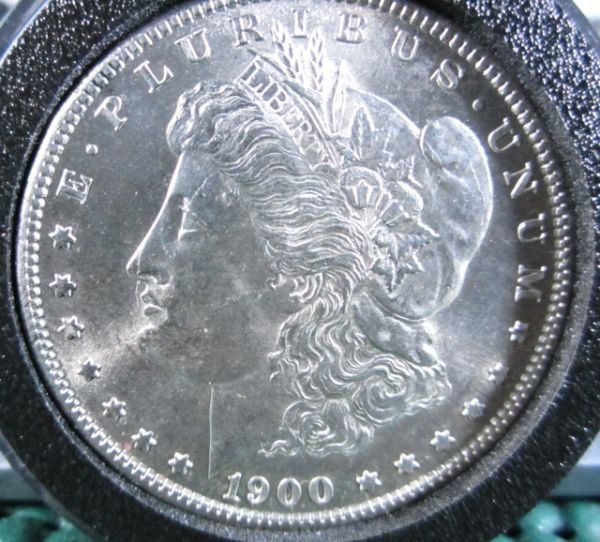 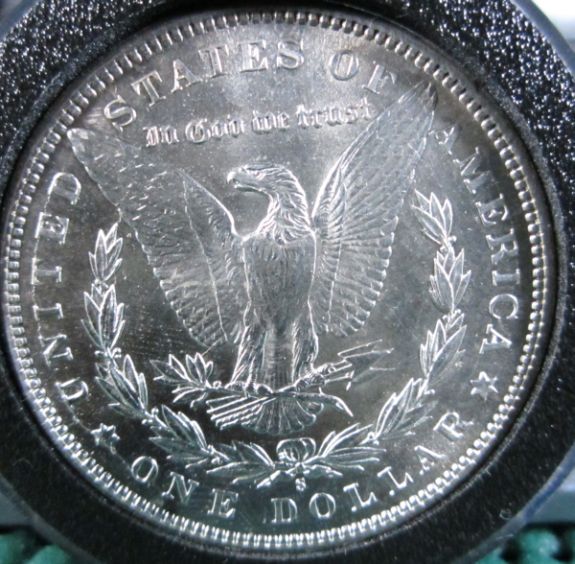 |
|
|
|
New Member
United States
19 Posts |
Typically, you would want the ISO to be at the lowest possible setting, as this reduces "noise" within the image and overall turns out better quality. However, a low ISO setting does translate to longer exposure, and slower shutter speeds, which can be increased by adding more light.
In regards to your aperture settings, although lower apertures do increase shutter speed, they also reduce the depth of focus, which could be causing some sharpness issues for you.
In addition, there is some heavy glare on the coin in your photo, especially on the picture on the obverse. You can simply fix this by lowering the angle of the light to the coin (move it farther away).
As an overall recap, for quality coin photos you typically want an aperture between f6-f10, the ISO at its lowest possible setting, and a shutter speed faster than 1/100s.
Now, I'm not sure what you wanted answered specifically, but I hope this helps! If you're looking for a wealth of information, try reading the book, Numismatic Photography by Mark Goodman. It's an excellent read and offers a lot of insight into setting everything up just right in order to achieve those beautiful coin pictures everyone adores.
|
|
Moderator
 United States
23522 Posts |
OK. Your metering and focusing settings are right; stick to them.
ISO3200 is way, way high for what you're wanting to do. With your camera, as NicOC said, ISO3200 is far too "noisy" for shooting coins. Even though your pics are a pretty good start, you're leaving a lot on the table at an ISO that high.
I wonder if there's not enough light, as opposed to too much. What configuration and wattage are your bulbs? It's hard to believe the camera needed ISO3200 to expose at 1/500sec. With enough light, that should have been ISO800 or even 400 to hit 1/500.
|
|
Pillar of the Community
 United States
3076 Posts |
The lighting bulbs I am using are GE6500K daylight bulbs..2 of them.....about 2 feet left and right from target...one thing I did notice is at ISO 1 or 200 the F(apeture/exposure?) really dropped to like 6...and the 1/25 or so resulted....the pictures I think had better detail ....and the ISO 3200 yeilded the 1/500 but loss of definition by far...A friend mentioned the GE6500's are too bright and there is a glare bounce back which could influence the other portions......of photography... I still need to make a box or something to ensure the plane of the coin to the camera is 90 degree's spot on...for focus, as I have noted that this coin is a VAM 6/6A one can not even see the OBVIOUS crack thought the lower neck...this is not important other than the focus is is not even and all of the image of the coin is not being seen. the VAM designation I care not for.... its more of How to take good pictures to me... Thanks for all of your inputs... |
|
Moderator
United States
23522 Posts |
I'm really amazed by the shutter speeds. Back when I was playing with the Canon A720 for my thread here, I was getting exposures of 1/1500 at ISO100 with two 50w bulbs. And that was shooting copper, much less reflective than silver.
Either way, you need to force the camera to ISO100/200 and work from there. Bulbs need to be about 10:00 and 2:00 to the coin, preferably as close to vertical above the coin as you can get. As long as the camera is securely mounted and you're using the 2-sec timer, an exposure of 1/25 should be OK but we're aiming at something faster.
|
|
Pillar of the Community
United States
3076 Posts |
Thanks for all the help guy's, I made some changes and went to the GE5000K as a note from my friend twohalk's that 6500K was just to bright especiall fir nice and shiny and PL DMPL's and such simply reflect the light and mess with the over ability to control what the camera F settings will be..
I forced the ISO to 200, with a 2 second delay, changes from earlier settings I need to document and post.. The troubleI was having was earlier today was low f or 1/160 results, After setting the self timer to 2 seconds a nifty little window appeared super magnifing the center which looked very detailed, something I was not getting earlier, I was loosing my definition...
I didn't notice what the F reading was on the Obv photo was but the reverse was at 1/1000....
I think I have the lighting or exposure turned down from earlier today as the brightness yeilded low F numbers
and I although the F number for say the REV is at F 1/1000
I think its slightly dark yet, as the backround is surely darker than real life....I think I'm gaining as the details are there....one thing I noticed...as I reach up to puch the button to take the picture the lighting changes on the right side...yet my hand is above the light source?
should I be using the mouse to take the pictures through the software on the computer to ensure the lighting stays balanced on both sides?
I will try turning up the exposure rate from a minus 2 working towards ZERO and document all my settings...I still need to figure out how to adjust all of the basic settings but I think I'm getting there...All opinions welcome...AS FAST AS POSSIBLE lol....actually I think this camera will work out just fine if I can learn what it is I am trying do do... Gene
|
|
Pillar of the Community
United States
3076 Posts |
of course it helps to post photo's 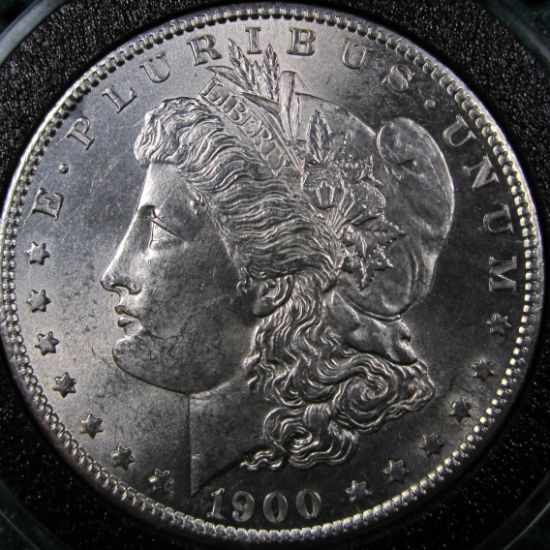 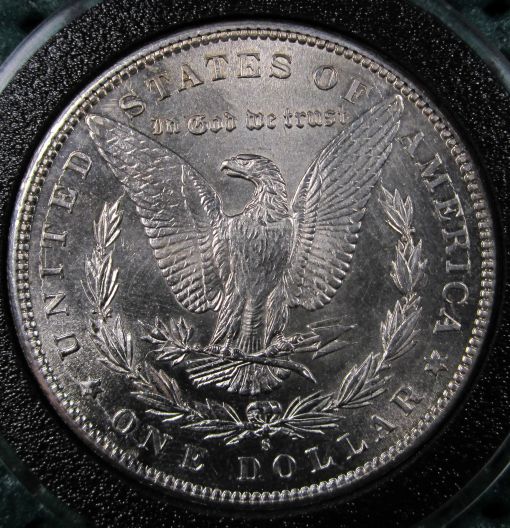 |
|
Pillar of the Community
United States
3076 Posts |
Any comments for the new photo's and setting's I did have to drop my exposure to minus 2 to attain the detail, and some of the detail is still not showing up.. it could be the camera is not exactly on the same plain..ideas comments? thanks....
|
|
Moderator
United States
23522 Posts |
The lighting pattern on the coin indicates a nice setup. They're a little underexposed, but your exposure was 1/1250@ISO200, an excellent indication that you're putting plenty of light on the coin. Try Exposure Compensation of -1 instead of -2 - don't change anything else - and see how you like the result.
|
|
Pillar of the Community
United States
3076 Posts |
Thanks for the reply SD I posted the minus 2 due to the detail; issue...the brighter the exposer, I lost detail...
now I realize the minus 2 results with less apparent luster of the coin, but it has better detail...I have to work that portion out...
but it must be known,, I am working on a small desk, the lights are about 16 inches left and right away from the coin
and I'm using the camera stand as the "lock" to control and shakyness the 2 second delay really helps...lighting and the angles I still have to work with but over all I think I am gaining..
|
| |
Replies: 9 / Views: 1,593 |
|










 Posted 07/16/2011 12:12 pm


