



Coin Community Family of Web Sites Join Thousands of Coin, Bullion, & Money Collectors
300,000 items to help build your collection! Specializing in Modern Numismatics Coin, Banknote and Medal Collectors's Online Mall Royal Estate Auctions - $1 Coin AuctionsJoin Thousands of Coin, Bullion, & Money Collectors Royal Canadian Mint products, Canadian, Polish, American, and world coins and banknotes. Vancouvers #1 Coin and Paper Money Dealer


Username:
Password:
Save Password
Forgot your Password?


This page may contain links that result in small commissions to keep this free site up and running.

Welcome Guest! Registering and/or logging in will remove the anchor (bottom) ads. It's Free!

Coin Photography -- Macro?

To participate in the forum you must log in or register.
Author Previous TopicReplies: 5 / Views: 2,343Next Topic  
Valued Member
kg2blade's Avatar
United States
84 Posts
 Posted 11/20/2006  8:40 pm Show Profile   Bookmark this topic Add kg2blade to your friends list Get a Link to this Message Number of Subscribers
Can someone explain to me what is meant by Macro in coin photography.

I just went through my fujifilm z3 manual and could not find the word anywhere.

I tried taken pictures and even tried a scanner, but I my picture do not look anywhere close to the ones I see on the forum...

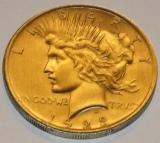
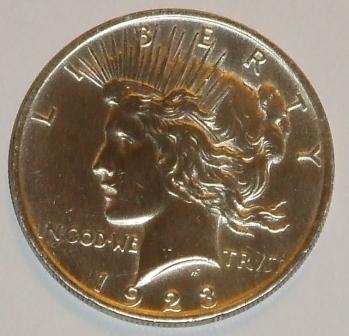
However, I am going to try the tripod next time. Here is a couple I pics of a Peace dollar that I tried on...

1. Coin-Photography----Macro??

2.
Coin-Photography----Macro??
Rest in Peace
Morgan Fred's Avatar
United States
2684 Posts
 Posted 11/20/2006  8:59 pm  Show Profile   Bookmark this reply Add Morgan Fred to your friends list Get a Link to this Reply
Hi KG--

Macro in digital cameras is usually applied synonomously with "close-up". Each camera make and model will have different parameters for macro in terms of the distance from the lens to the object being photographed. For example, the macro function on my Canon S2 IS is about 1.5 ft down to about 6" (I'm not certain of these distances since my manual is waaaaay out in my car). Then, any closer, the S2 IS has a Super Macro function which permits me to get even closer.

For my coin pics, I use a combination of the macro function (controlled by a button) and the optical zoom which permits full frame images of the coin. I shoot from a distance of about 16".

Your lower pic of the 23 Peace dollar is really quite good. Good focus, good lighting.

I really started on coin photography with my S2 IS only a couple months ago - I bought the camera in April. Knowing I had a steep learning curve, I experimented over a period of about three weeks with different settings, lighting, ISO ("film") speed, shutter speed and f/stops and just about every one of the hundreds of combinations of exposure. I still haven't fully mastered it, but I'm getting close enough that I was able to sell a Morgan for major bucks on ebay. In preparation for that listing, I took close to 400 images of only three coins, so it took a little patience on my part (and I am not a very patient person). I also kept copious notes on each exposure so I'd know where I had been, where I was going, what worked, and what didn't. My camera is not my father's Brownie Starflash.

I am certain others will kick in here soon with their own ideas.

Fred
Pillar of the Community
ageka's Avatar
Belgium
2078 Posts
 Posted 11/21/2006  07:30 am  Show Profile   Bookmark this reply Add ageka to your friends list Get a Link to this Reply
I do not know wheather this translates to digital and whould be happy if anybody could comment
I have 40 years of experience with a manual only Through the Lense Canon FTQL 2.8 aperture ( F 2.8)

On films anything 400 ASA or above risks going yellow inhouse and risks going grainy on blow up therefore my workhorse is 200

I prefer F 11 because anything remotely in the wright neighborhood of what you are shooting will be focussed

Free hand I need 1/60 seconds or better shutter speed not to have picture movement

I got some very nice picks from flowers and ties ( I paint on silk )
but all paper prints
Pillar of the Community
Metalman's Avatar
United States
7123 Posts
 Posted 11/21/2006  11:19 am  Show Profile   Bookmark this reply Add Metalman to your friends list Get a Link to this Reply
Macro On the digital cameras is usually indicated by a little tulip looking icon ,, My Fugi film A-205 has a macro setting as well as a zoom .

This setting as Fred said is used for close up Photography .

unfortunately not all digital cameras have a macro setting, If you could not find the instructions for use in your manuel ,,yours may not have that option.

Rick
Moderator
Learn More...
SsuperDdave's Avatar
United States
23522 Posts
 Posted 11/21/2006  7:01 pm  Show Profile   Bookmark this reply Add SsuperDdave to your friends list Get a Link to this Reply
If your manual is the same as Fuji's online version, the information you need is on Page 51.
Bedrock of the Community
United States
20753 Posts
 Posted 12/12/2006  7:56 pm  Show Profile   Bookmark this reply Add just carl to your friends list Get a Link to this Reply
As already stated Macro is sort of like Micro meaning or another way of saying close up to the subject. If your camera does not have such a feature that would indicate you probably can not take clear photos closer than abour a 6" or so. However, if this is true you may want to check your camera for threads on the front of the lense. Many decent cameras have what is called a filter ring on the front of the lense. It can be used for a cover for your lense but it can also be used for the addition of filters and close up lenses. If there are such threads on the front of your camera and it does tell you what the mm size is you would have to measure that diameter. Then if you can find a decent camera store or go on and try organisations such as B&H Photo Supplies (bhphotovideo.com), on of the largest photo supply companies, you may wantot purchase a few close up lenses. Vivitar, for example makes a 3 filter ring set of close up lenses that are listed as +1,+2+3. The total combination would allow you to put your camera right on the coin. Also, if you have trouble with glare, there are polarizing filters. If you do not have the appropriate filter ring for lenses available, there are also filter ring adapters that will allow you to go up or down in sizes. Many of such filters can spilt images, fog, star, sparkel, etc., etc. I have about 100 of such filters.
  Previous TopicReplies: 5 / Views: 2,343Next Topic  

To participate in the forum you must log in or register.


Disclaimer: While a tremendous amount of effort goes into ensuring the accuracy of the information contained in this site, Coin Community assumes no liability for errors. Copyright 2005 - 2026 Coin Community Family- all rights reserved worldwide. Use of any images or content on this website without prior written permission of Coin Community or the original lender is strictly prohibited.
Contact Us  |  Advertise Here  |  Privacy Policy / Terms of Use

Coin Community Forum © 2005 - 2026 Coin Community Forums
It took 0.27 seconds to rattle this change. Forums