| Author |
 Replies: 223 / Views: 43,370 Replies: 223 / Views: 43,370 |
|
|
|
Pillar of the Community
 United States
1345 Posts |
Quote:
I am officially at this stage...buying this stand today after hours of fooling around this weekend with less than desirable results.  Congrats ksmcents, you won't regret it. It's worth every penny if you need to check lots of coins, this is the ONLY way to go. I've had it for about a week and I've already lost count of how many coins I've photographed. A real time saver. |
|
Valued Member
United States
141 Posts |
I want to say up front what a fantastic person Harry is!! Three cheers! Dude, you saved me time and money on this coin photo thing. I was all set to pay many hundreds of $$$'s on a digital SLR and all that. Thank you so much! I'd have also NEVER figured out the LED light thing on my own. I can however picture smashed parts all over my basement floor from the frustration I would have had trying to figure this out on my own...;)
That said, I still haven't had a chance to re-load the drivers for Windows 7, but I will tonite. One thing I did find out, on Windows 8, the laptop driver for the built in Laptop camera will allow one to toggle between the scope on the USB port and the laptop camera. Unfortunately, the only way I've found on Win8 to actually take the picture is to push the red button on the scope and of couse, that jars the scope and blurs the picture. Further expeimentation is in order.
Next, I've just re-read this entire thread, but I'm still puzzled on a couple of things. (This question is just for my overall uderstanding of the process) Harry (or anyone), can you explain, in simple terms, how manipulating the light source drastically improves the focus? If I have the light source placed incorrectly, sometimes it will look like the coin is warped. However, moving the led light (excelent recommendation!) "straightens out the coin" so to speak. It must mess with the autofocus in someway?
Last, I've got the stand you recommended on order. I'm excited about the stability the stand will offer, yet concerned that it will add one more layer of complexity to the focusing issue. Maybe I just don't understand how to use the stand. With the stand, does one stop using the focus control on the scope and instead use the stand's up/down to perfom the focus? Or do you use the stand's up/down to fill the viewfinder and then use the scope to do the fine focusing?
|
|
Pillar of the Community
United States
1345 Posts |
Hey thanks for the kind words hawkeye, it was the least I could do to help a brother out. Glad I could save you from smashing it to pieces  Let us know if the drivers I emailed you work on your machine. By the way the laptop webcam issue can be a bit tricky. I had an issue on my Vista laptop that I still haven't gotten around to figuring out.. Apparently the issue or conflict is related to the Webcam software trying to handle the USB microscope. When actually the USB microscope has its own image capture software that allows you to snap photos with a click of the mouse. So if you can figure out how to make the USB image capture software the default for the USB scope then you should be okay.. The software also has an editing feature that allows you to work with the photos; make lines, shapes, measuremens and notes into your image. That software was included in the email I sent. The lighting takes lots of experimentation but you will be rewarded with great shots once you get it down to a science. You can create a wide range of effects by placing the light(s) at different angles and distances from the coins or different methods of diffusing the lights. Your going to find that some methods work alot better on certain coins than they do on others. I know absolutely zero about the the science of lighting and photography, so I just experiment until I find what works.. OH yeah and the members of this forum have lots of great tips and help on lighting, I believe SuperDave was one of the people that helped me out with getting set up early on in this thread.. Also read through the photography forum, theres tons written on different lighting techniques that work just as good on this scope as they do with other camera setups. BTW; VERY IMPORTANT to make sure the scope is at an exact 90* degree angle to the coin. It must be absolutely square to get proper focus and to keep the coin round looking and not ob-longed. the slightest tilt will throw things out of whack. Definitely get that stand setup ASAP! It won't add any new layers of complexity, in fact it will eliminate at least one frustrating and time consuming part of using a USB scope. It could not be simpler to use, and will save you countless hours of time and frustration.. I think you've already got the idea of how to use it. Just as you described it. Once you get the coin in the frame you focus the scope and shoot, and go to the next coin.. It's that easy. Plus you can also use the stand adjustment to fine tune your focus as well. One thing I would like to add before I forget, is that even though myself and others here have sung praises about the capabilities of USB microscope cameras, It is important for anyone reading this to remember that USB Microscopes were only intended to be used to examine tiny objects and details. I don't think they were really designed for or capable of producing those high quality images of coins we see that make us all drool. You can only get those results by using high end equipment and setups. But what this device offers is a heck of allot of bang for the buck, and once your good at using one you will be able to capture some very decent images. |
|
Pillar of the Community
United States
1620 Posts |
I gotta get one of those stands I use my scope mostly for errors/varieties and getting the light correctly and the focus using the basic stand it comes with is just a pain. Also for a super closeup on the coin I took off that little clear cone and it really makes a difference.
|
|
Pillar of the Community
United States
1345 Posts |
Quote:
I gotta get one of those stands I use my scope mostly for errors/varieties and getting the light correctly and the focus using the basic stand it comes with is just a pain. Also for a super closeup on the coin I took off that little clear cone and it really makes a difference. daniels; I haven't removed the clear end piece from mine just because I feel it adds additional protection to the lens, (scratches, dust, etc).. I also like to use it for checking varieties; I love looking for those Canada varieties. The only complaint I have about that clear plastic end piece when it comes to taking super close ups, and probably the reason why you removed it, is that when you get the scope right on top of the coin the clear plastic cone creates these funky reflections from the lights that just throw the shot off. I think that's due in part to using the built in LED lights, and how they reflect off the coin and around the inside of the cone and back into the lens. So I hardly ever use the built in lights for close ups, and only use them when taking pics from a good distance. I think there was a general consensus among us about those built in lights being way too strong and even casting a bluish tone into the image.. So I mostly just do not use them, and just use external lighting 99% of the time. BTW; Once you get the stand you will be able to set it up ONCE, and scan as many coins as you need to without ever worrying about the scope moving on you, or having to re-focus it each time you touch it.  |
|
Pillar of the Community
United States
1620 Posts |
That is exactly why I took it off lol and being I'm still learning I like seeing that close up shot. That blue/purple color it puts on the coin it gets me frustrated its good now thanks
|
|
Valued Member
United States
141 Posts |
Harry, Still a work in progress. The drivers worked quite well. There is much more functionality in what you sent versus what came with the scope. Focusing is still an issue. Regardless of how I light the coin, there are areas that seem to be "bubbled up" for lack of a better term. I thighly suspect that the stand (ordered from Lighthouse over a week and a hal ago. Called and they said they are "really backed up", so I need to wait for another week. What a crock!)will help is as much as the cheesy stand that comes with the unit causes the scope to be aligned at something other than 9 degrees lest it fall over. If this Celestron were available right now http://www.adorama.com/CNMSHMP.html I'd cut my losses and cancel the stand and buy this one. However, it's still not available. Anyway, enough whinning for now. I'll kee you posted. |
|
Pillar of the Community
United States
1345 Posts |
Thats cool, glad that the drivers worked for you.. I'm not sure what you mean about bubbling? The only thing that comes to mind is that allot of times the images look really grainy. Try changing the screen resolution to a lower setting. Also try changing the power line frequency setting to 60hz. Remember, Theres gonna be alot of experimenting with it, believe me I still do it too.. But to be honest with you I still can't get that Coin magazine cover shot of my coins, but I just try to get one's that are good enough.
Ahh wait a mkinute hawkeye that celestron looks nice but one problem I see with it is the length/height of the stand. You need around 6 or 7 inches of distance from the coin to lens in order to photograph larger coins like silver dollars. That height of the celestron's stand looks like it is meant only for real "close up" inspections, but I wonder if it would be able to zoom out to the entire coin.?
I know you must be dying of anticipation of receiving the Lighthouse stand, I know I couldn't stand waiting for a delivery, so I found a local supplier and picked it up personally. But In the meantime while you wait for the Lighthouse stand grab a pair of pliers and use them to tighten the clamp on the stock stand that came with the scope you should be able to get it snug enough so it won't move... Don't worry that will all be over soon :)
|
|
New Member
United States
22 Posts |
Looks good for a digital camera. You may have saved me a lot of $. Did you use a photography box it may help on lighting. Search on how to make your own for photo's.
|
|
Valued Member
Brazil
117 Posts |
That cam delivers awesome images. How much it costs?
|
|
Pillar of the Community
United States
1620 Posts |
Ready for this sit down when you read what we paid. Here it goes a whopping $27.00 us dollars....
Go to the first page and you will find the link there in the first post from harry
Edited by daniels
05/05/2013 12:19 am
|
|
New Member
United States
23 Posts |
Thank you for this awesome write up! I am new to coin collecting and having recently found a few error coins I want to pursue further. I purchased a USB microscope ($28) because I just couldn't get close enough with my regular camera (much less hold it still enough in the dim light) to really see the errors. The learning curve you express in these posts along with the photos gives me a lot of hope and enthusiasm.
|
|
Valued Member
United States
325 Posts |
Nice camera. I love those pics you took with it.
|
|
Pillar of the Community
United States
1345 Posts |
Quote:
Thank you for this awesome write up! I am new to coin collecting and having recently found a few error coins I want to pursue further. I purchased a USB microscope ($28) because I just couldn't get close enough with my regular camera (much less hold it still enough in the dim light) to really see the errors. The learning curve you express in these posts along with the photos gives me a lot of hope and enthusiasm.  I purchased this USB microscope camera for the very same reason you did. And I have to tell you that once you begin to capture your first close up images and details, you will definitely feel like you got your money's worth out of this device. The journey from there will be mostly spent just learning how to improve on your setup and image capture skills. But For less than $30 there is definitely a lot of bang for the buck. I do recommend purchasing the other accessories we have discussed. I don't see buying these as an additional expense because accessories, like stands and lighting, would still be required even with a much more expensive camera setup. |
|
New Member
United States
23 Posts |
Got my USB microscope today and spent a few hours getting it to work. Seems the CD that came with the scope was missing some files and the scope itself is a no-name Chinese mass produced version. I tried a number of software sets that failed to work with it before I finally tried MicroCapture. Now it works, but this software doesn't have the measurement tools. Oh, well, I can still use my photograph programs. First coin I looked at had a defect. ( Lincoln Penny with cracked head and a little pool of metal at tip of crack.) Oh, this is going to be fun! Sorry if it's fuzzy, but it is my first photo... 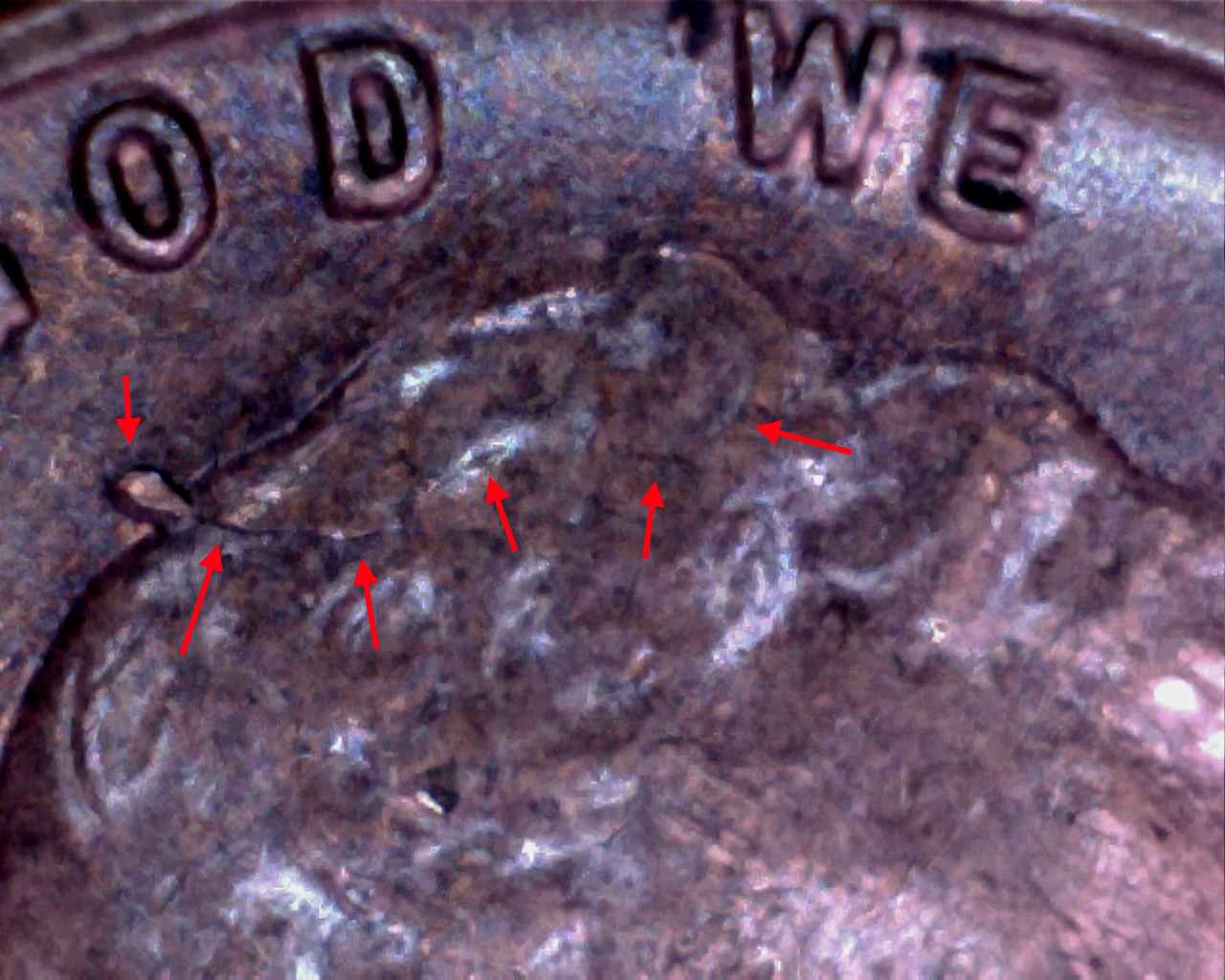 Or, determining that my D/S was actually Zinc Rot...  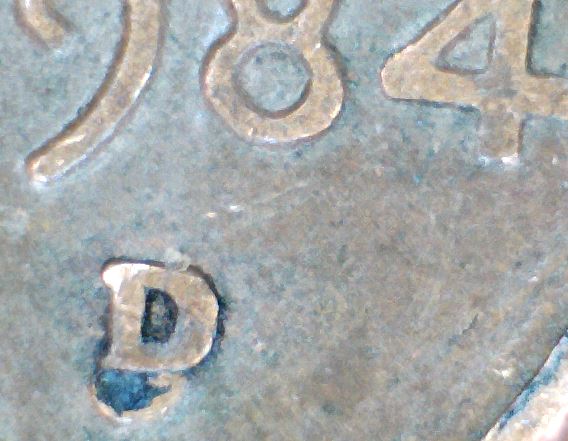 You've unleashed a monster. Thanks. |
| |
Replies: 223 / Views: 43,370 |








 First Page
 Previous Page


 Posted 04/26/2013 10:30 am


