| Author |
 Replies: 223 / Views: 43,380 Replies: 223 / Views: 43,380 |
|
|
|
Pillar of the Community
 United States
1345 Posts |
Nice job on capturing your first coin error images. I guess I got lucky in that my software has the measurement tool included. I can also measure angles and circles. See the sample image I uploaded below. Did you try double clicking on the image in the right hand pane, this opens it up in the edit image window.. One thing I do not see on mine is the arrow tool, did you add those red arrows to your image with your other software? Seems that the software packaged with these devices are hit or miss, some people have gotten CD's that were even missing the software completely. Fortunately for us, through this forum, we have been able to email each other any missing files. 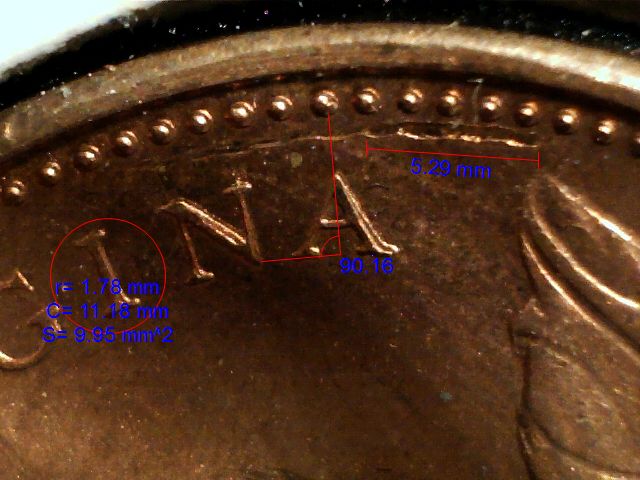 |
|
New Member
United States
23 Posts |
Okay, now I have measurement tools. (Double-clicked the saved image.) THANKS!
|
|
New Member
United States
22 Posts |
After reading this post you have convinced me to buy a Lighthouse Stand and a USB Microscope. Thanks for sharing your experiences. My order will arrive next week. Brian  |
|
Pillar of the Community
United States
1620 Posts |
Harry I can't figure out how to do that
|
|
Valued Member
United States
477 Posts |
Thanks for the info. After my disasters last night trying to shoot some of my newly acquired pennies with a D70 and 70mm lens I can see I need a whole other direction to go. This looks like the ticket at a reasonable price, compared to a new DSLR.
Rick
|
|
Valued Member
United States
477 Posts |
OK Harry, you can stop twisting my arm, I ordered one from the link you posted.
I thought I could get good pics with my thousand dollar DSLR but I see taking pics of small things up close is a lot different than taking pics of very large things very far away.
Rick
|
|
Valued Member
United States
98 Posts |
I got the USB microscope as well. Unfortunately, capture software that came with USB microscope likes to hang if I change any settings. What are good methods to take the picture of the whole coin? I have too many blurry pictures.
Just ordered lighthouse stand to see if it will help or not.
Edited by Peacesilver
08/15/2013 5:34 pm
|
|
Pillar of the Community
United States
2120 Posts |
Ooooo its on sale today.. .just bought one for 27$. free shipping.
|
|
Valued Member
United States
477 Posts |
OK, my microscope camera arrived today and I immediately tried to use it. Took a few times for my computer to recognize the camera but I finally figured out how to take and save a pic. Here's my very first one. Need to work on the focus I see. This thing looks like it's going to be a blast to use but I do see the need for an improved stand. Rick 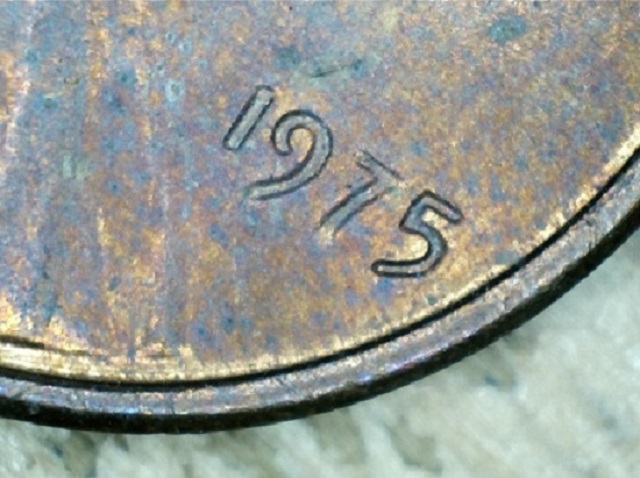 Edited by shootnstarz
08/22/2013 5:40 pm
|
|
Valued Member
United States
477 Posts |
I originally saw a mess of scratches and smudges in the first pic, then I discovered the dust cover over the end. Once I removed it the pic was clear.
I'm wide open for advice and pointers.
Rick
|
|
Pillar of the Community
United States
1345 Posts |
Congrats to all the new USB microscope owners.
There is a learning curve to getting good shots. It takes some practice and a little experimenting.
Basically you just need a good external light source like the goose neck LED lamps that were mentioned in prior posts. I rarely ever use the scopes built in lights.
Acheiving and Maintaining a good steady focus can be a pain without some kind of a stand or holder.
Use pure black or pure white backrounds. Background color can change everything. And what works on one type of coin may not work on a different one.
Don't mess with the scopes default settings too much, or it will drive you nuts.
The only 2 setting I ever switch on or off are the auto white balance and low light level compensation. Almost everything else is left on default settings. The scope doesn't like having its settings tweaked constantly. You'll be amazed at how many different results and special effects can be acheived by just changing the type, angle and distance of your light source..
If you ever need to adjust color. contrast, brightness, etc. Just run the photo through a photo editing software program. Thats slso useful for cropping, resizing, etc. You don't need any fancy photo shop program or anything like that, the basic photo edit software that came bundled with Windows works fine for me.
Here's a tip I use for getting an ultra sharp focus on your scope. Find something thats been printed with a dot matrix pattern, like the letters and barcodes printed on your mail or on your bills. I use these to set my focus before I start taking photos of my coins.
|
|
Valued Member
United States
359 Posts |
Does anybody have experience with a USB microscope like this? http://www.amazon.com/gp/product/B0...5BV4NHHC5J5CWe're looking at getting one for homeschool purposes and I'm wondering if it would work to take still images (e.g., of coins) as well. The $27 Newegg model looks great, but it doesn't have enough zoom to also look at cells & other science-y stuff.  |
|
Valued Member
United States
359 Posts |
Clarification: The root of my question is whether or not you can capture good images at ~40X magnification on a microscope like this, or if all I'd be able to do is capture pictures of Lincoln's nose hairs on a US cent.  |
|
Pillar of the Community
United States
1345 Posts |
The key word to remember here is "microscope". Typically designed and intended to look at very tiny objects at a very close up range. At that close range you'll be lucky if you can zoom out far enough to capture anything larger than Roosevelts head on a U.S. dime. Photographing nickels requires about 5 inches of distance between the coin and the lense, in order to get the whole nickel into the frame. Thats pretty much the minimum distance required in order to capture the entire nickel.. In order to get a coin as large as a Morgan silver dollar into the same frame you'd have to increase the distance two-fold or about 10 inches. Unless you just want to check for errors like double dates and RPM's, A biological microscope just does not have the same versatility for photographing coins. |
|
Valued Member
United States
477 Posts |
Does you lighthouse stand extend far enough away to photo a whole Morgan or Eagle?
Rick
|
| |
Replies: 223 / Views: 43,380 |







 First Page
 Previous Page


 Posted 05/18/2013 5:06 pm





