| Author |
 Replies: 85 / Views: 11,312 Replies: 85 / Views: 11,312 |
|
Pillar of the Community
Canada
2784 Posts |
just wondering . if the members here could help me put a system together. so I can take better picture of coins. I am presently using a digital camcorder with a twice the magnification converter lens. tomorrow I will purchase a canon rebel t5I camera it is a package deal. comes with a 18- 55 mm lense + eff 55- 250 mm lense + plus a bag I already have a tripod . hope the members here can help me with the rest. my camera.s have all been point and shoot
|
|
|
|
Valued Member
United States
275 Posts |
A good macro lens is needed to get the detail that is needed for good images. Usually the package deals DO NOT provide a macro option. Go to a good camera store and test the body you are buying and see what lens might work for you. Good Luck!
|
|
Pillar of the Community
 United States
4051 Posts |
You could use the camera with the extension tubes and lens described in the "under $400" thread. Much better option than buying a macro lens, and much cheaper too. What size coins do you plan to shoot? Do you plan to do varieties or detail shots?
Contact me for photographic equipment or visit my home page at: http://macrocoins.com |
|
New Member
Greece
45 Posts |
I had the same problem some months ago. Same lens, same camera (Canon 700D).
I used all cheap ways. At the beginning everything was great and... cheap.
As the time was passing by, I found my self not to be satisfied with all cheap staff results. Those kit lens + tubes +...+....
Now I have a Macro Lens 100L. The best you can buy. As you understand, the cheap was not cheap, and the expensive was finally cheap.
So take a good macro lens, study the lighting (maybe more important than any lens) and give time and practice to yourself. I would recommend also Mark Goodman's book for coin photography.
Good luck!
|
|
Pillar of the Community
United States
4051 Posts |
The 100L is indeed a good lens, but there are cheaper options that produce even better results.
Contact me for photographic equipment or visit my home page at: http://macrocoins.com |
|
Moderator
United States
23522 Posts |
Yeah, you can duplicate the 100mm Macro lens' capabilities on coins with a $25 duplicating lens and a bellows.
Rocky, that's a tremendous kit if you plan on using it for more "normal" photography as well as coins. The two lenses are the ones I recommend to anyone purchasing a Canon EF-S camera, really good value for money. However, only the 18-55 is at all suitable for coin photography and only then if you employ extension tubes or the equivalent to increase the lens' magnification capability.
The other course is to combine what you're already purchasing with the additional bits we recommend in the $400 rig - the bellows, a stand (which you need either way) and a dedicated lens plus whatever adapters are necessary. A decent bellows is less than $50 and good duplicating lenses can be had for $20-40. When you're ready you can add a microscope objective for about $25 and extend your capabilities into the high-magnification range.
|
|
Pillar of the Community
 Canada
2784 Posts |
thank you all very much for the input. I purchased the new camera they told me I have 30 day to make up my mind. there is just so much to try to understand. I hope you guys don't mind I will diffently need help. well I will read the set up manual and go from there. at the store they set up a camera. and took some pictures. I said hold it I can do better than tat with my smart phone. I said let me take you people to a form. they said ok know we know what you need. they was very impressed with you guys they said incredible. oh yes you may be getting some new member a lot of people in the store was watch the big monitor. can believe this about coins anyway. thank you yes I want to look into getting some that rigging and pieces thank you all again
|
|
Pillar of the Community
Canada
2784 Posts |
the macro lens the cheapest I can get here is 100 mm macros lens all the rest of the numbers will cost me 895 dollars . I have payed for it .I don't have to take it they explain that to me. it will be here in five days. I may have to take the camera to a professional to get it set.; I have no clue what this stuff means. maybe I have purchased to much camera. question can one use the camera to inspect the coins for varieties doubling and errors. looking at the computer screen . that what I would like to be able to do a 2 or 3 power magnifying glass don't cut it anymore . my eyes are not what they use to be hehehe
|
|
Pillar of the Community
Canada
2784 Posts |
thank you all . I will try to find that book thank you for the information. I am interested rpmrpm and Ssuperdave in this other way of doing this . I have taken some time and done some reading. I think I will be able to set the camera. if not my son is coming home and he will help set it follow you guys direction if you don't mind thank you all
|
|
Moderator
United States
23522 Posts |
OK, here you go.  Before you touch the camera, read these: http://www.cambridgeincolour.com/tu...a-lenses.htmhttp://www.cambridgeincolour.com/tu...exposure.htmhttp://www.cambridgeincolour.com/tu...of-field.htmThese articles will teach you the basics of photography, the settings you'll be manipulating and what they do to your image. You're a bit in the weeds now, understandable when looking at the complexities of manual photography from the outside for the first time. Cambridge Colour is the best place I've found to study photography on the Internet; it's an amazing resource. Do not hesitate to ask any question, regardless of how "stupid" you may think it. This stuff is complex, and there is no denying it. You have to learn to be a photographer now; it's the only way to justify the money spent. On the bright side, this is a skill, not a talent. It can all be taught. So, on to your rig. You've invested in the Canon 100mm Macro? There are 4 or 5 very, very good lenses in that focal length. All are roughly as sharp as each other, but I like the Canon best of all because it focuses internally. Some lenses extend, get longer as you focus them, and that complicates lighting. Not a dealbreaker, but the Canon does not extend and it's easier to work with as a result. The next paragraph applies to all these lenses, if you didn't get the Canon: The lens is capable of 1:1 magnification on the sensor. In other words, something 1" tall in real life occupies 1" of the camera's sensor. That's a ton of magnification when you think about it - instead of getting 25 of your friends into one picture, the camera is seeing only something 22.3x14.9mm in size (the size of the camera sensor) and giving you in return an image that's 5184x3456 pixels on your monitor. In sharp focus. You're going to be working with images so large you cannot see the whole coin on your monitor at once. And yes, you will be running the whole affair from your computer, and looking at the coin in real time and at full magnification if you wish. Yes, this one lens will probably meet all of your optical needs. You don't need to worry about bellows or multiple lenses. You spent the extra money to get the one that's good enough to stand alone. You *may* desire yet more magnification in the future, and if so it may be cheaply added. Not to worry there. But for now, start with Cambridge Colour and by the time your equipment is in one place you'll have a working knowledge of what it does. Do you have a tripod? You'll need something to hold the camera rig. A cheap tripod is capable of this, as long as it'll point the camera straight down (almost all will). Mine cost $22. We'll show you how to use it. Off you go. |
|
Pillar of the Community
Canada
2784 Posts |
thank you SsuperDdave. read about 2 links so far will finish in the next couple of days. about the time my lences gets here thank you so much
|
|
Moderator
United States
23522 Posts |
Take your time with it. The actual numbers don't matter, just the concepts they discuss.
|
|
Pillar of the Community
Canada
2784 Posts |
well I have tried the rebel t5i . really I like my sony handcam. for some reason my picture of coins on this new camera are always 90 degrees on its side and the camera wants to flash at every photo. need to learn how to turn it off. SsuperDdave the new macro lenes that is coming I may be able to connect that to my sony cam. I will get and email tomorrow about how I can do that.if they have a connector. I will have to focus it manually. I don't mind that . I was told I can connect to a flat screen and check coins at a pace that .I can work with they are saying the imagine will fill my 34 inch flat screen in high resolution detail. so my fingers are crossed thank you all so much thank you crosseyedand you also superdave we will get there. the new penny new camera the old penny sony cam 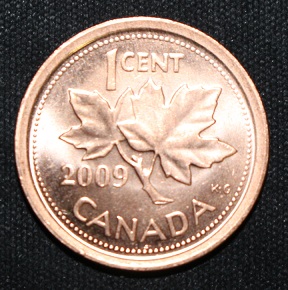 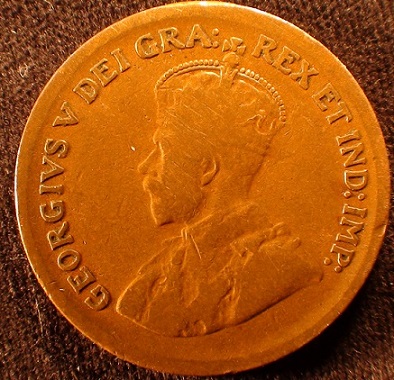 |
|
Pillar of the Community
United States
849 Posts |
Not too shabby!Soon You'll be taking pictures like a pro in no time.
The "Q" button,will let You shut off the flash(pg 54). Set to CA shooting.Press the "Q" button,turn the dial (by the trip button) to select the function You want to change.Then using the ^<> buttons to change it and then hit the set button.And Your done.
You may need more light as well.A stronger,more intense light will also shut off the auto-flash.I use a 5500-6500K bulb(K is the temperature/color of the light)so the camera thinks it is in daylight.
I think you have to go into the main menu to get to the auto rotate in order to enable/disable it.
|
|
Moderator
United States
23522 Posts |
I didn't know it was *able* to rotate images. I've never seen the setting.
|
|
Pillar of the Community
United States
849 Posts |
Yeah, it is kind of annoying.
Another thing that you might try is changing the background. If the sensor is reading how dark the background is and is trying to compensate for it, the auto flash will fire.
Try a neutral gray or white background.
|
| |
Replies: 85 / Views: 11,312 |












 Posted 02/27/2015 11:17 pm


