| Author |
 Replies: 85 / Views: 11,318 Replies: 85 / Views: 11,318 |
|
|
|
Pillar of the Community
 United States
4051 Posts |
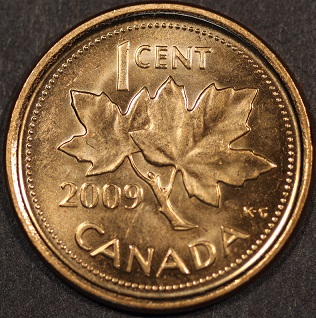
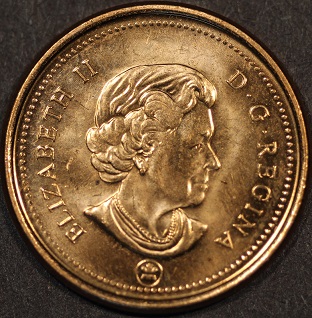
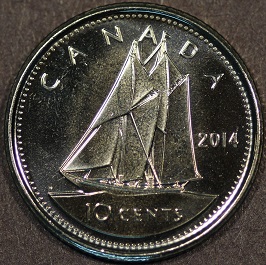
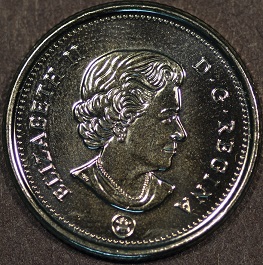
The pics look pretty good for first pass review. You might want to do a little with lighting (move to 10:00 and 2:00, add a little diffusion), and work on your camera settings (reduce contrast on the shinier coins).
|
|
Pillar of the Community
 Canada
2784 Posts |
question dave the camera I purchased at the pawn shop. when I connect it to the computer. the screen opens for remote taking pictures. but there is no live view. one can take pictures and make adjustments but there is no live view. the camera lense is cracked at the end and the memory card spring is broke. the guy at the pawn shop told me if it did not function properly. I can return it so I think I will. I have purchased a brand new canon t5 this time all the soft ware loaded plus a photo editing program that looks really good. I will take some pictures later to night after I come back from to club meeting. thank you dave, bill and members
|
|
Pillar of the Community
Canada
2784 Posts |
|
|
Pillar of the Community
Canada
2784 Posts |
hello dave trying to figure out how to use this canon picture editing program that comes on the cds that are with the canon camera. I was wondering do you know anything about these photo editing programs. Canon Picture Style Editor. so far I have found out one has to take the photos in raw mode. what do this mean. dave I know your busy what would you recommend for a program to edit coin photos. can I use this program of canons. I am not sure, thank you have a great day
|
|
Pillar of the Community
Canada
2784 Posts |
yes dave done some more reading . ones you do one picture say a penny as long as all I do is pennies. this program will automatically change every penny picture I take with the camera. I guess when you set this program it goes right I to your live view and automatically adjust all penny photos. so when you change to a new coin you have to start a new setup for that partial coin . once you have all the coin you are going to photo the program changes every time you do a different coin automatically. if I am reading this right. I don't know if I like that idea . if you get a change. could you see if this is correct please. thank you
|
|
Moderator
United States
23522 Posts |
Honestly, I don't know that Canon editor at all, because I've been using the software I use for so long. I never learned it. The things you'll need to do to edit your pics aren't complicated enough to learn the Gimp as I use - there are a bunch of free and relatively easy editing programs. All you need is to crop, resize, sharpen and maybe play with color a little bit if the white balance isn't as good as you'd like. Maybe we need a new thread on image editors. Let's see what I can do.  |
|
Pillar of the Community
Canada
2784 Posts |
I am very surprised. I attached me camera kit lenses to the bellows zoomed it all the way out. adjusted the tripod played with the focus a little. took 4 pictures 2 of both sides of a very pristine penny. I then put the elnikkor lenses on and adjusted focused and took 4 more pictures of the same coin. I was amazed either my camera skills are improving that much but there is no different in the photos. I am very pleased that the bellows. can has this kind of effect on my kit lenses. it is the lenses that I receive when I purchased the canon it is a efs 18-55 mm with a macro 0.25m/0.8ft. there is no differents in the 8 photos. that I can see. I need to find a photo editing program that I can use. I will show you the 2 sets of images so you can all see for yourselves
|
|
Moderator
United States
23522 Posts |
These images are a lot larger than you know, I think. Mounting am 18-55 on a bellows is going to increase the magnification it gives and help it focus more closely, but there is no bellows which will make that lens as sharp as the 75mm El-Nikkor.
So this is the time to concentrate on figuring out just how large these images are. When you see them full size - you're only going to be able to see a third of the coin on your screen - you'll see the superiority of the Nikon's details. The other concentration for the moment is to figure out how to post them larger here.
|
|
Pillar of the Community
Canada
2784 Posts |
well I took more pictures tonight all I did was crop in photo gallery. I kept down sizing until the photo was under 100 kb about 92 or 94 total kb. I have borrowed a macro lens a canon ef 100mm f2/8 usm here is a couple of photos I believe the el-nikkor out shoots it. actually the kit lense on the bellows bites it as far as I can tell here is a couple of photos 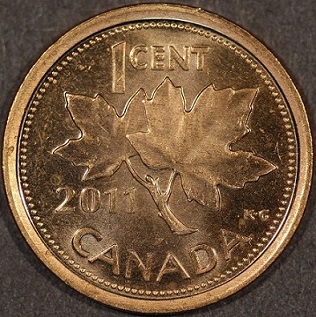 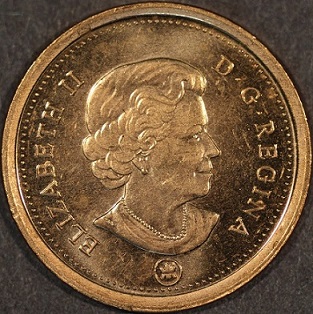 |
|
Pillar of the Community
Canada
2784 Posts |
I have finally figured out what is going wrong with the focus. I read the 400 thread and el-cheapo lens thread again. dave told me that once the coin is in focus . to click zoom I would and you will see the focus needs a little tikking. every time I would do this I would them close the zoom window lock the tripod or bellows. this is where I was creating my problem. I remember bill telling rmcrmc to lock the camera mount and adjust the coin. dave has said he even try's to make no movement when he clicks the mouse. so I changed the way I would take the photos that is when I seen my problem I left the zoom window open even trying to lock the bellow movement changes the focus. so all I need to do is make a adjustment plate for the coin and the rest should be easier. I will do this and post some photos later thank you all
|
| |
Replies: 85 / Views: 11,318 |








 First Page
 Previous Page

 Posted 04/21/2015 2:33 pm