| Author |
 Replies: 28 / Views: 2,727 Replies: 28 / Views: 2,727 |
|
|
|
Moderator
 United States
196424 Posts |
|
|
Moderator
United States
108000 Posts |
When ever my computer starts acting up or getting bogged down, I go to settings and check for updates - usually there are a few that need to finish, then reboot and all is well.
|
|
Moderator
United States
108000 Posts |
But please don't disappear like Coop - I couldn't handle it.
|
|
Moderator
 United States
56855 Posts |
Quote:
But please don't disappear like Coop - I couldn't handle it. Thanks John I will try not to. I do hope that coop comes back asap. As to updates, I do those on a regular basis. John1  |
|
Bedrock of the Community
United States
37206 Posts |
Just went through the same thing with my old Dell XP. Bought it in 2006 and it finally just said I quit. Now I've got to learn Windows 11.
|
|
Bedrock of the Community
United States
27514 Posts |
John, have you backed up your computer hard drive lately? Externally, that is. It's something I haven't done in a while, and I have files going back > 30 years. A crash would wipe out everything since my last backup 3 years ago. A 128GB USB flash drive can be obtained for < $20 and this would ease the heartache of a complete computer meltdown.
Inordinately fascinated by bits of metal with strange markings and figures
|
|
Moderator
United States
56855 Posts |
I have not backed up. I do have a 1t drive though.Just lazy I guess. I have not had that computer problem since then,fingers crossed  John1 |
|
Pillar of the Community
United States
1648 Posts |
Quote:
I have not backed up. I do have a 1t drive though.Just lazy I guess. I have not had that computer problem since then,fingers crossed
John1 Great to hear no further computer issues  I try to backup mostly just certain files like updated documents or downloads once per week to an external drive, and some to another location also on the hard drive every few days which helps if a file had a problem. On a big crash, if you think you'd go crazy if you had to reinstall every program you have added since you got the computer then an occasional full backup is also helpful. I mainly lost things over the years like free games and programs that were giveaways and so could not be reinstalled when I had a major crash, but the first crash I did lose documents that I hadnt been backing up regularly like now. |
|
Bedrock of the Community
United States
19622 Posts |
Backups are a good thing...
|
|
Moderator
United States
108000 Posts |
Quote:
I have not had that computer problem since then,fingers crossed Well, don't jinx it John.. |
|
Bedrock of the Community
Australia
21792 Posts |
I do shut downs on my computer and 'phone roughly one per week.
Even more necessary if you move money electronically.
|
|
Pillar of the Community
 United States
4622 Posts |
For backups the rule used to be 3-2-1. 3 copies on at least 2 different media with at least 1 off-site https://www.backblaze.com/blog/the-...up-strategy/With ransomware, that is changing because it's too easy for the 3 copies all to be encrypted - the primary gets grabbed, the backup copies it to the backup and the offsite media is updated too. This (from the above link) has describes the 3-2-1-1-0 and 4-3-2 schemes: https://www.backblaze.com/blog/what...1-0-vs-4-3-2. When it comes to backups in a professional venue, you can't be too careful. If they - entropy and users - really are out to get you, is it truly paranoia? BTW, I'm a huge fan of that last 0 (0 errors). A backup you think you are making or one that has errors will prove to be useless when you need it. -----Burton 50+ year / Life / Emeritus ANA member (joined 12/1/1973) Life member: Numismatics International, CONECA Member: TNA, FtWCC, NETCC, EveryCountry (online) coin club Owned by three cats and a wife of 40+ years (joined 1983) Author: 3rd Edition of the Sample Slabs book, https://www.sampleslabs.info/ |
|
Valued Member
United States
357 Posts |
A few suggestions that might help avoid PC problems. 1. https://www.ccleaner.com/speccy. this PC tool will monitor your PC as well as providing detailed information about your system. There is both a free and paid version. I use the free version to monitor the temperature of my hard drives. Leave the window output (see below) on your desktop for constant monitoring (by yourself). The internal fan on my laptop is shot and without a little help from a desktop fan the PC will detect an overheating condition, causing an immediate shutdown. See screen snip below. Speccy gives me a little peace of mind that my laptop will not crash on me when least expected. 2. For backups I have an external hard drive product called Clickfree. Once you set it up, it will automatically backup your computer on a schedule you establish. It's a USB device. In my setup, it sits quietly behind my laptop and runs as per the schedule. It creates a complete backup. Mine, I believe, is a 1 terabyte drive. Amazon still sells some 500Gb drives ( https://www.amazon.com/Clickfree-Au...=B00539IGTU)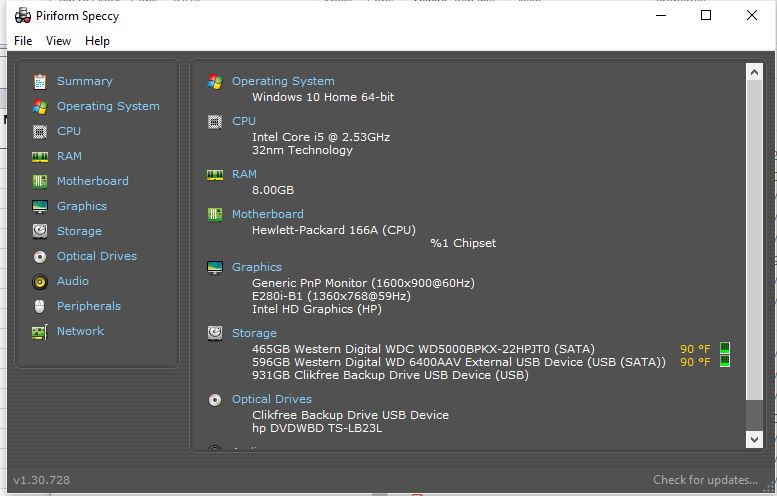 |
| |
Replies: 28 / Views: 2,727 |








 First Page


 Posted 10/01/2023 6:31 pm


 Uncirculated American Silver Eagles


