|
This page may contain links that result in small commissions to keep this free site up and running.

Welcome Guest! Registering and/or logging in will remove the anchor (bottom) ads and the security checks. It's Free!
To participate in the forum you must log in or register. | Author |
 Replies: 3 / Views: 1,809 Replies: 3 / Views: 1,809 |
|
|
Pillar of the Community
United States
9810 Posts |
Anybody know of software that will reliably control my Canon cameras from my Macbook Pro? Adobe Lightroom won't work, Apple Aperture doesn't work either, they both fail in tethering.
I am using OS X 10.6.8 and both programs are latest versions. Canon's own software also fails under OS X 10.6.8
I've DL'ed a trial of DSLR Remote Pro, but have not tried it out yet, maybe tonight (work has been hectic) I'll get some time to try it out.
Just wondering if anyone else has similar issues. I used to use my desktop XP bos but it's in storage now, worked OK, but my Mac has such a better display. I'd really like to use the live view as I begin working with my new bellows for focusing.
Thanks for any tips, if I can get DSLR Pro working I'll post about it. I just don't want to spend even more $$ for just that feature - come on Canon, you've been lagging behind Nikon on Mac software for 3 years now! "Buy the Book Before You Buy the Coin" - Aaron R. Feldman - "And read it" - Me 2013! ANA Life Member #3288 in good standing since 1981, ANS, Early American Coppers Member (EAC), Colonial Coin Collectors Club member (C4), Conder Token Collector Club member (CTCC), Civil War Token Society (CWTS) member, Liberty Seated Collectors Club (LSCC) & Numismatic Bibliomania Society member (NBS), USMex, Member in good standing, 2¢ variety collector. See my want page: http://goccf.com/t/140440 |
|
|
|
Valued Member
United States
132 Posts |
I dont know of any software that can run directly on the Mac. Depending on how old your mac is, you can run virtualization software on it and have your cake, and eat it too. I use parallels and windows 7 pro. You can run both side by side. You can also install a bootcamp partition, and you can boot directly into Windows. IMHO it runs Windows 7 better then my actual PC. The only problem is the price you're willing to pay. Parallels will run you about $80, depending on where you get it. If you have a copy of Windows XP or 7 around without a used license, then you dont have to buy Windows OS, otherwise you're stuck with that price as well. May not be the answer you're looking for, but most likely the only decent option. http://www.parallels.com/products/desktop/Edited by TonedMo87
03/27/2012 11:31 pm
|
|
Bedrock of the Community
United States
10065 Posts |
Since you are running 10.6.8, this means you are running an Intel based Mac. This means it can run Windows as a native operating system. Install Windows and use it this way. You can download a free program called "Boot Camp" which allows you to choose which system to run on startup or invest 60.00 or so into programs such as VMware Fusion or Parallels which allows you to run both operating systems at the same time and drag/drop/copy/paste between the two as if they were all just one system. 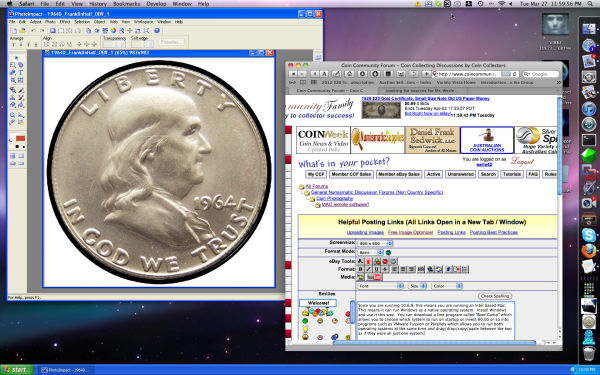 Here is a screenshot of my Mac running Windows and OS X simultaneously. You can see the Windows taskbar at the bottom. The window at the right is the one I am writing this post in. The graphics program on the left is Ulead Photo Impact - a Windows-only program. B/c Macs are now Intel based - there is no such thing as a compatibility issue anymore. If Mac software does not exist, then run Windows! A great thing about this is that when Windows crashes (inevitable), it cannot take the whole system with it b/c the Mac "encapsulates" each program it runs in a separate area of memory - hence the whole system does not crash. How much squash could a Sasquatch squash if a Sasquatch would squash squash? Download and read: Grading the graders Costly TPG ineptitude and No FG Kennedy halveshttps://ln5.sync.com/dl/7ca91bdd0/w...i3b-rbj9fir2 |
|
Pillar of the Community
 United States
9810 Posts |
I have a second (older) Intel Macbook Pro that I have running bootcamp and windows XP (plan to upgrade to Win7 soon) I use it for my astronomy/astrophotography stuff, as it is a faster computer running XP than my old buggy Toshiba laptop was. I could always use that I suppose. It's been a Windows workhorse so far running 100's of hours outside in damp humid nights with not a single glitch yet (knock on wood). I plan on switch over to Windows 7 as XP is getting a bit long in the tooth, the only trouble I have with it is my USB to serial (DB9) ports keep switching com port numbers on me each time I plug in my serail devices. I need to keep at least 1 port open in 1-8 but it always jumps to ports 11-21 open and one of my focusers only works in com ports 1-8. I know why it's doing it, but I can't figure out how to stop it, my friend running the same equipment said his stopped doing that as soon as he upgraded, so that is planned after an astronomy trip for work to NY in late April. Don't want to change over until after my meetings where I'll need my mac/pc running! Thanks for the suggestions. I also own both Parallels and VM Fussion - would just need to upgrade them to t latest if I go that route, I prefer bootcamp as it was always a lot more stable and faster.
Is there a good remote camera control for Windows or should I just stick with the Canon software? Remember I want to try to get this going really cheap of free.
Just tried DSLR Remote to no avail either, it crashes immediately upon camera connect attempt. Tried 1.5 and 1.4 versions. Looks like Canon won't play nice with Apple any more. Worked under OS X 10.2 if I recall, no more it seems, and I have a lot of cameras to try, Canon 20Da, 30D, 7D, 5D, 5DmkII, 5dmkIII, 1D and 1Ds, none connect to any program via a tether. The computer sees the cameras no problem in the OS under system profiles, just can't control the camera at all and no program will see the cameras on connect attempts. Bummer, looks like Windows is my only option now.
"Buy the Book Before You Buy the Coin" - Aaron R. Feldman - "And read it" - Me 2013! ANA Life Member #3288 in good standing since 1981, ANS, Early American Coppers Member (EAC), Colonial Coin Collectors Club member (C4), Conder Token Collector Club member (CTCC), Civil War Token Society (CWTS) member, Liberty Seated Collectors Club (LSCC) & Numismatic Bibliomania Society member (NBS), USMex, Member in good standing, 2¢ variety collector. See my want page: http://goccf.com/t/140440Edited by westcoin
03/28/2012 05:09 am
|
| |
Replies: 3 / Views: 1,809 |
|
To participate in the forum you must log in or register.
Disclaimer: While a tremendous amount of effort goes into ensuring the accuracy of the information contained in this site, Coin Community assumes no liability for errors. Copyright 2005 - 2026 Coin Community Family- all rights reserved worldwide. Use of any images or content on this website without prior written permission of Coin Community or the original lender is strictly prohibited.
Contact Us | Advertise Here | Privacy Policy / Terms of Use
|
| Coin Community Forum |
© 2005 - 2026 Coin Community Forums |
| It took 0.34 seconds to rattle this change. |
 |
|
| |
| |







 Posted 03/28/2012 12:09 am


