| Author |
 Replies: 20 / Views: 3,348 Replies: 20 / Views: 3,348 |
|
Valued Member
United States
51 Posts |
Hello,
I've been using my set up (Nikon D5000, belows) for the past several months, while continue my education about numismatic photography through different forums and publications. I have couple of questions that I can not find an answer anywhere, perhaps because on a specifics of my set up.
For some reason I can not set custom white balance on my D5000. I have followed all the directions from the manual, however the results are 99% of the time results in error. The only suggestion the manual has is to move around the 18% gray paper, but this does not help. Is this due to the insufficient (or too much) lighting? I have tried some predefined WB on my D5000, but they do not represent color correctly. The one time I was successful in setting up WB (using two diffused Dansko lights), the results were good. However, I wanted to try axial setup with different light source and can not set the WB, neither can I set it for High Angle shots with two diffused danskos.
Second problem with my D5000 is inability to set Exposure Compensation. When I use ControlMyNikon or Menu on the camera to change this settings (from 0 to +1 or -1) I can see significant change in the viewfinder or on my computer screen, however the shot taken with these modified settings are not different from the original setting at 0. Again, I am shooting with D5000 with belows setup, using Spiratone 75mm enlarging lens, camera is in Manual mode.
Any ideas on what I am doing wrong?
|
|
|
|
Pillar of the Community
 United States
4051 Posts |
Are you de-focusing the grey card or keeping it in focus? I find that significant defocusing is required to get good correction.
I don't think exposure compensation works in manual mode. It will work in other modes, like A. Manual sets all parameters, and won't allow compensation.
|
|
Valued Member
 United States
51 Posts |
Ray,
I have tried focusing and de-focusing grey card with the same error as a result of WB. I have even tried at maximum and medium heights of my set up - same results.
I will try exposure compensation in Aperture Priority mode, haven't thought about it!
|
|
Pillar of the Community
United States
4132 Posts |
I usually just set the white balance in the RAW editor - it seems more accurate and easier to fine-tune. Setting it in-camera is a PITA and doesn't have any real benefit (as long as you're shooting RAW, which you should be).
|
|
Moderator
United States
23522 Posts |
I don't know how Nikon does things - could the lack of electronic communication between lens and camera have a bearing?
|
|
Valued Member
United States
51 Posts |
Captain, I am not sure I understand this: how would a RAW editor know about your lighting setup / white balance? I understand this can be very useful in fine-tuning the color? Do you have any pointers for Photoshop or Gimp?
|
|
Valued Member
United States
51 Posts |
SuperDave, you may be onto something... If I set WB with a lens directly attached to my D5000, then reassemble the bellows setup, given the same lighting conditions - will this work? Will definitely give this a try tonight...
|
|
Pillar of the Community
United States
4132 Posts |
Well, I use Adobe Camera Raw, and that has a white balance setting. If you take a picture of a gray card and then open that file in ACR, there is an eye dropper tool you can use to measure the white balance. You can then create a preset to use on the coin photos you take under the same lighting conditions.
If you're really ambitious and have a Macbeth ColorChecker or similar chart, you can construct a more elaborate profile to correct for camera/lens/lighting combinations.
|
|
Moderator
United States
23522 Posts |
Quote:
SuperDave, you may be onto something... If I set WB with a lens directly attached to my D5000, then reassemble the bellows setup, given the same lighting conditions - will this work? Will definitely give this a try tonight... Using my Canon, Jansjos balance nicely using the Tungsten preset, and the worst I ever have to do is back the Yellow hue off slightly in postprocessing. And Canon is infamous for misinterpreting tungsten in the presets. |
|
Valued Member
United States
51 Posts |
Just to update on the things I have tried last night. A bit later I will post some images to demonstrate the results.
The issue with white balance. First I have tried Captain's suggestion on fixing white balance in RAW editor, but probably due to my novice experience with software, I was not satisfied with results - not a true coin color. But it was a good experience, I will definitely look into it in the future.
Second, I have tried to do white balance with my camera and a stock lens under the same lighting conditions. I was able to set it only in Aperture Priority mode (Manual was giving me the same error). However, when I have reattached my camera to bellows and snapped some pictures, the color was still not quite right.
Thirdly, I have continued to try different settings with my set up, and voila - White Balance calibration worked. I have set aperture wide open (f 3.5), extended bellows to the maximum height - finally getting White Balance to calibrate correctly.
|
|
Moderator
United States
23522 Posts |
So perhaps, even though it looked correct to you, the lighting was not evenly spread over the entire field the camera was seeing. By extending the bellows most fully, you're achieving maximum magnification and therefore the smallest-possible field of view.
|
|
Valued Member
United States
51 Posts |
SuperDave, I guess what I have learned is that my D5000 will refuse to calibrate White Balance if there is not enough light. By opening up the aperture to the maximum, and raising the camera so it can absorb more light did the trick. Also, I could not find "tungsten" setting on my Nikon, and all presets are throwing a lot of yellows and reds.
|
|
Valued Member
United States
51 Posts |
OK, as promised some images which should indicate my work-flow progress. As I was experimenting with Axial lighting, this is White Balance that my camera decided was the closest one based on "auto" setting. Keep in mind - this is not a Gold coin, just a Silver Walker :) 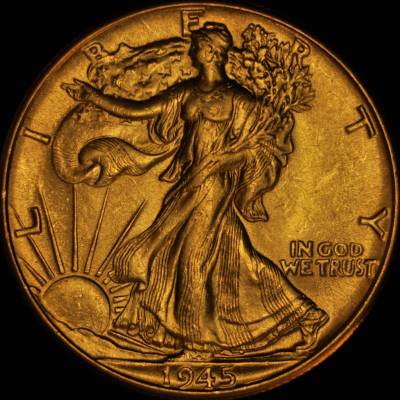 As I mentioned in my earlier posts, I had a really tough time setting a custom "measure" setting for White Balance on my Nikon D5000 with bellows setup. It was throwing an error on each and every attempt. So I thought I would try to attach a stack lens to my camera and attempt to white balance under the same lighting conditions. After a successful attempt, I have reassemble my bellows and snapped this picture: 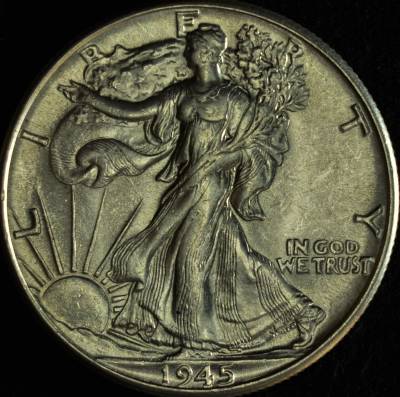 Still not there... After another half an hour or trial an error, I have set the aperture on my lens (attached to bellows) wide open to f 3.5, cranked up my camera to the highest allowable position on my bellows, and voila - White Balance adjustment worked! Here is the first picture I took at f3.5 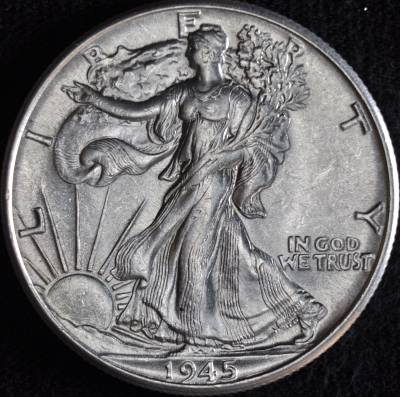 Again, the same Axial setup, f4 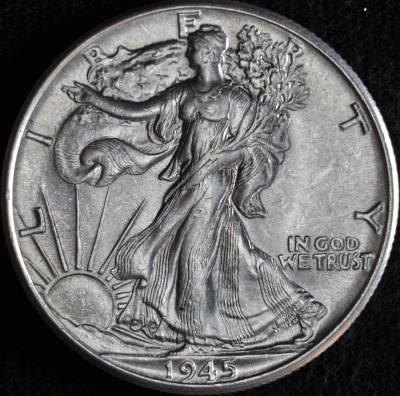 And f5.6 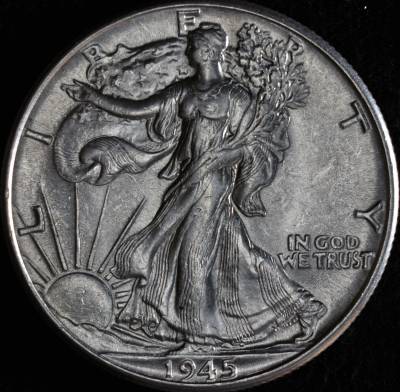 Now, that I got the White Balance to work, I was not happy with the contrast of the image (coin seems to lost its fire), so I have changed my lighting to two overhead Jansjos, slightly diffused. This image was taken with 2 diffused Jansjos at high angle, same height as the lens 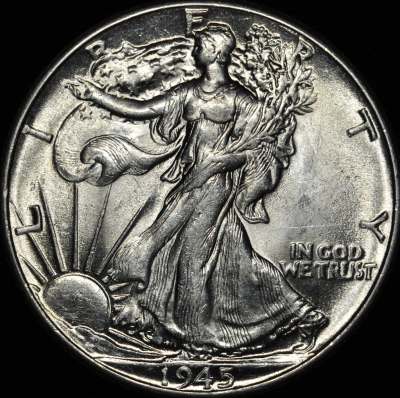 This image was taken with 2 diffused Jansjos at low angle, about 1/3 of a distance from coin to lens 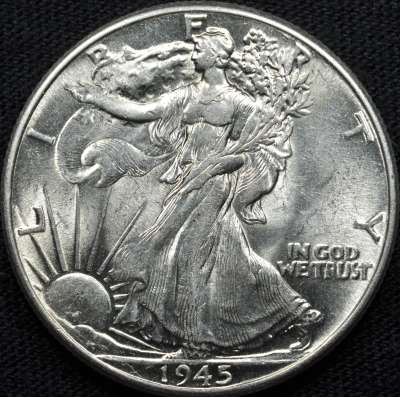 This image was taken with 2 diffused Jansjos at medium angle, about 3/4 of a distance from coin to lens 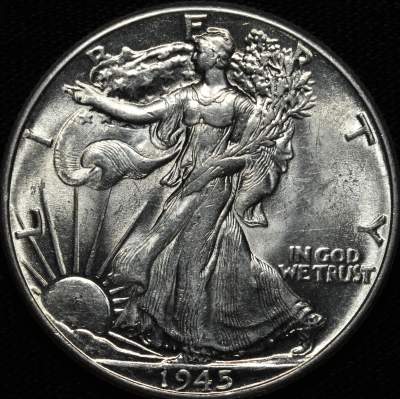 This image was taken with 2 diffused Jansjos at medium angle, about 1/2 of a distance from coin to lens 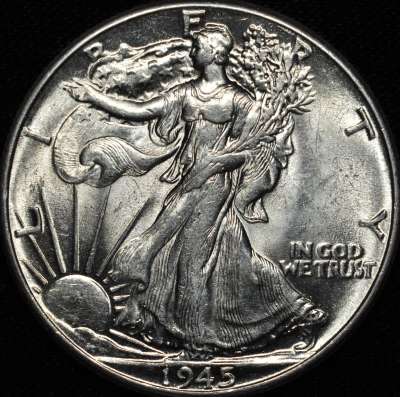 This image was taken with 2 diffused Jansjos at high angle, about 1/3 of a distance from coin to lens 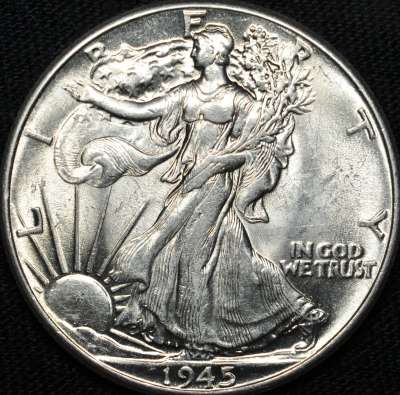 Which of these images has most potential? Any pointers / suggestions for improvement? |
|
Pillar of the Community
United States
8534 Posts |
I like 4th one from bottom.
Oregon coin geek.....*** GO BEAVS ! ! ! ***
|
|
Pillar of the Community
United States
4132 Posts |
I like the medium angle ones.
|
|
Pillar of the Community
United States
4051 Posts |
I prefer the high angle ones, and my favorite of the lot is 5th from bottom. It needs a bit of levels correction (gamma) and it will look very good.
|
| |
Replies: 20 / Views: 3,348 |










 Posted 10/31/2012 10:59 am


