









 Posted 01/21/2013 11:51 pm


I have had several CCF family members, at different times, ask me how I do my images/graphics.
Look on ebay for a copy of Photo Impact (by Ulead). One of my friends has been a professional printer for years - and also makes a business by designing his own graphics.
He told me once he literally bought every copy of every software graphics program he could find to see which was best. He now uses the above program.
The amazing thing is the price - it will likely run you 20.00 (no typo there - twenty!) by the time you pay S&H. This is b/c Ulead was never a company the size of Adobe etc. However, their software is amazingly user friendly and simple to use compared to the standards used by most people.
The Gimp is a free, very powerful program. And, like Adobe, it is much more difficult to use than Photo Impact.
BTW - Corel recently bought Ulead and I see on ebay they are released a version 13. The latest I have used is version 10. I see that (unusual) there are actually versions 5 and 6 on ebay right now also. Version 5 and 6 allows things like these rather simply:
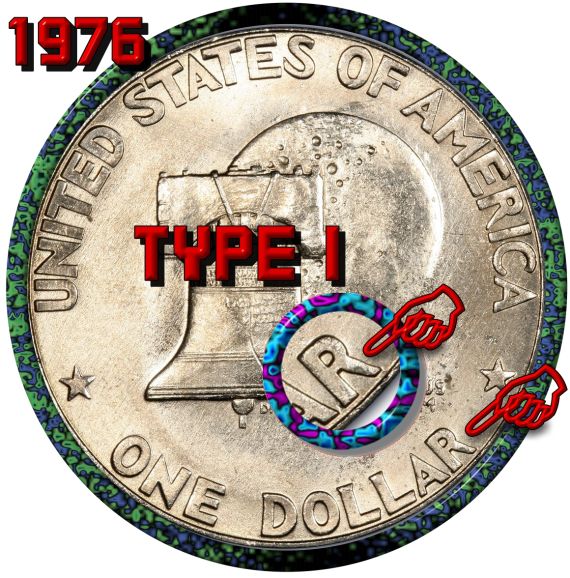

The entire pic was accomplished easily with Photo Impact from pic manipulation/editing to easily adding the frames/text/shadows and small, framed overlay.
I have yet to read a manual with the program since for me, it was pretty much logical and user-friendly. There is documentation on the DVD the program comes on.
And although versions 5 and 6 will do the above easily, higher versions give more extras (like more frame-shape options, more textures, more pic embellishments etc.)
It also has power enough to accomplish things like this with less hassle than Adobe etc.:

I hope this helps.
Look on ebay for a copy of Photo Impact (by Ulead). One of my friends has been a professional printer for years - and also makes a business by designing his own graphics.
He told me once he literally bought every copy of every software graphics program he could find to see which was best. He now uses the above program.
The amazing thing is the price - it will likely run you 20.00 (no typo there - twenty!) by the time you pay S&H. This is b/c Ulead was never a company the size of Adobe etc. However, their software is amazingly user friendly and simple to use compared to the standards used by most people.
The Gimp is a free, very powerful program. And, like Adobe, it is much more difficult to use than Photo Impact.
BTW - Corel recently bought Ulead and I see on ebay they are released a version 13. The latest I have used is version 10. I see that (unusual) there are actually versions 5 and 6 on ebay right now also. Version 5 and 6 allows things like these rather simply:
The entire pic was accomplished easily with Photo Impact from pic manipulation/editing to easily adding the frames/text/shadows and small, framed overlay.
I have yet to read a manual with the program since for me, it was pretty much logical and user-friendly. There is documentation on the DVD the program comes on.
And although versions 5 and 6 will do the above easily, higher versions give more extras (like more frame-shape options, more textures, more pic embellishments etc.)
It also has power enough to accomplish things like this with less hassle than Adobe etc.:
I hope this helps.
How much squash could a Sasquatch squash if a Sasquatch would squash squash?
Download and read: Grading the graders
Costly TPG ineptitude and No FG Kennedy halves
https://ln5.sync.com/dl/7ca91bdd0/w...i3b-rbj9fir2
Download and read: Grading the graders
Costly TPG ineptitude and No FG Kennedy halves
https://ln5.sync.com/dl/7ca91bdd0/w...i3b-rbj9fir2
Edited by Earle42
01/21/2013 11:52 pm
01/21/2013 11:52 pm


