| Author |
 Replies: 40 / Views: 4,894 Replies: 40 / Views: 4,894 |
|
|
|
Pillar of the Community
United States
543 Posts |
I was just literally doing a search for this thread! Glad someone brought it back up. I have a very mundane checklist I created myself using Adobe Illustrator. Here's a sample: 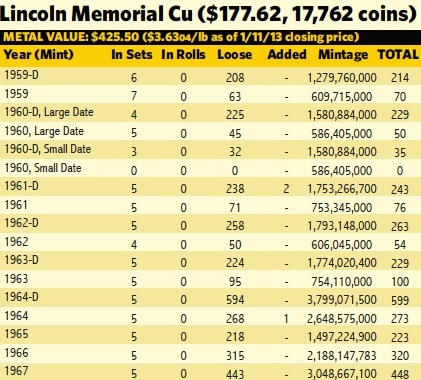 |
|
Valued Member
United States
197 Posts |
I have an Excel spreadsheet with columns listing coin denomination, face value, date of purchase, purchase price, and grade. I have a column for the gold or silver value of bullion coins and a column for numismatic value for coins having a significant value over melt. At the bottom of the spreadsheet, I have a row that gives a sum of the purchase prices and current prices of all of the coins, based on the price of gold and silver or the current numismatic values, as the case may be. I then have a field at the bottom that adds up everything for a grand total, then I have a field for net gain over purchase price and a field for percent gain over purchase price. At the top of the spreadsheet I have a field for the current spot price of gold and the current spot price of silver; at any time, I can plug in the current prices of gold and silver, and bam! I have a good estimate of the total current value of my entire collection, the current net gain for the total investment, and the current percent gain. Obviously, the totals I come up with are not what I could expect to yield from selling the whole lot, but it's close enough for practical purposes.
|
|
Pillar of the Community
Australia
7096 Posts |
I have just started to use Excel as a database for my collections. I am doing this primarily to prevent myself from buying duplicate coins all the time  I create a database for each denomination and include columns for; Date,With grades for Circulation issue,Proof issue,Silver proof issue and mint marks. I don't have any buying costs or values listed a.. Because I can't remember or don't want to remember what I paid for each coin. b.. Values change from year to year so that information becomes irrelevant over time anyway. A large proportion of my collection is stored in 2x2's in PVC free albums ( I am working on the rest), I name each database the same as Labeled on the different albums. I am only about 5% of the way through this and only do it when I am bored stupid, It is a great idea but what a pain in the butt doing it |
|
Bedrock of the Community
United States
20753 Posts |
Never could figure out why anyone would buy a program to keep track of their coins. Almost all ocmputers today have Excel and that is all most need. More than that becomes a loss of fun for the hobby.
|
|
Valued Member
United States
396 Posts |
Like stud722 I use Excel. I keep track of over 6 thousand coins. I don't keep track of miscellaneous stuff like wheats and nice looking clad dimes and Jefferson nickels I find. Data: Type, variety - if any, year, mint, condition, estimated Red Book value, what I paid (even if zero), and location (e.g. collection). Since I used Excel every day before retiring, and since I started seriously collecting only three years ago and started the record keeping at the get go it has easy for me. If I were starting from scratch with a serious collection, I would start with the most significant types and work my way down. |
|
Rest in Peace
United States
10625 Posts |
I purchased an older version of what Dave H has, CoinsPlus-2000 Gold edition. It's a great database for what I do.
|
|
Pillar of the Community
United States
917 Posts |
I received the cataloging software Exact change for Christmas and have been pretty happy with it. The best part, I can generate a list of coins that I want to upgrade/sell/buy and bring that to a show with me.
|
|
Pillar of the Community
United Kingdom
2931 Posts |
I just use the table function of Word. As others have indicated approximate values change and when you have 7000+ different coin types following values in a meaningful way would be pretty hard.
I list by country (or more accurately issuing authority) then by ruler or republic etc, I keep this as up to date as possible just so I don't buy duplicates. I also have a photo dabase of everything again split into the same categories as above.
All my better coins I photograph and then write up in html and add them to my website. This makes a great way to view the images and think about what I want to get next.
|
|
Pillar of the Community
United States
1261 Posts |
I keep my list on Excel but recently purchased an App for my iPad called UScoins. It is pretty nice. It allows you to store as many images of the coin as you like. You can also look up PCGS data and recent auction values for each coin as well. I also circle the value of the coins I have in a value magazine so when I go to the coin store I can quickly see what I have and what I need. But the app is the nicest since I always have the image of the coin with me.
|
|
Valued Member
Canada
55 Posts |
I have started with an Excel spreadsheet. I have each of the countries in a different tab or worksheet. Then columns with year, mint mark, variety, denomination, grade, quantity, value, and notes. As I am just starting the grade column right now is completely empty on all my sheet. I hope once I have worked with the coins a bit more I will feel comfortable enough to assign grades, but for right now I am just working to sort through everything that I have.
|
| |
Replies: 40 / Views: 4,894 |








 First Page
 Previous Page


 Posted 01/12/2013 5:40 pm


