Coin Community Family of Web Sites Join Thousands of Coin, Bullion, & Money Collectors
Vancouvers #1 Coin and Paper Money Dealer Coin, Banknote and Medal Collectors's Online Mall 300,000 items to help build your collection! Royal Estate Auctions - $1 Coin AuctionsJoin Thousands of Coin, Bullion, & Money Collectors Specializing in Modern Numismatics Royal Canadian Mint products, Canadian, Polish, American, and world coins and banknotes.


Username:
Password:
Save Password
Forgot your Password?


This page may contain links that result in small commissions to keep this free site up and running.

Welcome Guest! Registering and/or logging in will remove the anchor (bottom) ads. It's Free!

2001 Kentucky Quarter-- Doubling Or Chip?

To participate in the forum you must log in or register.
Author Previous TopicReplies: 8 / Views: 1,006Next Topic  
Valued Member
coinaki's Avatar
United States
207 Posts
 Posted 06/12/2013  8:34 pm Show Profile   Bookmark this topic Add coinaki to your friends list Get a Link to this Message Number of Subscribers
Howdy folks,

A) Would the mark under the earlobe be considered as doubling, or is it a die chip?

B) Don't know why George is crying, but, would that be a die chip or a gouge?
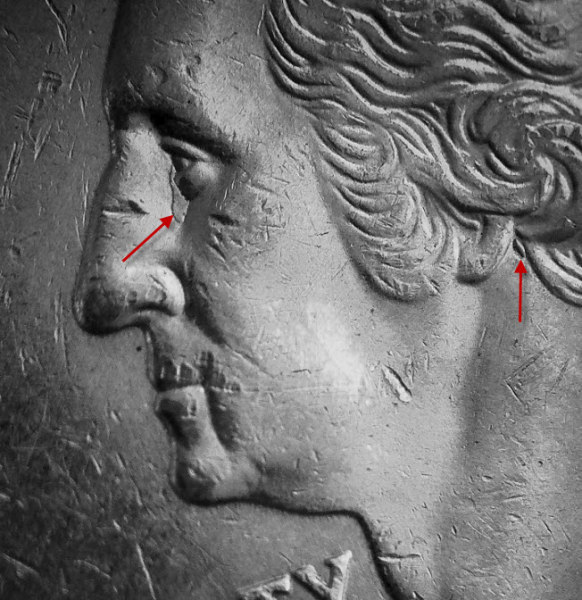


2001-Kentucky-Quarter---Doubling-Or-Chip?
Moderator
Learn More...
John1's Avatar
United States
56855 Posts
 Posted 06/13/2013  06:45 am  Show Profile   Bookmark this reply Add John1 to your friends list Get a Link to this Reply
Maybe it's a die clash?
John1
Valued Member
coinaki's Avatar
United States
207 Posts
 Posted 06/14/2013  4:06 pm  Show Profile   Bookmark this reply Add coinaki to your friends list Get a Link to this Reply
Could be, John1... although the one under the earlobe seems too bold and "isolated" to be a clash mark.
I tried looking the net for anything similar but nothing pops up.
Bedrock of the Community
coop's Avatar
United States
62064 Posts
 Posted 06/17/2013  10:09 pm  Show Profile   Bookmark this reply Add coop to your friends list Get a Link to this Reply
The tear drop looks like over polishing. The mid devices were removed to cover a clash in that area. The earlobe? Not sure, so I won't speculate. My image source changed their format and now I can't get editable images for clashes. TIFF images don't work with my software program....
Valued Member
coinaki's Avatar
United States
207 Posts
 Posted 06/19/2013  3:02 pm  Show Profile   Bookmark this reply Add coinaki to your friends list Get a Link to this Reply
Thanks, coop.
So I guess for now this one goes into the cryogenic chamber for future evaluation.
Pillar of the Community
jay4202472000's Avatar
United States
853 Posts
 Posted 06/19/2013  3:22 pm  Show Profile   Bookmark this reply Add jay4202472000 to your friends list Get a Link to this Reply

Quote:
The tear drop looks like over polishing. The mid devices were removed to cover a clash in that area. The earlobe? Not sure, so I won't speculate. My image source changed their format and now I can't get editable images for clashes. TIFF images don't work with my software program....


Hey coop, can you open the file in something like paint and then save it to a .gif or whatever file type your software uses? Just trying to help. We sure don't need to loose those images you can provide. They are unbelievable.
Bedrock of the Community
coop's Avatar
United States
62064 Posts
 Posted 06/19/2013  5:26 pm  Show Profile   Bookmark this reply Add coop to your friends list Get a Link to this Reply
I can convert some images types. But it has to be able to open with Photoshop in order to convert them to JPEG. That format works best for me. I keep looking for a solution.
Pillar of the Community
Pete2226's Avatar
United States
3330 Posts
 Posted 06/19/2013  5:34 pm  Show Profile   Bookmark this reply Add Pete2226 to your friends list Get a Link to this Reply
Richard - I use Windows 7. If I open a file with a photo and right click on the photo, then go to edit then go to the icon just below the top bar on the far left. It has a drop down menu, click on the drop down arrow, then click on "save as" and it gives you the option of saving in a number of different formats, including .jpg
This might work with another program too.

Pete
Edited by Pete2226
06/19/2013 5:36 pm
Bedrock of the Community
coop's Avatar
United States
62064 Posts
 Posted 06/19/2013  5:41 pm  Show Profile   Bookmark this reply Add coop to your friends list Get a Link to this Reply
I'll check into that. Thanks
  Previous TopicReplies: 8 / Views: 1,006Next Topic  

To participate in the forum you must log in or register.


Disclaimer: While a tremendous amount of effort goes into ensuring the accuracy of the information contained in this site, Coin Community assumes no liability for errors. Copyright 2005 - 2026 Coin Community Family- all rights reserved worldwide. Use of any images or content on this website without prior written permission of Coin Community or the original lender is strictly prohibited.
Contact Us  |  Advertise Here  |  Privacy Policy / Terms of Use

Coin Community Forum © 2005 - 2026 Coin Community Forums
It took 0.28 seconds to rattle this change. Forums



